

How to book a flight with RBC Avion Rewards points

One of the options for redeeming Avion Rewards credit cards is to use your points towards airfare anywhere in the world. Here’s how this works for a fixed-point exchange.
RBC Avion Rewards Points
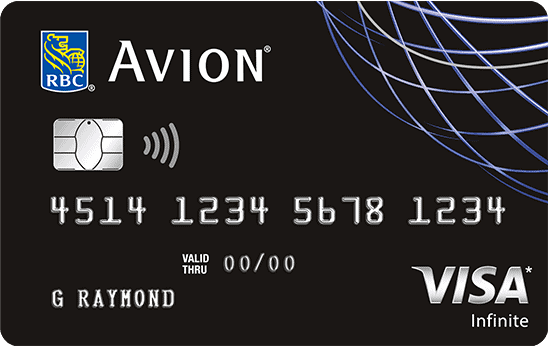
There are several RBC Avion Rewards credit cards. The one used for this example is the RBC Visa Infinite Avion Card.
RBC Avion Rewards points can be used to travel anywhere in the world with a round-trip ticket. A one-way trip requires half as many Avion points. Here is the airfare table for a round-trip flight:
| Avion Points | Destinations | Maximum Ticket Price |
| 15 000 | Flight within a province or neighbouring state | $350 |
| 35 000 | Flight anywhere in Canada or the United States (except Hawaii and Alaska) | $750 |
| 45 000 | Western Canada or the United States to Mexico, Hawaii or Alaska. Eastern Canada to Bermuda, Central America or the Caribbean | $900 |
| 55 000 | Eastern Canada or the United States to Mexico, Hawaii or Alaska. Western Canada to Bermuda, Central America or the Caribbean | $1,100 |
| 65 000 | Flight from Canada or United States to Europe | $1,300 |
| 100 000 | Fly from Canada or United States to … anywhere in the world! | $2,000 |
On average this equals about 2 cents per Avion point .

- Annual fee
- $120
- Our valuation
- $1,050ⓘMilesopedia first-year estimate First-year valueWelcome bonus$1,050Total$1,050Rewards on your spending are not included. The calculator that adds them from your own profile is on the card's page.
- Milesopedia first-year estimateⓘFirst-year valueWelcome bonus$1,050Total$1,050Rewards on your spending are not included. The calculator that adds them from your own profile is on the card's page.
- Welcome offer
- Up to 70,000 points
- Ends Nov 25, 2026
on RBC's website
For a limited time, the RBC Avion Visa Infinite Card offers a welcome bonus of up to 70,000 Avion points, worth up to $1,500 in travel.
- 35,000 points upon approval of your application
- 20,000 points when you charge $5,000 in purchases to your account within the first six months
- 15,000 points on the first anniversary of your account
You can redeem your Avion points for flights with more than 500 airlines, with no blackout periods or seat restrictions, or transfer them to partner programs such as American Airlines AAdvantage, The British Airways Club, Cathay Pacific Asia Miles and WestJet Rewards.
The card earns you 1.25 points per dollar on eligible travel purchases and 1 point per dollar on all your other eligible purchases. It also includes extensive insurance coverage: emergency medical, trip cancellation and interruption, collision coverage for rental vehicles, and mobile devices.
The annual fee is $120.
Legal
Refer to RBC page for up to date offer terms and conditions
† Based on the Air Travel Reward redemptions from the Air Travel Redemption Schedule starting at 35,000 Avion points for one round-trip long-haul flight to almost anywhere in Canada or the United States with a maximum ticket price of $750, you will need a minimum of 70,000 Avion Points for two round-trips long-haul flights to almost anywhere in Canada or the United States, exclusive of Hawaii and Alaska. All applicable taxes, service fees and surcharges are the responsibility of the traveler. For more details, including information on redeeming for first class and business class seats, visit: www.avionrewards.com/travel/index.html. For general redemption terms, conditions and restrictions that apply to the Avion Rewards program, please visit: www.avionrewards.com or call 1-800 ROYAL 1-2 (1-800-769-2512).
^ Based on the Air Travel Reward redemptions from the Air Travel Redemption Schedule starting at 15,000 Avion points for a round trip within or to an adjacent Canadian province/territory or U.S State with a maximum ticket price of $350. You will need a minimum of 60,000 Avion Points for four round-trips within or to an adjacent Canadian province/territory or U.S State. All applicable taxes, service fees and surcharges are the responsibility of the traveller. For more details, including information on redeeming for first class and business class seats, please visit: www.avionrewards.com/travel/index.html. For general redemption terms, conditions and restrictions that apply to the Avion Rewards program, please visit: www.avionrewards.com or call 1-800 ROYAL 1-2 (1-800-769-2512).
1 This offer only applies to new applications for an RBC Avion Visa Infinite or RBC Avion Visa Platinum credit card (each, an “Eligible Credit Card”) received between “August 13, 2026” and “November 25, 2026” (“Offer Period”) and approved by Royal Bank of Canada (“Royal Bank”) subject to the conditions below. Additional cardholders(s) (co-applicant and authorized user(s)) on the Eligible Credit Card account, as well as existing cardholders on any RBC Royal Bank personal credit card account transferring to an Eligible Credit Card account during the Offer Period, are not eligible for the offer.
35,000 welcome Avion points (“Welcome Points”) will appear on your monthly credit card statement within sixty (60) days after your application has been approved, provided that your Eligible Credit Card account remains open and in good standing at the time the Welcome points are credited to your account, “good standing” meaning that your Eligible Credit Card account must not be past due for more than two (2) consecutive credit card account statement periods, closed, charged off or in credit revoked status.
You will receive 20,000 bonus Avion points (“Bonus Points”) if a total of $5,000 or more (“Qualifying Transaction Amount”) in qualifying net purchases and/or pre-authorized bill payment transactions (“Qualifying Transactions”) are posted to your Eligible Credit Card account within the first six (6) months from your Eligible Credit Card account opening date (“Period”). The Bonus Points will appear on your monthly credit card statement within sixty days (60) after you reach $5,000 in Qualifying Transactions, provided your Eligible Credit Card account remains open and in good standing at the time the Bonus Points are credited to your account.
Qualifying Transactions exclude cash advances (including balance transfers, cash-like transactions and bill payments that are not pre-authorized charges that you set up with a merchant), interest charges and fees. Credits for returns and adjustments posted to your Eligible Credit Card account during the Period will reduce the amount of your Qualifying Transactions. The Qualifying Transaction Amount is based on the transaction posting date of each Qualifying Transaction, not the transaction date. This means that transactions that take place prior to the last day of the Period will not be considered for the Qualifying Transaction Amount if they have not yet been posted or processed by the merchant, the payment network (Visa) or Royal Bank by the last day of the Period.
15,000 additional Avion points (“Anniversary Points”) will appear on your monthly credit card statement within twelve (12) to sixteen (16) weeks after the one- year anniversary of your account opening, provided that your Eligible Credit Card account remains open and in good standing at the time the Anniversary Points are credited to your account.
If you close or change your Eligible Credit Card Account for another type of RBC Royal Bank credit card before the Welcome Points, the Bonus Points and/or the Anniversary Points have been credited to your account, you may lose the benefit of this offer. This offer may not be combined or used in conjunction with any other offer. Royal Bank reserves the right to cancel, modify or withdraw this offer at any time without notice, even after your application has been approved, including if we suspect that you may be manipulating or abusing it, or engaging in any suspicious or fraudulent activity, as determined by Royal Bank in its sole discretion. For complete terms and conditions that apply to the Avion Rewards Program, please visit www.avionrewards.com or call 1-800-769-2512.
^Point redemptions for flights under the Air Travel Redemption Schedule start at 7,500 points for a short-haul one-way Economy Class flight priced at no more than $175 (and start at 15,000 points for a short-haul round-trip Economy Class flight priced at no more than $350). The traveller is responsible for all applicable taxes, administration fees and surcharges. To learn more, including guidelines regarding redeeming points for a Business Class flight, visit www.avionrewards.com/fr/travel/.
2 Avion points are earned on qualifying net purchases only; they are not earned on cash advances (including balance transfers, cash-like transactions and bill payments that are not pre-authorized charges that you set up with a merchant) interest charges or fees, and credits for returns and adjustments will reduce or cancel the points earned by the amounts originally charged.
4 To participate in this offer, you must have an RBC debit card or a credit card which is issued by Royal Bank of Canada (excluding RBC commercial credit cards) (“RBC Card”). RBC business clients will only be able to link up to two (2) RBC business credit cards and one (1) RBC business debit card to a Petro-Points card.
You must be enrolled in RBC Online Banking or the RBC Mobile app in order to link your RBC Card to your Petro-Points card. Card linking may take up to 2 business days to process before savings and bonus points can be applied to purchases. A linked RBC Card means an RBC Card linked to a Petro-Points Account. Your linked RBC Card acts as your Petro-Points card. You will automatically earn Petro-Points when you pay for qualifying purchases with your linked RBC Card at Petro-Canada locations and you do not need to swipe your Petro-Points card before you pay. You can redeem your Petro-Points at Petro-Canada using your linked RBC Card. Each time you use your linked RBC Card to purchase any grade of gasoline, or diesel, at a Petro-Canada location, you will save three cents ($0.03) per litre at the time of the transaction.
6 Each time you use your linked Eligible Avion Rewards Credit Card to pay for purchases at a Petro-Canada Location, you will earn a bonus of twenty percent (20%) more Avion points than you normally earn for every $1 in purchases in accordance with the Avion Rewards Terms and Conditions. Please allow up to ninety (90) days from the date the transaction is posted on your credit card statement for the bonus points to be deposited into Avion Rewards account. Authorized Users are excluded from earning Avion points bonus.
6 Each time you use your eligible linked Avion Rewards credit card to pay for purchases at a Petro-Canada location, you will receive a bonus of twenty percent (20%) more Avion points than you would normally receive for each dollar of purchase, in accordance with the terms of the Avion Rewards program. Please allow up to ninety (90) days from the date the transaction is posted to your credit card statement for your bonus points to be deposited into your Avion Rewards account. Authorized users cannot earn bonus Avion points.
7 Coverage underwritten by RBC Insurance Company of Canada. Please refer to the insurance certificate for complete details. rbc-visa-infinite-avion-certificate-of-insurance.pdf
9 Under 65 years of age, 15 days of coverage. For age 65 and over, 3 days of coverage. Coverage underwritten by RBC Insurance Company of Canada.
10 The discount of up to 20% off the base rate only (time and mileage) (the “discount”) is offered at participating corporate Hertz locations in Canada and the United States. The discount excludes taxes, tax recovery charges, fees, surcharges and the cost of any optional service, such as refuelling. If you are a personal credit cardholder, you must enter the first six digits of your eligible Avion Rewards card in the CDP number field at the time of booking to receive the discount. For business credit cards and commercial credit cards, a CDP number will be generated upon enrolment in the Hertz Business Rewards program. Please use this CDP identification number for future reservations to take advantage of the discount and the Hertz Business Rewards program. To take advantage of the discount, your colleagues and your company’s employees must also enter the Hertz Business Rewards program CDP number at the time they make their reservation with Hertz. Hertz, and not Royal Bank of Canada, is responsible for the sales and refund terms that apply to the discount. For complete terms, visit hertz.ca (external site opens in a new window). Royal Bank of Canada reserves the right to cancel, amend or withdraw this offer at any time, even after you have activated it. To learn more about the Avion Rewards program, go to www.avionrewards.com/fr/ (opens in a new window).
11 This offer is not transferable. To earn 3X the Avion points you normally earn (“Bonus Points”) for every one dollar ($1.00) in purchases, including taxes, you make at any corporately owned Hertz location in Canada, U.S., UK, Germany, Italy, Switzerland, Netherlands, Belgium, Spain, Australia and Luxembourg, beginning January 2, 2025 to December 31, 2025 (“Offer Period”), click the “Load Offer” button and pay using one of your eligible RBC Avion credit card (“Eligible RBC Card/Credit Card”) (“Qualifying Purchase”). Franchised Hertz locations are not eligible for this offer.
The up to 20% discount rate applies to the base rate only (time and mileage charges) (“Discount”) and is available at participating Hertz corporate locations in Canada and the U.S.. The Discount excludes taxes, tax reimbursements, fees, surcharges and optional service charges, such as refueling. CDP ID #451401 must be used at time of reservation to receive the Discount.
Upon Hertz Gold Plus Rewards (GPR) registration, you’ll be upgraded to Hertz Five Star status in 48 hours. If you’re already an existing member of Hertz GPR, please follow the prompts on the landing page.
If you change your eligible RBC Avion credit card, you must load the Hertz offer again in Offers. If you cancel your eligible RBC Avion credit card, you will not be eligible for the Discount, Bonus Points or Hertz Five Star status.
Please allow up to 30 days from the date of your Qualifying Purchase, provided your credit card account was in good standing at that time, for the Bonus Points to appear on the account statement tied to your eligible RBC Avion credit card. Cancellations or price adjustments may cancel or reduce the Avion points earned on your Qualifying Purchase, including Bonus Points. Offer may not be combined with any other offer, promotion, certificate, voucher or other discount.
Hertz, not Royal Bank of Canada, is responsible for the sales and returns terms and conditions applicable to your Qualifying Purchase(s) and Discount. For complete terms and conditions please visit: https://www.hertz.ca/avionrewardselite(opens to external site). Royal Bank of Canada reserves the right to cancel, modify or withdraw this offer at any time, even after you have activated it. For more details on the Offers program, please visit rbc.com/offers(opens to external site).
12 You will earn 1.25 Avion points for every dollar spent when you use your RBC Avion Visa Infinite card to pay for travel-related purchases made at merchants classified by Visa’s “Merchant Category Code” (“MCC”) as “travel”, which may include: airlines, accommodations, tour operators, cruise lines, travel agencies and car rental companies. Even though some merchants may sell travel products/services, purchases made at these locations may not necessarily qualify for the 1.25 Avion points per dollar if the merchant is not classified with a “travel” MCC. Also, merchants that are not classified by a “travel” MCC may be located on the premises of merchants that are classified with a “travel” MCC, and purchases made at these locations may not qualify for this added benefit. For more details, please refer to the Avion Rewards Terms and Conditions at: https://www.avionrewards.com/terms-and-conditions/index.html
14 The term “redeem” means using your Be Well points to pay, or partially pay, for eligible purchases using your Be Well card at participating Rexall locations according to the instructions provided by the cashier, the point-of-sale terminal or any other payment processing device. You can redeem the Be Well points you earn for eligible purchases—see section 5 of the Be Well terms (available at https://www.letsbewell.ca/terms-conditions)—or for another purpose that we may provide from time to time.
You must have joined the Be Well program and registered your Be Well card, or otherwise called customer service, to redeem Be Well points. Any Be Well points earned on a Be Well card will remain the property of the Be Well administrator until the enrollment and registration process is complete.
You must redeem a minimum of 25,000 Be Well points at any time, which are worth $10. Be Well points can be redeemed in $10 increments, up to a maximum of $200 (500,000 Be Well points) in a single transaction. A maximum of 500,000 Be Well points can be redeemed within a 24-hour period.
In Ontario and British Columbia, Be Well points cannot be redeemed for prescription drugs. As the laws of each province and territory may change from time to time, you are encouraged to consult your pharmacist for more information in this regard.
Be Well points you earn when you make a purchase cannot be redeemed immediately for that same purchase. They can only be redeemed for a future eligible purchase that must be made at least 12 hours after earning those Be Well points.
16 To receive a complimentary DashPass subscription for $0 delivery fees on orders of $15 or more at eligible restaurants when you pay with your Eligible RBC Credit Card, you must subscribe to DashPass by adding an Eligible RBC Credit Card, accept the DoorDash terms and conditions, and activate your benefit by clicking “Activate Free DashPass” before November 16, 2028 (“Offer Period”). If you are an existing DashPass subscriber and have already added an Eligible RBC Credit Card to your account you must activate your benefit by clicking “Activate Free DashPass” during the Offer Period. If you have been charged for DashPass you will receive a refund to the method of original payment, in the amount of the monthly subscription fee for the month you activate your complimentary subscription. For all clients, by clicking on “Activate Free DashPass” you agree to the DoorDash terms and conditions which can be found at https://help.doordash.com/consumers/s/terms-and-conditions .
Eligible RBC Credit cardholders include primary cardholders, co-applicants, authorized users, primary business cardholders and secondary business cardholders on an Eligible RBC Credit Card account.
The DashPass monthly subscription fee will be waived (“Complimentary DashPass Subscription”) and you will receive either a 6 months or 12 months Complimentary DashPass Subscription based on the Eligible RBC Credit Card you use to subscribe to DashPass.
DashPass subscriptions purchased through third parties, including third-party payment accounts, or online or mobile digital wallets (like Apply Pay and Google Pay) are not eligible for the Complimentary DashPass Subscription.
Eligible RBC Credit Cards: Your Eligible RBC Credit Card may only be used with one DoorDash account to receive a Complimentary DashPass Subscription. Once you have received a Complimentary DashPass Subscription you cannot use the same eligible RBC Credit Card to obtain a Complimentary DashPass Subscription with another DoorDash account.
You are only eligible for one 12 month Complimentary DashPass Subscription and one 6 months Complimentary DashPass Subscription during the Offer Period. The Complimentary DashPass Subscription commences on the date you subscribe to receive the Complimentary DashPass Subscription. For example, if you subscribe to a 12 month Complimentary DashPass Subscription in on the last day of your second month of a 6 months Complimentary DashPass Subscription you will receive a total of 14 months of Complimentary DashPass Subscription. In order to validate your credit card as an Eligible RBC Credit Card, Royal Bank may need to administer a $0.50 charge to validate your card enrollment. This charge will be reversed in 3 to 5 days once your account has been validated.
12 Month Complimentary DashPass Subscription is available for the following Eligible RBC Credit Cards:
As an RBC Avion Visa Platinum, RBC Avion Visa Infinite , RBC Avion Visa Infinite Privilege, RBC Avion Visa Infinite Privilege for Private Banking, WestJet RBC World Elite Mastercard, RBC Rewards Visa Preferred, RBC Cash Back Preferred World Elite Mastercard, More Rewards RBC Visa Infinite, RBC British Airways Visa Infinite, RBC Avion Visa Business, RBC Avion Visa Infinite Business, WestJet RBC World Elite Mastercard for Business (Elite Benefit cards) cardholder.
You are eligible for a Complimentary DashPass Subscription for 12 months from the date you subscribe to receive the Complimentary DashPass Subscription. You will be auto-enrolled into full-price membership at the then-current rate after the end of the 12 month Complimentary DashPass Subscription. Your RBC credit card account must be open and not in default to maintain the benefits of DashPass.
6 Months Complimentary DashPass Subscription is available for the following Eligible RBC Credit Cards:
As an Rewards+TM Visa‡, Signature® RBC Rewards® Visa‡, RBC® Visa‡ Platinum, RBC® Visa‡ Cash Back, RBC® Cash Back Mastercard‡, RBC® Visa‡ Classic Low Rate Option, RBC® Visa‡ Classic, RBC® Student Visa‡ Classic, RBC® Visa‡ Classic II Student, RBC® Visa‡ Gold, RBC® U.S. Dollar Visa‡ Gold, RBC Rewards Visa‡ Gold, RBC RateAdvantage® Visa‡, WestJet RBC® Mastercard‡, RBC ION Visa, RBC ION+ Visa, More Rewards RBC Visa, RBC Staff VISA Classic Expense, RBC Staff VISA Gold Expense, RBC® Visa‡ Business, RBC® Visa‡ Business Gold, RBC® Visa‡ CreditLine for Small BusinessTM, or RBC® Business Cash Back Mastercard‡, WestJet RBC® World Elite Mastercard‡ (Premium Benefit Cards).
You are eligible for a Complimentary DashPass Subscription for 6 months from the date you subscribed to the Complimentary DashPass Subscription. You will be auto-enrolled into full-price membership at the then-current rate after the end of the 6 months Complimentary DashPass Subscription. Your RBC credit card account must be open and not in default to maintain the benefits of DashPass.
DoorDash not Royal Bank of Canada, is responsible for (i) services and products provided through DoorDash; (ii) DashPass, including the DashPass Benefits, the administration of DashPass and (iii) the DoorDash terms and conditions. The Complimentary DashPass Subscription offer may be amended or withdrawn at any time. To learn more about DashPass, visit www.doordash.com/dashpass (opens to external site). For full DashPass for RBC Program Terms and Conditions, visit rbcroyalbank.com/credit-cards/documentation/pdf/full-doordash-tcs-en.pdf
Annual fee
Annual income required
Conversion fees
2.5%
Earning rate
- 1.25xTravel
- 1xAll spending
Value
Transfer partners
- American Airlines AAdvantageAirline
- British Airways ClubAirline
- Cathay Asia MilesAirline
- WestJet RewardsAirline
Card benefits
Travel insurance
Purchase protection
How to Book an Airline Ticket with RBC Avion Rewards Points
With 35,000 Avion points, I could afford a plane ticket to Canada or the United States.
From your RBC Online Banking profile, click on the blue Avion Rewards button.
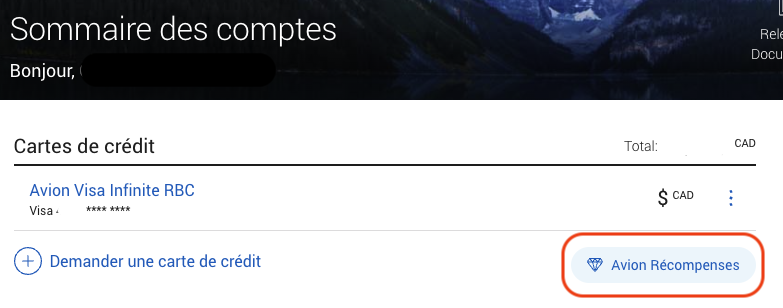
Then, on the Trips page, click on Book a Trip.
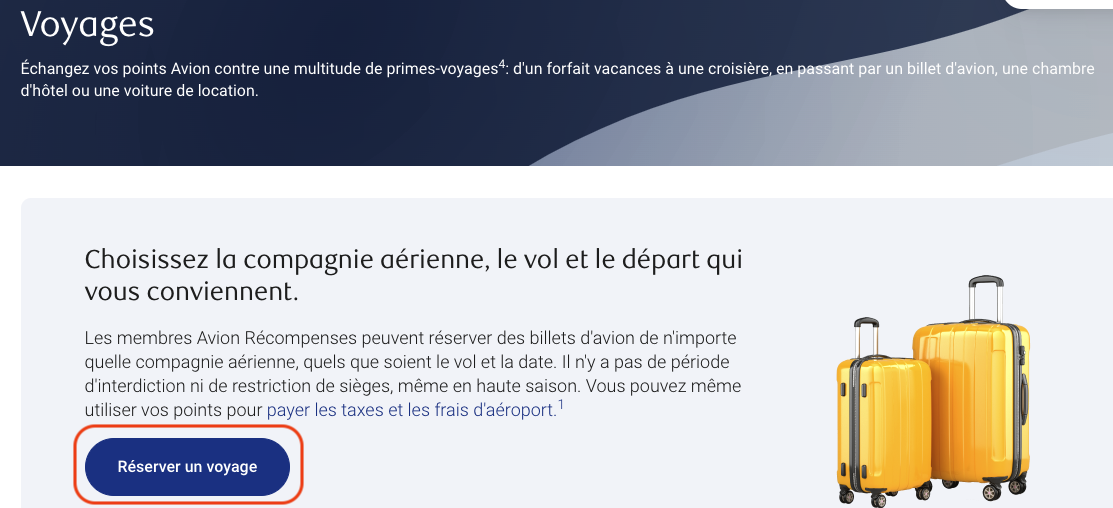
Avion Rewards acts like a travel agency. Generally, the prices are the same as the ones found on the sites of the carriers and tour operators.
Its search tool allows you to use RBC Avion Rewards points to book :
- A flight
- A car rental
- Hotel stays
- Or Vacation Packages
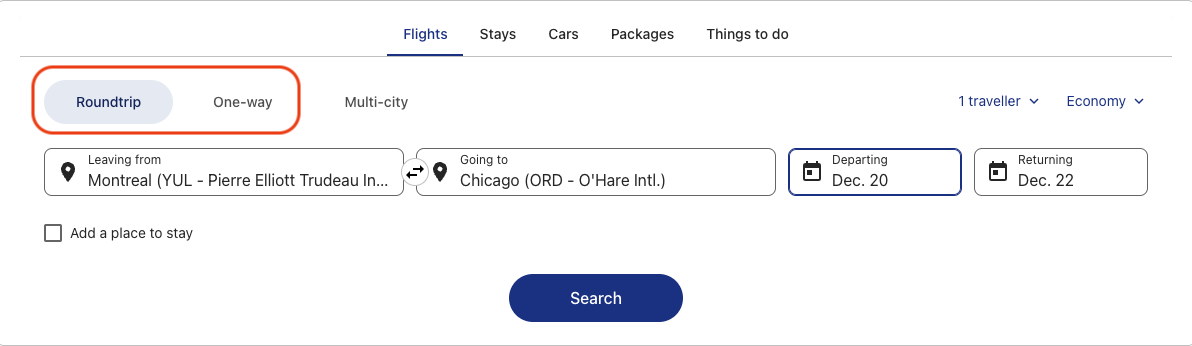
After entering your desired dates and destinations, the results will be displayed. On the left, there is a filter for options.
In this example, the non-stop and no change fee options are selected.
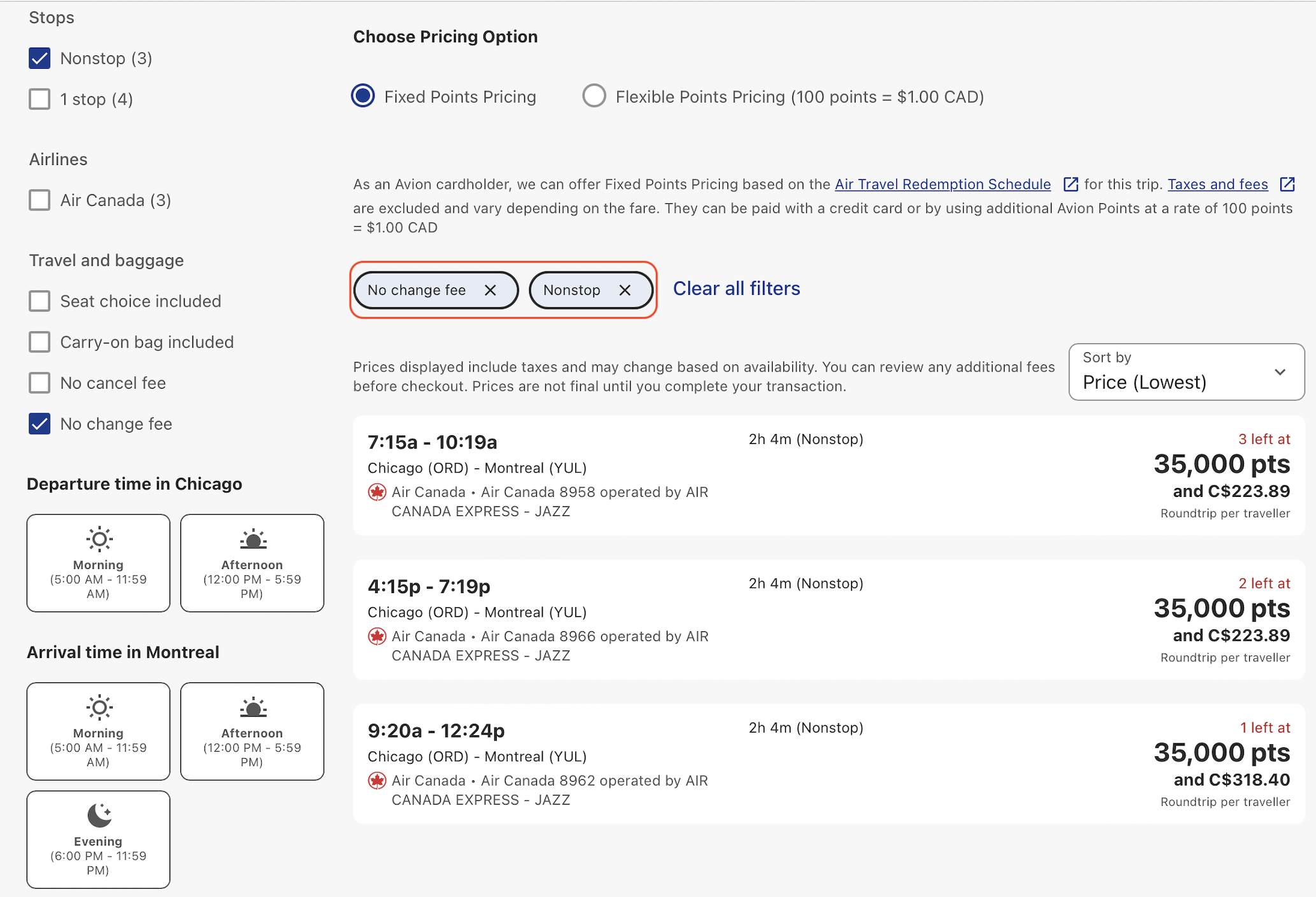
35,000 points can be redeemed on a flight costing up to $750.
In this example, I have chosen a higher class. This exceeds the $750, the remaining balance is added to the taxes and fees.
In my case, the same flight cost about $1,000 on the Air Canada website. This equates to 2.14 cents per point, ($750 divided by 35,000 points) which is excellent!
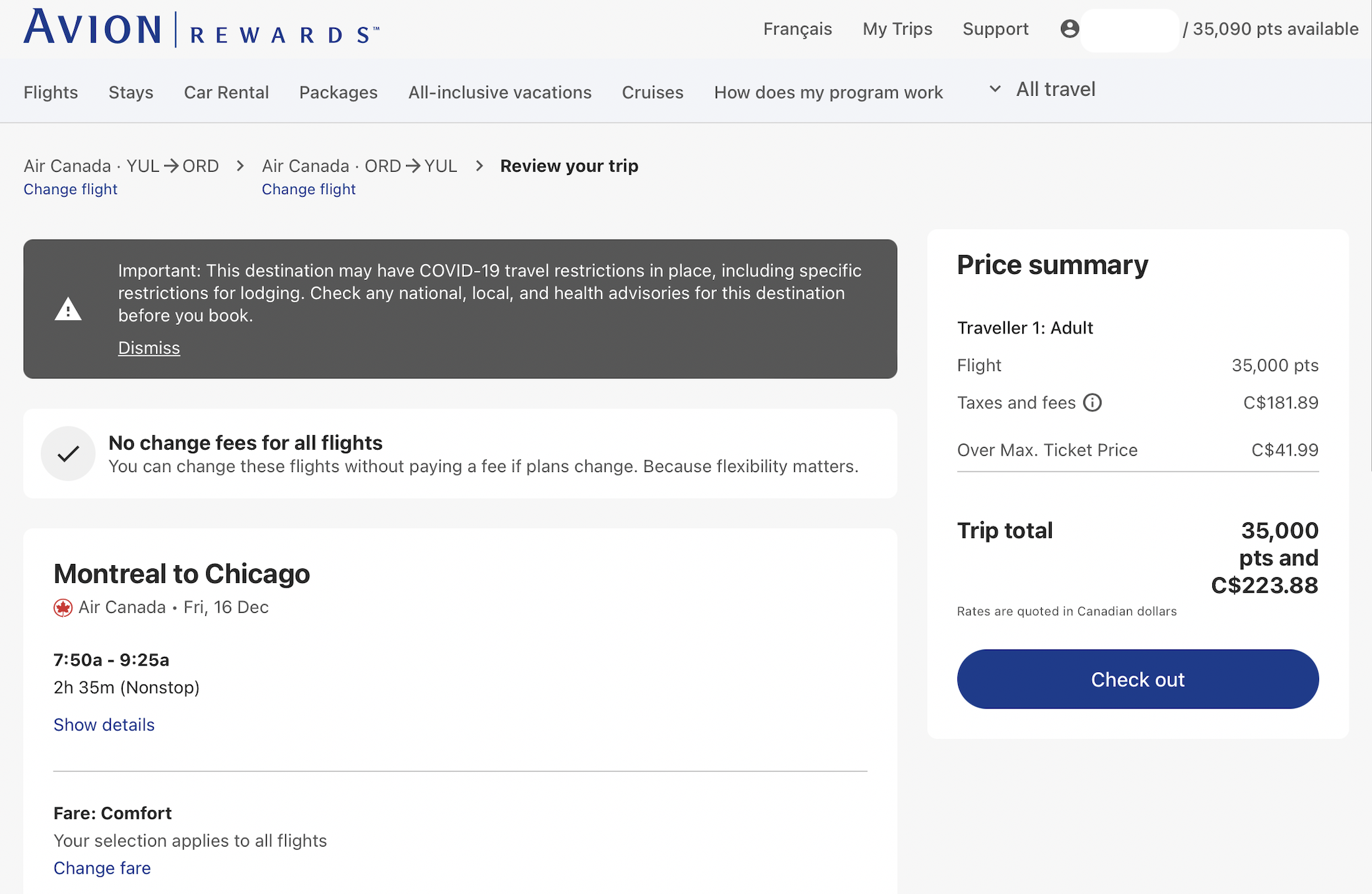
On the checkout page, RBC shows the points required to book this airline ticket. Any remaining point balance can be used to reduce the tax and fee balance.
For example, 90 points were used to lower the balance by 90 cents. The rest is to be paid with a credit card.
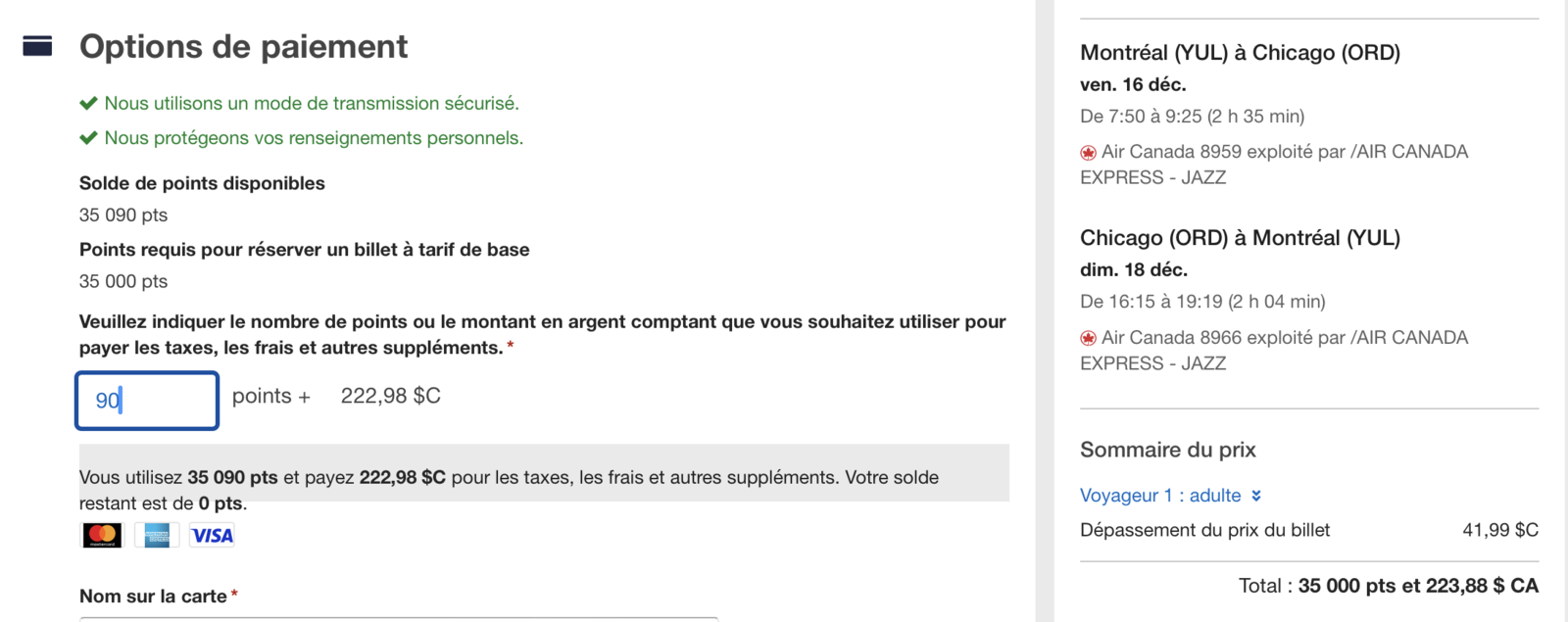
Enter the traveler’s information and make the payment.
An email from RBC Avion Rewards will be sent moments later to confirm. A few minutes later (or a few hours for some), the airline will send confirmation in a separate email. All the details will be there, including the reservation number.
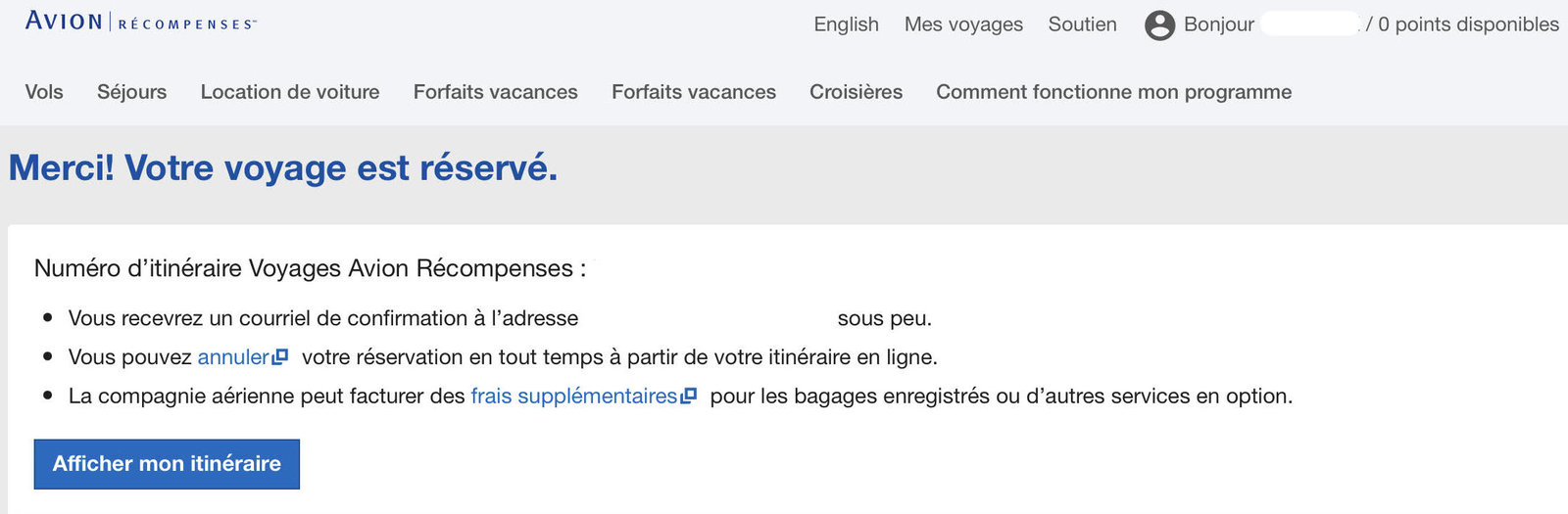
How to Manage an Airline Ticket Purchased with RBC Avion Rewards Points
The booked trip can be found in the My Trips section of the RBC Avion Rewards portal. A link redirects you to the airline’s website.
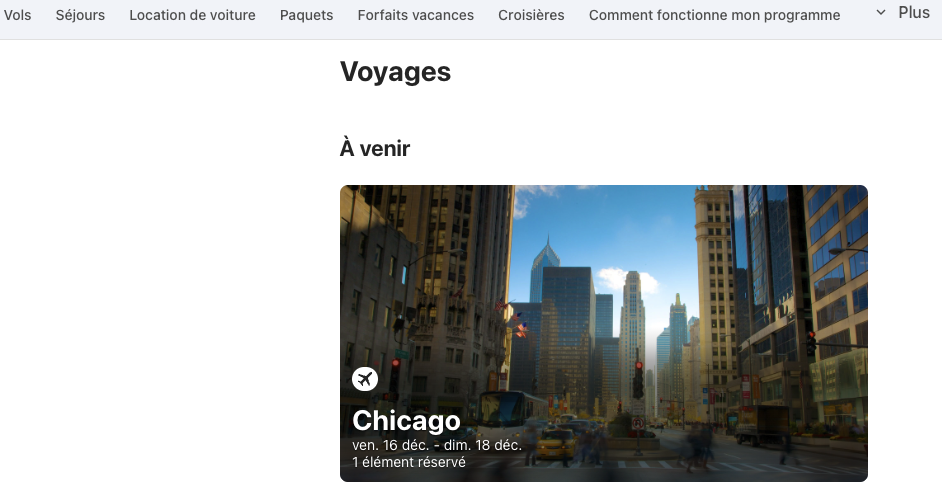
You will be able to link this reservation to your frequent flyer profile. Here I entered my Aeroplan membership number.
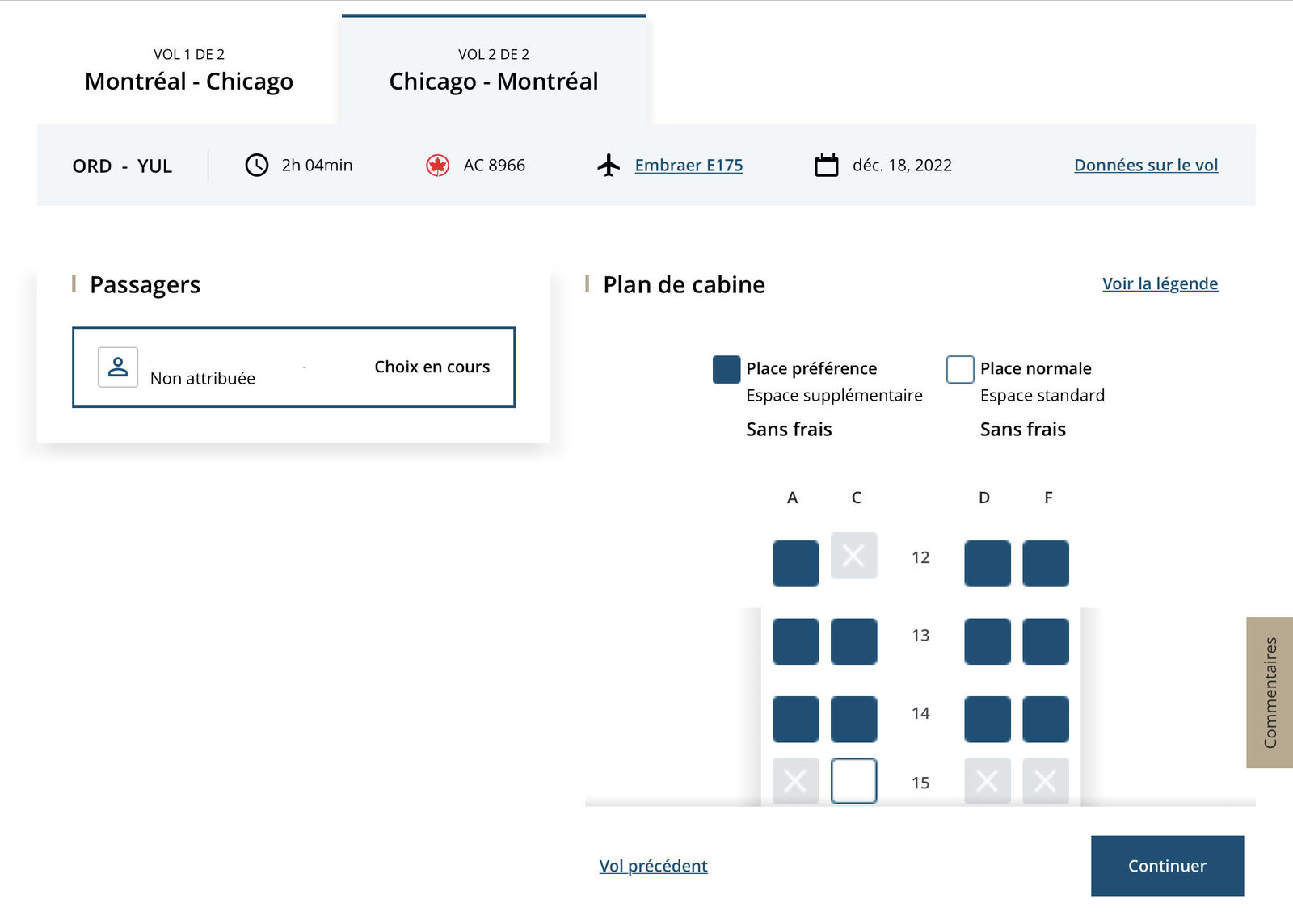
Since I had taken the Comfort fare on Air Canada, I was able to choose a Prefered seat at no charge. This must be done directly on the Air Canada website.
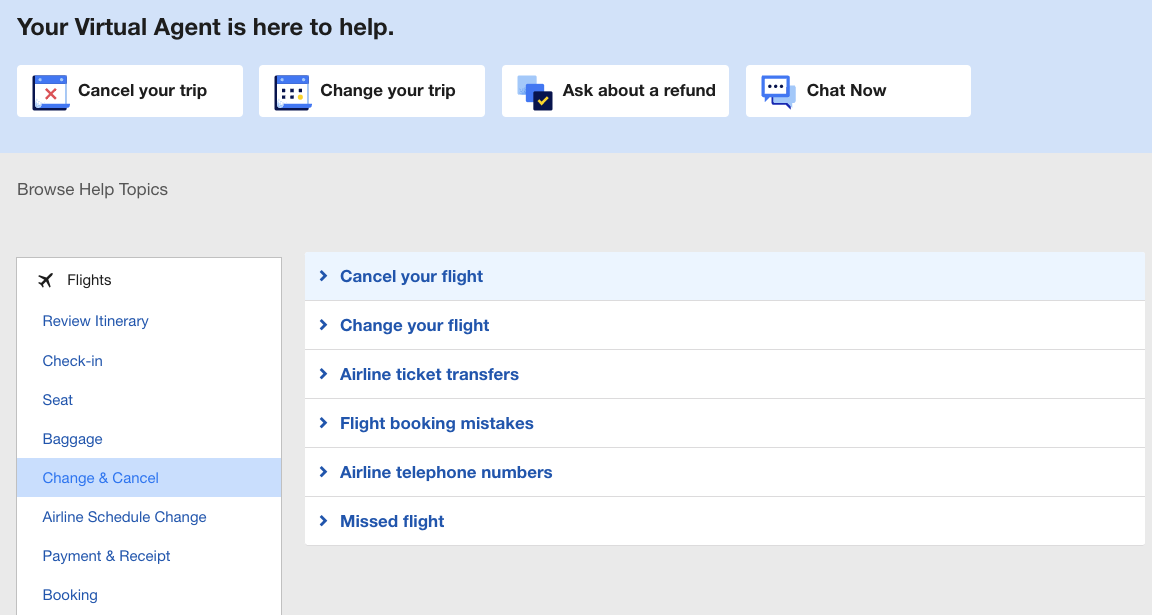
There is also the option to chat with a virtual agent on the RBC site in the Help section.
In addition, if you have eUpgrades with Air Canada, you have the option to apply them at check-in 24 hours prior to your flight.

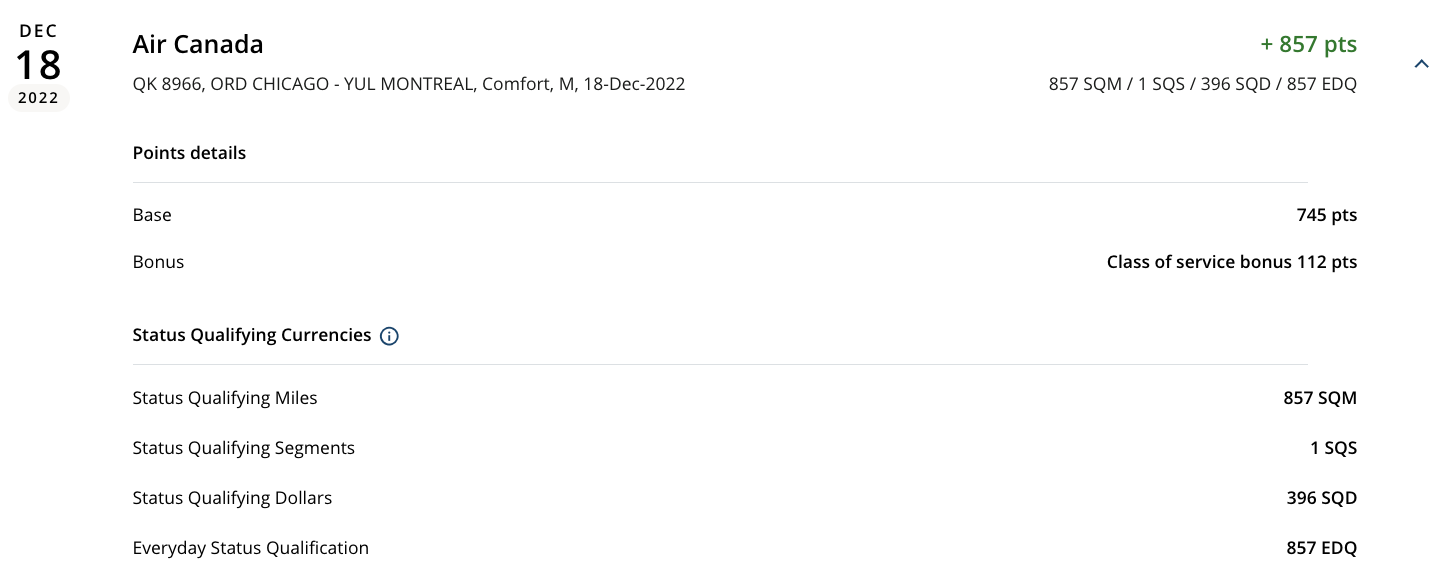
When your flight is completed, points and qualifications are deposited into your account based on the fare booked.
For example, the Comfort rate booked through RBC gave :
- MQS
- SQS
- DQS
- QQS
- Aeroplan Points
This counts towards your Aeroplan Status.
- Annual fee
- $120
- Our valuation
- $1,050ⓘMilesopedia first-year estimate First-year valueWelcome bonus$1,050Total$1,050Rewards on your spending are not included. The calculator that adds them from your own profile is on the card's page.
- Milesopedia first-year estimateⓘFirst-year valueWelcome bonus$1,050Total$1,050Rewards on your spending are not included. The calculator that adds them from your own profile is on the card's page.
- Welcome offer
- Up to 70,000 points
- Ends Nov 25, 2026
on RBC's website
For a limited time, the RBC Avion Visa Infinite Card offers a welcome bonus of up to 70,000 Avion points, worth up to $1,500 in travel.
- 35,000 points upon approval of your application
- 20,000 points when you charge $5,000 in purchases to your account within the first six months
- 15,000 points on the first anniversary of your account
You can redeem your Avion points for flights with more than 500 airlines, with no blackout periods or seat restrictions, or transfer them to partner programs such as American Airlines AAdvantage, The British Airways Club, Cathay Pacific Asia Miles and WestJet Rewards.
The card earns you 1.25 points per dollar on eligible travel purchases and 1 point per dollar on all your other eligible purchases. It also includes extensive insurance coverage: emergency medical, trip cancellation and interruption, collision coverage for rental vehicles, and mobile devices.
The annual fee is $120.
Legal
Refer to RBC page for up to date offer terms and conditions
† Based on the Air Travel Reward redemptions from the Air Travel Redemption Schedule starting at 35,000 Avion points for one round-trip long-haul flight to almost anywhere in Canada or the United States with a maximum ticket price of $750, you will need a minimum of 70,000 Avion Points for two round-trips long-haul flights to almost anywhere in Canada or the United States, exclusive of Hawaii and Alaska. All applicable taxes, service fees and surcharges are the responsibility of the traveler. For more details, including information on redeeming for first class and business class seats, visit: www.avionrewards.com/travel/index.html. For general redemption terms, conditions and restrictions that apply to the Avion Rewards program, please visit: www.avionrewards.com or call 1-800 ROYAL 1-2 (1-800-769-2512).
^ Based on the Air Travel Reward redemptions from the Air Travel Redemption Schedule starting at 15,000 Avion points for a round trip within or to an adjacent Canadian province/territory or U.S State with a maximum ticket price of $350. You will need a minimum of 60,000 Avion Points for four round-trips within or to an adjacent Canadian province/territory or U.S State. All applicable taxes, service fees and surcharges are the responsibility of the traveller. For more details, including information on redeeming for first class and business class seats, please visit: www.avionrewards.com/travel/index.html. For general redemption terms, conditions and restrictions that apply to the Avion Rewards program, please visit: www.avionrewards.com or call 1-800 ROYAL 1-2 (1-800-769-2512).
1 This offer only applies to new applications for an RBC Avion Visa Infinite or RBC Avion Visa Platinum credit card (each, an “Eligible Credit Card”) received between “August 13, 2026” and “November 25, 2026” (“Offer Period”) and approved by Royal Bank of Canada (“Royal Bank”) subject to the conditions below. Additional cardholders(s) (co-applicant and authorized user(s)) on the Eligible Credit Card account, as well as existing cardholders on any RBC Royal Bank personal credit card account transferring to an Eligible Credit Card account during the Offer Period, are not eligible for the offer.
35,000 welcome Avion points (“Welcome Points”) will appear on your monthly credit card statement within sixty (60) days after your application has been approved, provided that your Eligible Credit Card account remains open and in good standing at the time the Welcome points are credited to your account, “good standing” meaning that your Eligible Credit Card account must not be past due for more than two (2) consecutive credit card account statement periods, closed, charged off or in credit revoked status.
You will receive 20,000 bonus Avion points (“Bonus Points”) if a total of $5,000 or more (“Qualifying Transaction Amount”) in qualifying net purchases and/or pre-authorized bill payment transactions (“Qualifying Transactions”) are posted to your Eligible Credit Card account within the first six (6) months from your Eligible Credit Card account opening date (“Period”). The Bonus Points will appear on your monthly credit card statement within sixty days (60) after you reach $5,000 in Qualifying Transactions, provided your Eligible Credit Card account remains open and in good standing at the time the Bonus Points are credited to your account.
Qualifying Transactions exclude cash advances (including balance transfers, cash-like transactions and bill payments that are not pre-authorized charges that you set up with a merchant), interest charges and fees. Credits for returns and adjustments posted to your Eligible Credit Card account during the Period will reduce the amount of your Qualifying Transactions. The Qualifying Transaction Amount is based on the transaction posting date of each Qualifying Transaction, not the transaction date. This means that transactions that take place prior to the last day of the Period will not be considered for the Qualifying Transaction Amount if they have not yet been posted or processed by the merchant, the payment network (Visa) or Royal Bank by the last day of the Period.
15,000 additional Avion points (“Anniversary Points”) will appear on your monthly credit card statement within twelve (12) to sixteen (16) weeks after the one- year anniversary of your account opening, provided that your Eligible Credit Card account remains open and in good standing at the time the Anniversary Points are credited to your account.
If you close or change your Eligible Credit Card Account for another type of RBC Royal Bank credit card before the Welcome Points, the Bonus Points and/or the Anniversary Points have been credited to your account, you may lose the benefit of this offer. This offer may not be combined or used in conjunction with any other offer. Royal Bank reserves the right to cancel, modify or withdraw this offer at any time without notice, even after your application has been approved, including if we suspect that you may be manipulating or abusing it, or engaging in any suspicious or fraudulent activity, as determined by Royal Bank in its sole discretion. For complete terms and conditions that apply to the Avion Rewards Program, please visit www.avionrewards.com or call 1-800-769-2512.
^Point redemptions for flights under the Air Travel Redemption Schedule start at 7,500 points for a short-haul one-way Economy Class flight priced at no more than $175 (and start at 15,000 points for a short-haul round-trip Economy Class flight priced at no more than $350). The traveller is responsible for all applicable taxes, administration fees and surcharges. To learn more, including guidelines regarding redeeming points for a Business Class flight, visit www.avionrewards.com/fr/travel/.
2 Avion points are earned on qualifying net purchases only; they are not earned on cash advances (including balance transfers, cash-like transactions and bill payments that are not pre-authorized charges that you set up with a merchant) interest charges or fees, and credits for returns and adjustments will reduce or cancel the points earned by the amounts originally charged.
4 To participate in this offer, you must have an RBC debit card or a credit card which is issued by Royal Bank of Canada (excluding RBC commercial credit cards) (“RBC Card”). RBC business clients will only be able to link up to two (2) RBC business credit cards and one (1) RBC business debit card to a Petro-Points card.
You must be enrolled in RBC Online Banking or the RBC Mobile app in order to link your RBC Card to your Petro-Points card. Card linking may take up to 2 business days to process before savings and bonus points can be applied to purchases. A linked RBC Card means an RBC Card linked to a Petro-Points Account. Your linked RBC Card acts as your Petro-Points card. You will automatically earn Petro-Points when you pay for qualifying purchases with your linked RBC Card at Petro-Canada locations and you do not need to swipe your Petro-Points card before you pay. You can redeem your Petro-Points at Petro-Canada using your linked RBC Card. Each time you use your linked RBC Card to purchase any grade of gasoline, or diesel, at a Petro-Canada location, you will save three cents ($0.03) per litre at the time of the transaction.
6 Each time you use your linked Eligible Avion Rewards Credit Card to pay for purchases at a Petro-Canada Location, you will earn a bonus of twenty percent (20%) more Avion points than you normally earn for every $1 in purchases in accordance with the Avion Rewards Terms and Conditions. Please allow up to ninety (90) days from the date the transaction is posted on your credit card statement for the bonus points to be deposited into Avion Rewards account. Authorized Users are excluded from earning Avion points bonus.
6 Each time you use your eligible linked Avion Rewards credit card to pay for purchases at a Petro-Canada location, you will receive a bonus of twenty percent (20%) more Avion points than you would normally receive for each dollar of purchase, in accordance with the terms of the Avion Rewards program. Please allow up to ninety (90) days from the date the transaction is posted to your credit card statement for your bonus points to be deposited into your Avion Rewards account. Authorized users cannot earn bonus Avion points.
7 Coverage underwritten by RBC Insurance Company of Canada. Please refer to the insurance certificate for complete details. rbc-visa-infinite-avion-certificate-of-insurance.pdf
9 Under 65 years of age, 15 days of coverage. For age 65 and over, 3 days of coverage. Coverage underwritten by RBC Insurance Company of Canada.
10 The discount of up to 20% off the base rate only (time and mileage) (the “discount”) is offered at participating corporate Hertz locations in Canada and the United States. The discount excludes taxes, tax recovery charges, fees, surcharges and the cost of any optional service, such as refuelling. If you are a personal credit cardholder, you must enter the first six digits of your eligible Avion Rewards card in the CDP number field at the time of booking to receive the discount. For business credit cards and commercial credit cards, a CDP number will be generated upon enrolment in the Hertz Business Rewards program. Please use this CDP identification number for future reservations to take advantage of the discount and the Hertz Business Rewards program. To take advantage of the discount, your colleagues and your company’s employees must also enter the Hertz Business Rewards program CDP number at the time they make their reservation with Hertz. Hertz, and not Royal Bank of Canada, is responsible for the sales and refund terms that apply to the discount. For complete terms, visit hertz.ca (external site opens in a new window). Royal Bank of Canada reserves the right to cancel, amend or withdraw this offer at any time, even after you have activated it. To learn more about the Avion Rewards program, go to www.avionrewards.com/fr/ (opens in a new window).
11 This offer is not transferable. To earn 3X the Avion points you normally earn (“Bonus Points”) for every one dollar ($1.00) in purchases, including taxes, you make at any corporately owned Hertz location in Canada, U.S., UK, Germany, Italy, Switzerland, Netherlands, Belgium, Spain, Australia and Luxembourg, beginning January 2, 2025 to December 31, 2025 (“Offer Period”), click the “Load Offer” button and pay using one of your eligible RBC Avion credit card (“Eligible RBC Card/Credit Card”) (“Qualifying Purchase”). Franchised Hertz locations are not eligible for this offer.
The up to 20% discount rate applies to the base rate only (time and mileage charges) (“Discount”) and is available at participating Hertz corporate locations in Canada and the U.S.. The Discount excludes taxes, tax reimbursements, fees, surcharges and optional service charges, such as refueling. CDP ID #451401 must be used at time of reservation to receive the Discount.
Upon Hertz Gold Plus Rewards (GPR) registration, you’ll be upgraded to Hertz Five Star status in 48 hours. If you’re already an existing member of Hertz GPR, please follow the prompts on the landing page.
If you change your eligible RBC Avion credit card, you must load the Hertz offer again in Offers. If you cancel your eligible RBC Avion credit card, you will not be eligible for the Discount, Bonus Points or Hertz Five Star status.
Please allow up to 30 days from the date of your Qualifying Purchase, provided your credit card account was in good standing at that time, for the Bonus Points to appear on the account statement tied to your eligible RBC Avion credit card. Cancellations or price adjustments may cancel or reduce the Avion points earned on your Qualifying Purchase, including Bonus Points. Offer may not be combined with any other offer, promotion, certificate, voucher or other discount.
Hertz, not Royal Bank of Canada, is responsible for the sales and returns terms and conditions applicable to your Qualifying Purchase(s) and Discount. For complete terms and conditions please visit: https://www.hertz.ca/avionrewardselite(opens to external site). Royal Bank of Canada reserves the right to cancel, modify or withdraw this offer at any time, even after you have activated it. For more details on the Offers program, please visit rbc.com/offers(opens to external site).
12 You will earn 1.25 Avion points for every dollar spent when you use your RBC Avion Visa Infinite card to pay for travel-related purchases made at merchants classified by Visa’s “Merchant Category Code” (“MCC”) as “travel”, which may include: airlines, accommodations, tour operators, cruise lines, travel agencies and car rental companies. Even though some merchants may sell travel products/services, purchases made at these locations may not necessarily qualify for the 1.25 Avion points per dollar if the merchant is not classified with a “travel” MCC. Also, merchants that are not classified by a “travel” MCC may be located on the premises of merchants that are classified with a “travel” MCC, and purchases made at these locations may not qualify for this added benefit. For more details, please refer to the Avion Rewards Terms and Conditions at: https://www.avionrewards.com/terms-and-conditions/index.html
14 The term “redeem” means using your Be Well points to pay, or partially pay, for eligible purchases using your Be Well card at participating Rexall locations according to the instructions provided by the cashier, the point-of-sale terminal or any other payment processing device. You can redeem the Be Well points you earn for eligible purchases—see section 5 of the Be Well terms (available at https://www.letsbewell.ca/terms-conditions)—or for another purpose that we may provide from time to time.
You must have joined the Be Well program and registered your Be Well card, or otherwise called customer service, to redeem Be Well points. Any Be Well points earned on a Be Well card will remain the property of the Be Well administrator until the enrollment and registration process is complete.
You must redeem a minimum of 25,000 Be Well points at any time, which are worth $10. Be Well points can be redeemed in $10 increments, up to a maximum of $200 (500,000 Be Well points) in a single transaction. A maximum of 500,000 Be Well points can be redeemed within a 24-hour period.
In Ontario and British Columbia, Be Well points cannot be redeemed for prescription drugs. As the laws of each province and territory may change from time to time, you are encouraged to consult your pharmacist for more information in this regard.
Be Well points you earn when you make a purchase cannot be redeemed immediately for that same purchase. They can only be redeemed for a future eligible purchase that must be made at least 12 hours after earning those Be Well points.
16 To receive a complimentary DashPass subscription for $0 delivery fees on orders of $15 or more at eligible restaurants when you pay with your Eligible RBC Credit Card, you must subscribe to DashPass by adding an Eligible RBC Credit Card, accept the DoorDash terms and conditions, and activate your benefit by clicking “Activate Free DashPass” before November 16, 2028 (“Offer Period”). If you are an existing DashPass subscriber and have already added an Eligible RBC Credit Card to your account you must activate your benefit by clicking “Activate Free DashPass” during the Offer Period. If you have been charged for DashPass you will receive a refund to the method of original payment, in the amount of the monthly subscription fee for the month you activate your complimentary subscription. For all clients, by clicking on “Activate Free DashPass” you agree to the DoorDash terms and conditions which can be found at https://help.doordash.com/consumers/s/terms-and-conditions .
Eligible RBC Credit cardholders include primary cardholders, co-applicants, authorized users, primary business cardholders and secondary business cardholders on an Eligible RBC Credit Card account.
The DashPass monthly subscription fee will be waived (“Complimentary DashPass Subscription”) and you will receive either a 6 months or 12 months Complimentary DashPass Subscription based on the Eligible RBC Credit Card you use to subscribe to DashPass.
DashPass subscriptions purchased through third parties, including third-party payment accounts, or online or mobile digital wallets (like Apply Pay and Google Pay) are not eligible for the Complimentary DashPass Subscription.
Eligible RBC Credit Cards: Your Eligible RBC Credit Card may only be used with one DoorDash account to receive a Complimentary DashPass Subscription. Once you have received a Complimentary DashPass Subscription you cannot use the same eligible RBC Credit Card to obtain a Complimentary DashPass Subscription with another DoorDash account.
You are only eligible for one 12 month Complimentary DashPass Subscription and one 6 months Complimentary DashPass Subscription during the Offer Period. The Complimentary DashPass Subscription commences on the date you subscribe to receive the Complimentary DashPass Subscription. For example, if you subscribe to a 12 month Complimentary DashPass Subscription in on the last day of your second month of a 6 months Complimentary DashPass Subscription you will receive a total of 14 months of Complimentary DashPass Subscription. In order to validate your credit card as an Eligible RBC Credit Card, Royal Bank may need to administer a $0.50 charge to validate your card enrollment. This charge will be reversed in 3 to 5 days once your account has been validated.
12 Month Complimentary DashPass Subscription is available for the following Eligible RBC Credit Cards:
As an RBC Avion Visa Platinum, RBC Avion Visa Infinite , RBC Avion Visa Infinite Privilege, RBC Avion Visa Infinite Privilege for Private Banking, WestJet RBC World Elite Mastercard, RBC Rewards Visa Preferred, RBC Cash Back Preferred World Elite Mastercard, More Rewards RBC Visa Infinite, RBC British Airways Visa Infinite, RBC Avion Visa Business, RBC Avion Visa Infinite Business, WestJet RBC World Elite Mastercard for Business (Elite Benefit cards) cardholder.
You are eligible for a Complimentary DashPass Subscription for 12 months from the date you subscribe to receive the Complimentary DashPass Subscription. You will be auto-enrolled into full-price membership at the then-current rate after the end of the 12 month Complimentary DashPass Subscription. Your RBC credit card account must be open and not in default to maintain the benefits of DashPass.
6 Months Complimentary DashPass Subscription is available for the following Eligible RBC Credit Cards:
As an Rewards+TM Visa‡, Signature® RBC Rewards® Visa‡, RBC® Visa‡ Platinum, RBC® Visa‡ Cash Back, RBC® Cash Back Mastercard‡, RBC® Visa‡ Classic Low Rate Option, RBC® Visa‡ Classic, RBC® Student Visa‡ Classic, RBC® Visa‡ Classic II Student, RBC® Visa‡ Gold, RBC® U.S. Dollar Visa‡ Gold, RBC Rewards Visa‡ Gold, RBC RateAdvantage® Visa‡, WestJet RBC® Mastercard‡, RBC ION Visa, RBC ION+ Visa, More Rewards RBC Visa, RBC Staff VISA Classic Expense, RBC Staff VISA Gold Expense, RBC® Visa‡ Business, RBC® Visa‡ Business Gold, RBC® Visa‡ CreditLine for Small BusinessTM, or RBC® Business Cash Back Mastercard‡, WestJet RBC® World Elite Mastercard‡ (Premium Benefit Cards).
You are eligible for a Complimentary DashPass Subscription for 6 months from the date you subscribed to the Complimentary DashPass Subscription. You will be auto-enrolled into full-price membership at the then-current rate after the end of the 6 months Complimentary DashPass Subscription. Your RBC credit card account must be open and not in default to maintain the benefits of DashPass.
DoorDash not Royal Bank of Canada, is responsible for (i) services and products provided through DoorDash; (ii) DashPass, including the DashPass Benefits, the administration of DashPass and (iii) the DoorDash terms and conditions. The Complimentary DashPass Subscription offer may be amended or withdrawn at any time. To learn more about DashPass, visit www.doordash.com/dashpass (opens to external site). For full DashPass for RBC Program Terms and Conditions, visit rbcroyalbank.com/credit-cards/documentation/pdf/full-doordash-tcs-en.pdf
Annual fee
Annual income required
Conversion fees
2.5%
Earning rate
- 1.25xTravel
- 1xAll spending
Value
Transfer partners
- American Airlines AAdvantageAirline
- British Airways ClubAirline
- Cathay Asia MilesAirline
- WestJet RewardsAirline
Card benefits
Travel insurance
Purchase protection
Here are other ways to use RBC Avion points.
Another way to redeem RBC Avion Rewards points for travel
Occasionally, the Avion Rewards site may experience technical difficulties or your flight may not appear in the search results.
At that time, call Avion Rewards Customer Service at 1-800-769-2512.
- Get an authorization number to book the flight you want (mandatory);
- Book your own flight directly on the desired airline’s website;
- Send an e-mail to travel@service.rbcrewards.com with your authorization number obtained earlier from Customer Service, your name, the number of tickets reserved, proof of purchase and itinerary details.
Avion Rewards will then deduct the required points from your RBC Rewards points account to credit the cost of your airline tickets, according to their airfare table.
Our featured card
- Annual fee
- $120
- Our valuation
- $1,050ⓘMilesopedia first-year estimate First-year valueWelcome bonus$1,050Total$1,050Rewards on your spending are not included. The calculator that adds them from your own profile is on the card's page.
- Milesopedia first-year estimateⓘFirst-year valueWelcome bonus$1,050Total$1,050Rewards on your spending are not included. The calculator that adds them from your own profile is on the card's page.
- Welcome offer
- Up to 70,000 points
- Ends Nov 25, 2026
on RBC's website
For a limited time, the RBC Avion Visa Infinite Card offers a welcome bonus of up to 70,000 Avion points, worth up to $1,500 in travel.
- 35,000 points upon approval of your application
- 20,000 points when you charge $5,000 in purchases to your account within the first six months
- 15,000 points on the first anniversary of your account
You can redeem your Avion points for flights with more than 500 airlines, with no blackout periods or seat restrictions, or transfer them to partner programs such as American Airlines AAdvantage, The British Airways Club, Cathay Pacific Asia Miles and WestJet Rewards.
The card earns you 1.25 points per dollar on eligible travel purchases and 1 point per dollar on all your other eligible purchases. It also includes extensive insurance coverage: emergency medical, trip cancellation and interruption, collision coverage for rental vehicles, and mobile devices.
The annual fee is $120.
Legal
Refer to RBC page for up to date offer terms and conditions
† Based on the Air Travel Reward redemptions from the Air Travel Redemption Schedule starting at 35,000 Avion points for one round-trip long-haul flight to almost anywhere in Canada or the United States with a maximum ticket price of $750, you will need a minimum of 70,000 Avion Points for two round-trips long-haul flights to almost anywhere in Canada or the United States, exclusive of Hawaii and Alaska. All applicable taxes, service fees and surcharges are the responsibility of the traveler. For more details, including information on redeeming for first class and business class seats, visit: www.avionrewards.com/travel/index.html. For general redemption terms, conditions and restrictions that apply to the Avion Rewards program, please visit: www.avionrewards.com or call 1-800 ROYAL 1-2 (1-800-769-2512).
^ Based on the Air Travel Reward redemptions from the Air Travel Redemption Schedule starting at 15,000 Avion points for a round trip within or to an adjacent Canadian province/territory or U.S State with a maximum ticket price of $350. You will need a minimum of 60,000 Avion Points for four round-trips within or to an adjacent Canadian province/territory or U.S State. All applicable taxes, service fees and surcharges are the responsibility of the traveller. For more details, including information on redeeming for first class and business class seats, please visit: www.avionrewards.com/travel/index.html. For general redemption terms, conditions and restrictions that apply to the Avion Rewards program, please visit: www.avionrewards.com or call 1-800 ROYAL 1-2 (1-800-769-2512).
1 This offer only applies to new applications for an RBC Avion Visa Infinite or RBC Avion Visa Platinum credit card (each, an “Eligible Credit Card”) received between “August 13, 2026” and “November 25, 2026” (“Offer Period”) and approved by Royal Bank of Canada (“Royal Bank”) subject to the conditions below. Additional cardholders(s) (co-applicant and authorized user(s)) on the Eligible Credit Card account, as well as existing cardholders on any RBC Royal Bank personal credit card account transferring to an Eligible Credit Card account during the Offer Period, are not eligible for the offer.
35,000 welcome Avion points (“Welcome Points”) will appear on your monthly credit card statement within sixty (60) days after your application has been approved, provided that your Eligible Credit Card account remains open and in good standing at the time the Welcome points are credited to your account, “good standing” meaning that your Eligible Credit Card account must not be past due for more than two (2) consecutive credit card account statement periods, closed, charged off or in credit revoked status.
You will receive 20,000 bonus Avion points (“Bonus Points”) if a total of $5,000 or more (“Qualifying Transaction Amount”) in qualifying net purchases and/or pre-authorized bill payment transactions (“Qualifying Transactions”) are posted to your Eligible Credit Card account within the first six (6) months from your Eligible Credit Card account opening date (“Period”). The Bonus Points will appear on your monthly credit card statement within sixty days (60) after you reach $5,000 in Qualifying Transactions, provided your Eligible Credit Card account remains open and in good standing at the time the Bonus Points are credited to your account.
Qualifying Transactions exclude cash advances (including balance transfers, cash-like transactions and bill payments that are not pre-authorized charges that you set up with a merchant), interest charges and fees. Credits for returns and adjustments posted to your Eligible Credit Card account during the Period will reduce the amount of your Qualifying Transactions. The Qualifying Transaction Amount is based on the transaction posting date of each Qualifying Transaction, not the transaction date. This means that transactions that take place prior to the last day of the Period will not be considered for the Qualifying Transaction Amount if they have not yet been posted or processed by the merchant, the payment network (Visa) or Royal Bank by the last day of the Period.
15,000 additional Avion points (“Anniversary Points”) will appear on your monthly credit card statement within twelve (12) to sixteen (16) weeks after the one- year anniversary of your account opening, provided that your Eligible Credit Card account remains open and in good standing at the time the Anniversary Points are credited to your account.
If you close or change your Eligible Credit Card Account for another type of RBC Royal Bank credit card before the Welcome Points, the Bonus Points and/or the Anniversary Points have been credited to your account, you may lose the benefit of this offer. This offer may not be combined or used in conjunction with any other offer. Royal Bank reserves the right to cancel, modify or withdraw this offer at any time without notice, even after your application has been approved, including if we suspect that you may be manipulating or abusing it, or engaging in any suspicious or fraudulent activity, as determined by Royal Bank in its sole discretion. For complete terms and conditions that apply to the Avion Rewards Program, please visit www.avionrewards.com or call 1-800-769-2512.
^Point redemptions for flights under the Air Travel Redemption Schedule start at 7,500 points for a short-haul one-way Economy Class flight priced at no more than $175 (and start at 15,000 points for a short-haul round-trip Economy Class flight priced at no more than $350). The traveller is responsible for all applicable taxes, administration fees and surcharges. To learn more, including guidelines regarding redeeming points for a Business Class flight, visit www.avionrewards.com/fr/travel/.
2 Avion points are earned on qualifying net purchases only; they are not earned on cash advances (including balance transfers, cash-like transactions and bill payments that are not pre-authorized charges that you set up with a merchant) interest charges or fees, and credits for returns and adjustments will reduce or cancel the points earned by the amounts originally charged.
4 To participate in this offer, you must have an RBC debit card or a credit card which is issued by Royal Bank of Canada (excluding RBC commercial credit cards) (“RBC Card”). RBC business clients will only be able to link up to two (2) RBC business credit cards and one (1) RBC business debit card to a Petro-Points card.
You must be enrolled in RBC Online Banking or the RBC Mobile app in order to link your RBC Card to your Petro-Points card. Card linking may take up to 2 business days to process before savings and bonus points can be applied to purchases. A linked RBC Card means an RBC Card linked to a Petro-Points Account. Your linked RBC Card acts as your Petro-Points card. You will automatically earn Petro-Points when you pay for qualifying purchases with your linked RBC Card at Petro-Canada locations and you do not need to swipe your Petro-Points card before you pay. You can redeem your Petro-Points at Petro-Canada using your linked RBC Card. Each time you use your linked RBC Card to purchase any grade of gasoline, or diesel, at a Petro-Canada location, you will save three cents ($0.03) per litre at the time of the transaction.
6 Each time you use your linked Eligible Avion Rewards Credit Card to pay for purchases at a Petro-Canada Location, you will earn a bonus of twenty percent (20%) more Avion points than you normally earn for every $1 in purchases in accordance with the Avion Rewards Terms and Conditions. Please allow up to ninety (90) days from the date the transaction is posted on your credit card statement for the bonus points to be deposited into Avion Rewards account. Authorized Users are excluded from earning Avion points bonus.
6 Each time you use your eligible linked Avion Rewards credit card to pay for purchases at a Petro-Canada location, you will receive a bonus of twenty percent (20%) more Avion points than you would normally receive for each dollar of purchase, in accordance with the terms of the Avion Rewards program. Please allow up to ninety (90) days from the date the transaction is posted to your credit card statement for your bonus points to be deposited into your Avion Rewards account. Authorized users cannot earn bonus Avion points.
7 Coverage underwritten by RBC Insurance Company of Canada. Please refer to the insurance certificate for complete details. rbc-visa-infinite-avion-certificate-of-insurance.pdf
9 Under 65 years of age, 15 days of coverage. For age 65 and over, 3 days of coverage. Coverage underwritten by RBC Insurance Company of Canada.
10 The discount of up to 20% off the base rate only (time and mileage) (the “discount”) is offered at participating corporate Hertz locations in Canada and the United States. The discount excludes taxes, tax recovery charges, fees, surcharges and the cost of any optional service, such as refuelling. If you are a personal credit cardholder, you must enter the first six digits of your eligible Avion Rewards card in the CDP number field at the time of booking to receive the discount. For business credit cards and commercial credit cards, a CDP number will be generated upon enrolment in the Hertz Business Rewards program. Please use this CDP identification number for future reservations to take advantage of the discount and the Hertz Business Rewards program. To take advantage of the discount, your colleagues and your company’s employees must also enter the Hertz Business Rewards program CDP number at the time they make their reservation with Hertz. Hertz, and not Royal Bank of Canada, is responsible for the sales and refund terms that apply to the discount. For complete terms, visit hertz.ca (external site opens in a new window). Royal Bank of Canada reserves the right to cancel, amend or withdraw this offer at any time, even after you have activated it. To learn more about the Avion Rewards program, go to www.avionrewards.com/fr/ (opens in a new window).
11 This offer is not transferable. To earn 3X the Avion points you normally earn (“Bonus Points”) for every one dollar ($1.00) in purchases, including taxes, you make at any corporately owned Hertz location in Canada, U.S., UK, Germany, Italy, Switzerland, Netherlands, Belgium, Spain, Australia and Luxembourg, beginning January 2, 2025 to December 31, 2025 (“Offer Period”), click the “Load Offer” button and pay using one of your eligible RBC Avion credit card (“Eligible RBC Card/Credit Card”) (“Qualifying Purchase”). Franchised Hertz locations are not eligible for this offer.
The up to 20% discount rate applies to the base rate only (time and mileage charges) (“Discount”) and is available at participating Hertz corporate locations in Canada and the U.S.. The Discount excludes taxes, tax reimbursements, fees, surcharges and optional service charges, such as refueling. CDP ID #451401 must be used at time of reservation to receive the Discount.
Upon Hertz Gold Plus Rewards (GPR) registration, you’ll be upgraded to Hertz Five Star status in 48 hours. If you’re already an existing member of Hertz GPR, please follow the prompts on the landing page.
If you change your eligible RBC Avion credit card, you must load the Hertz offer again in Offers. If you cancel your eligible RBC Avion credit card, you will not be eligible for the Discount, Bonus Points or Hertz Five Star status.
Please allow up to 30 days from the date of your Qualifying Purchase, provided your credit card account was in good standing at that time, for the Bonus Points to appear on the account statement tied to your eligible RBC Avion credit card. Cancellations or price adjustments may cancel or reduce the Avion points earned on your Qualifying Purchase, including Bonus Points. Offer may not be combined with any other offer, promotion, certificate, voucher or other discount.
Hertz, not Royal Bank of Canada, is responsible for the sales and returns terms and conditions applicable to your Qualifying Purchase(s) and Discount. For complete terms and conditions please visit: https://www.hertz.ca/avionrewardselite(opens to external site). Royal Bank of Canada reserves the right to cancel, modify or withdraw this offer at any time, even after you have activated it. For more details on the Offers program, please visit rbc.com/offers(opens to external site).
12 You will earn 1.25 Avion points for every dollar spent when you use your RBC Avion Visa Infinite card to pay for travel-related purchases made at merchants classified by Visa’s “Merchant Category Code” (“MCC”) as “travel”, which may include: airlines, accommodations, tour operators, cruise lines, travel agencies and car rental companies. Even though some merchants may sell travel products/services, purchases made at these locations may not necessarily qualify for the 1.25 Avion points per dollar if the merchant is not classified with a “travel” MCC. Also, merchants that are not classified by a “travel” MCC may be located on the premises of merchants that are classified with a “travel” MCC, and purchases made at these locations may not qualify for this added benefit. For more details, please refer to the Avion Rewards Terms and Conditions at: https://www.avionrewards.com/terms-and-conditions/index.html
14 The term “redeem” means using your Be Well points to pay, or partially pay, for eligible purchases using your Be Well card at participating Rexall locations according to the instructions provided by the cashier, the point-of-sale terminal or any other payment processing device. You can redeem the Be Well points you earn for eligible purchases—see section 5 of the Be Well terms (available at https://www.letsbewell.ca/terms-conditions)—or for another purpose that we may provide from time to time.
You must have joined the Be Well program and registered your Be Well card, or otherwise called customer service, to redeem Be Well points. Any Be Well points earned on a Be Well card will remain the property of the Be Well administrator until the enrollment and registration process is complete.
You must redeem a minimum of 25,000 Be Well points at any time, which are worth $10. Be Well points can be redeemed in $10 increments, up to a maximum of $200 (500,000 Be Well points) in a single transaction. A maximum of 500,000 Be Well points can be redeemed within a 24-hour period.
In Ontario and British Columbia, Be Well points cannot be redeemed for prescription drugs. As the laws of each province and territory may change from time to time, you are encouraged to consult your pharmacist for more information in this regard.
Be Well points you earn when you make a purchase cannot be redeemed immediately for that same purchase. They can only be redeemed for a future eligible purchase that must be made at least 12 hours after earning those Be Well points.
16 To receive a complimentary DashPass subscription for $0 delivery fees on orders of $15 or more at eligible restaurants when you pay with your Eligible RBC Credit Card, you must subscribe to DashPass by adding an Eligible RBC Credit Card, accept the DoorDash terms and conditions, and activate your benefit by clicking “Activate Free DashPass” before November 16, 2028 (“Offer Period”). If you are an existing DashPass subscriber and have already added an Eligible RBC Credit Card to your account you must activate your benefit by clicking “Activate Free DashPass” during the Offer Period. If you have been charged for DashPass you will receive a refund to the method of original payment, in the amount of the monthly subscription fee for the month you activate your complimentary subscription. For all clients, by clicking on “Activate Free DashPass” you agree to the DoorDash terms and conditions which can be found at https://help.doordash.com/consumers/s/terms-and-conditions .
Eligible RBC Credit cardholders include primary cardholders, co-applicants, authorized users, primary business cardholders and secondary business cardholders on an Eligible RBC Credit Card account.
The DashPass monthly subscription fee will be waived (“Complimentary DashPass Subscription”) and you will receive either a 6 months or 12 months Complimentary DashPass Subscription based on the Eligible RBC Credit Card you use to subscribe to DashPass.
DashPass subscriptions purchased through third parties, including third-party payment accounts, or online or mobile digital wallets (like Apply Pay and Google Pay) are not eligible for the Complimentary DashPass Subscription.
Eligible RBC Credit Cards: Your Eligible RBC Credit Card may only be used with one DoorDash account to receive a Complimentary DashPass Subscription. Once you have received a Complimentary DashPass Subscription you cannot use the same eligible RBC Credit Card to obtain a Complimentary DashPass Subscription with another DoorDash account.
You are only eligible for one 12 month Complimentary DashPass Subscription and one 6 months Complimentary DashPass Subscription during the Offer Period. The Complimentary DashPass Subscription commences on the date you subscribe to receive the Complimentary DashPass Subscription. For example, if you subscribe to a 12 month Complimentary DashPass Subscription in on the last day of your second month of a 6 months Complimentary DashPass Subscription you will receive a total of 14 months of Complimentary DashPass Subscription. In order to validate your credit card as an Eligible RBC Credit Card, Royal Bank may need to administer a $0.50 charge to validate your card enrollment. This charge will be reversed in 3 to 5 days once your account has been validated.
12 Month Complimentary DashPass Subscription is available for the following Eligible RBC Credit Cards:
As an RBC Avion Visa Platinum, RBC Avion Visa Infinite , RBC Avion Visa Infinite Privilege, RBC Avion Visa Infinite Privilege for Private Banking, WestJet RBC World Elite Mastercard, RBC Rewards Visa Preferred, RBC Cash Back Preferred World Elite Mastercard, More Rewards RBC Visa Infinite, RBC British Airways Visa Infinite, RBC Avion Visa Business, RBC Avion Visa Infinite Business, WestJet RBC World Elite Mastercard for Business (Elite Benefit cards) cardholder.
You are eligible for a Complimentary DashPass Subscription for 12 months from the date you subscribe to receive the Complimentary DashPass Subscription. You will be auto-enrolled into full-price membership at the then-current rate after the end of the 12 month Complimentary DashPass Subscription. Your RBC credit card account must be open and not in default to maintain the benefits of DashPass.
6 Months Complimentary DashPass Subscription is available for the following Eligible RBC Credit Cards:
As an Rewards+TM Visa‡, Signature® RBC Rewards® Visa‡, RBC® Visa‡ Platinum, RBC® Visa‡ Cash Back, RBC® Cash Back Mastercard‡, RBC® Visa‡ Classic Low Rate Option, RBC® Visa‡ Classic, RBC® Student Visa‡ Classic, RBC® Visa‡ Classic II Student, RBC® Visa‡ Gold, RBC® U.S. Dollar Visa‡ Gold, RBC Rewards Visa‡ Gold, RBC RateAdvantage® Visa‡, WestJet RBC® Mastercard‡, RBC ION Visa, RBC ION+ Visa, More Rewards RBC Visa, RBC Staff VISA Classic Expense, RBC Staff VISA Gold Expense, RBC® Visa‡ Business, RBC® Visa‡ Business Gold, RBC® Visa‡ CreditLine for Small BusinessTM, or RBC® Business Cash Back Mastercard‡, WestJet RBC® World Elite Mastercard‡ (Premium Benefit Cards).
You are eligible for a Complimentary DashPass Subscription for 6 months from the date you subscribed to the Complimentary DashPass Subscription. You will be auto-enrolled into full-price membership at the then-current rate after the end of the 6 months Complimentary DashPass Subscription. Your RBC credit card account must be open and not in default to maintain the benefits of DashPass.
DoorDash not Royal Bank of Canada, is responsible for (i) services and products provided through DoorDash; (ii) DashPass, including the DashPass Benefits, the administration of DashPass and (iii) the DoorDash terms and conditions. The Complimentary DashPass Subscription offer may be amended or withdrawn at any time. To learn more about DashPass, visit www.doordash.com/dashpass (opens to external site). For full DashPass for RBC Program Terms and Conditions, visit rbcroyalbank.com/credit-cards/documentation/pdf/full-doordash-tcs-en.pdf
Annual fee
Annual income required
Conversion fees
2.5%
Earning rate
- 1.25xTravel
- 1xAll spending
Value
Transfer partners
- American Airlines AAdvantageAirline
- British Airways ClubAirline
- Cathay Asia MilesAirline
- WestJet RewardsAirline
Card benefits
Travel insurance
Purchase protection
Our editorial integrity
Our reviews and rankings are based on an objective assessment. Advertisers do not influence our content. We may receive compensation through some links; our analysis and opinions remain independent.