How to obtain a Desjardins void cheque on AccèsD

Loading article…
Instead of writing “VOID” by hand on a paper cheque, did you know that you can quickly and easily obtain a Desjardins void cheque on AccèsD? In this article, we explain how to obtain a void cheque online or on the mobile app. We also explain how to read the information printed on your Desjardins void cheque.
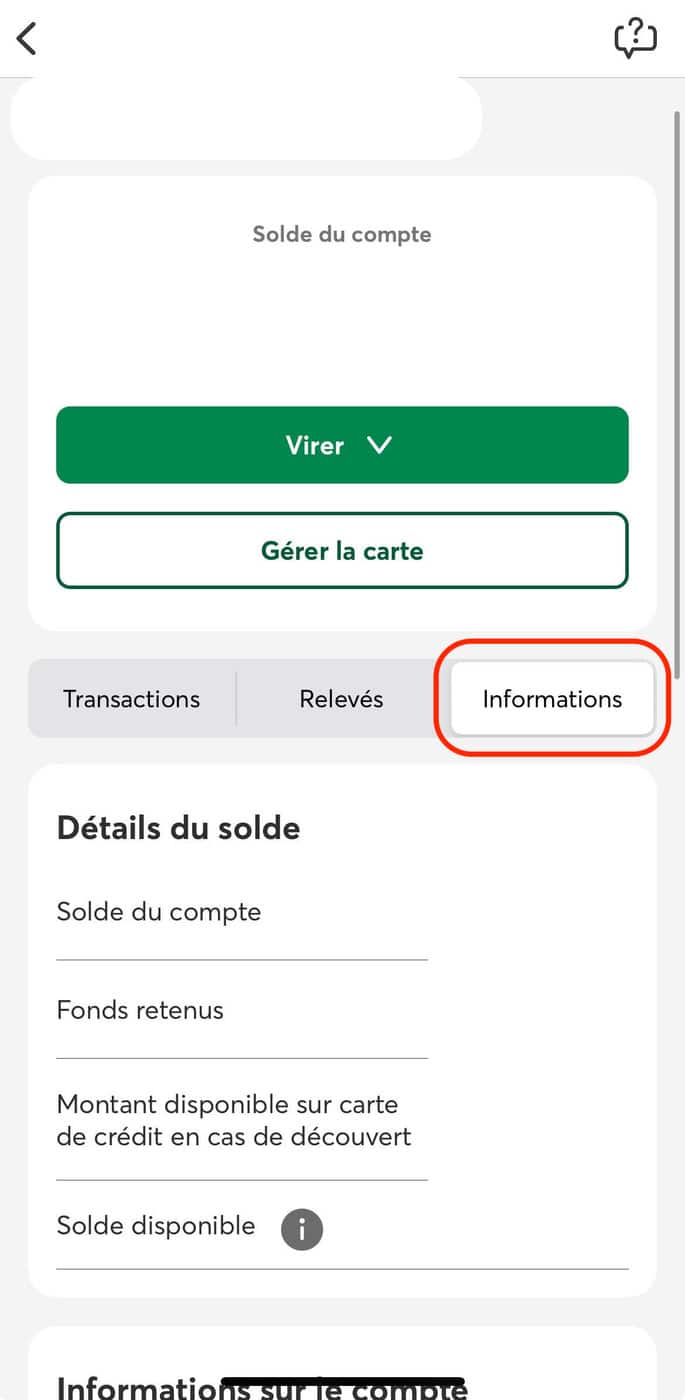
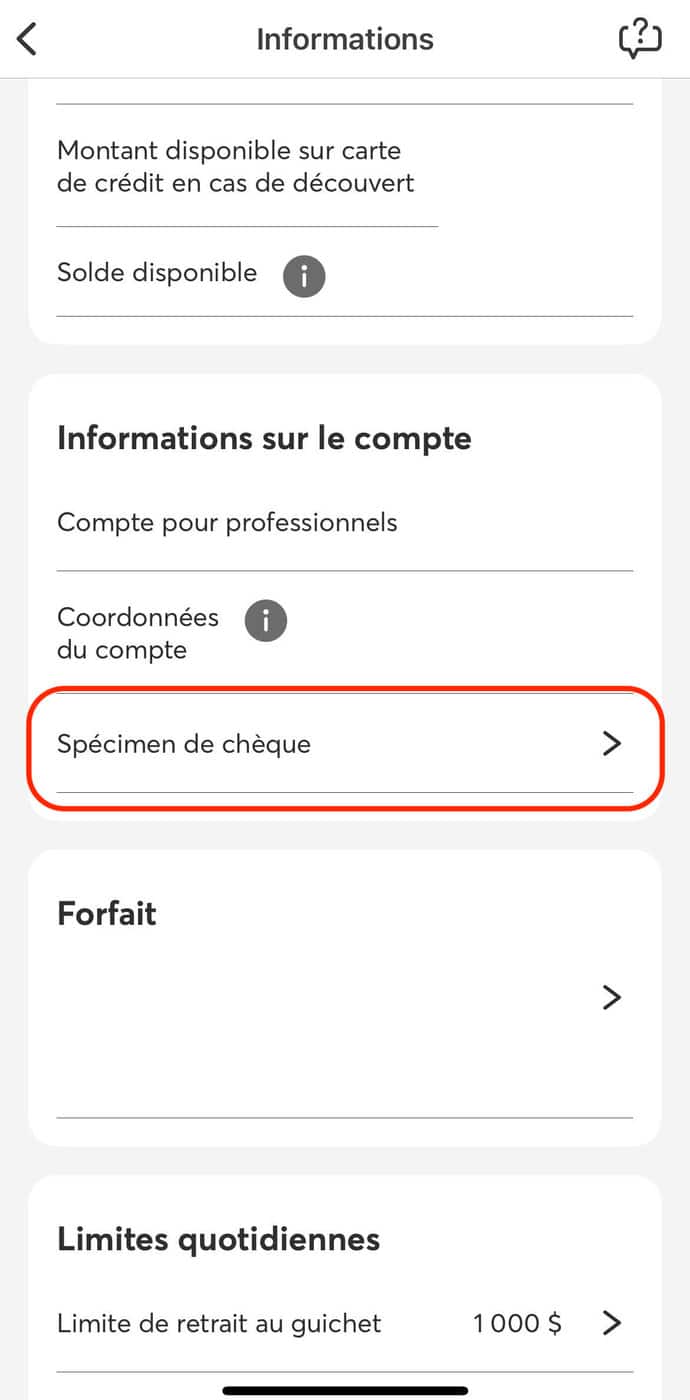
In short: in AccèsD, on the web or in the Desjardins mobile app, open your everyday account, select “Information”, then “Void cheque” to download the PDF. The document shows your transit number (5 digits), the Desjardins institution number (815) and your folio number (7 digits).
A void cheque is a copy of a cheque used to share your banking information with a third party. For example, with your employer so it can deposit your pay directly into your account. Or with a service provider or a lender so it can withdraw money from your chequing account to cover your monthly payments (car loan, telecom bill, etc.).
Your void cheque, whether it comes from Desjardins or another financial institution, contains the following information:
The transit number (or identification number) has five digits. It corresponds to the number of the bank branch. Combined with the three-digit institution number and the account number (which has a variable number of digits), it identifies a bank account precisely.
The institution number has three digits and corresponds to the number of the financial institution. It appears after the transit number (or identification number) at the bottom of the cheque. For Desjardins caisses in Quebec, the three-digit institution number is 815.
Here are the steps to find your Desjardins void cheque on the AccèsD online and mobile services.
Open the AccèsD mobile app and follow these steps:
You can then email your Desjardins void cheque to your employer or your service provider.
Open your web browser, go to the AccèsD website and follow these steps:

In addition to your home address and the address of your bank branch, your Desjardins void cheque shows the following details: transit number (or identification number), institution number and account number. Here is a closer look at each of them.
Your Desjardins void cheque usually shows your home address, in the upper left corner.
Your Desjardins void cheque shows the address of the Desjardins caisse branch your bank account is attached to.
The transit number (or identification number) has five digits and identifies the Desjardins caisse branch your bank account is attached to.
The institution number has three digits and identifies your financial institution. For Desjardins caisses in Quebec, the three-digit institution number is 815.
The account number (or folio number) has seven digits and appears after the institution number at the bottom of your Desjardins void cheque.
In short, the AccèsD online and mobile services let you obtain a Desjardins void cheque quickly and easily. The AccèsD portal also gives access to several other services, such as viewing your Desjardins chequing account and your Desjardins credit card. You can also check your Equifax and TransUnion credit score free of charge.
The right credit card depends on your profile: income, spending and goal (travel, cash back, balance transfer). To compare the options against your own criteria, use our credit card comparison tool. You can also consult our ranking of the best credit cards of the month, updated every month by the Milesopedia team.
You can find your Desjardins void cheque quickly on the AccèsD online and mobile services. Follow the few steps explained in this article.
Your account number appears at the bottom right of your Desjardins void cheque. It has seven digits and comes after the three-digit institution number (815 for Desjardins caisses in Quebec).
On your Desjardins void cheque, the last digit is the check digit. It is part of your seven-digit account number.
The AccèsD online and mobile services show your bank account number. You can also find it on your Desjardins cheques. It has seven digits and appears after the institution number at the bottom of the cheque.
To reach Desjardins customer service, call 514 224-7737 (514 CAISSES) for Montreal and the surrounding area, or 1 800 224-7737 (1 800 CAISSES) elsewhere in Canada and in the United States. If you are a Desjardins member, you can also book an appointment in person, by phone or by video by logging in to AccèsD.
on BMO's website
Our reviews and rankings are based on an objective assessment. Advertisers do not influence our content. We may receive compensation through some links; our analysis and opinions remain independent.