

ExpertFlyer: The Ultimate Tool for Optimizing Flight Searches

The ExpertFlyer tool will mainly make our lives easier by conducting availability searches on our behalf when we encounter fully booked flights using points.
New ExpertFlyer 2026 Features: What's Changing for Canadian Travelers
ExpertFlyer has just announced a series of major updates that transform the flight search platform. These new features, available now, represent the most significant evolution since the service’s creation and build upon the complete overhaul completed over the past 18 months.
Main ExpertFlyer Updates
1. Extended American Airlines Systemwide Upgrade (SWU) Search
The most anticipated feature concerns American Airlines status holders. ExpertFlyer now allows searching for systemwide upgrade availability up to 330 days in advance on the most popular routes.
Key Benefits:
- Multi-destination search (example: « Anywhere in the U.S. to Anywhere in Europe »)
- Elimination of manual route-by-route checks
- One-click verification button before booking
- Perfect for using certificates before expiration
- This feature is integrated into the new Elite plan, specifically designed for American Airlines Concierge Key, Executive Platinum, and Platinum Pro members.
2. Enhanced Visual Seat Maps
The new seat maps offer an enriched visual experience with:
- Clear display of available and occupied seats
- Details on seat pitch and width
- Information on aircraft variants
- Detailed cabin configuration
- Ability to toggle between detailed view and classic interface
3. Massive Increase in Alert Limits
ExpertFlyer has significantly increased the number of available alerts:
| Plan | Previous Limits | New Limits |
|---|---|---|
| Basic | 4 alerts | 50 alerts |
| Premium | 200 alerts | 250 alerts |
| Elite (new) | N/A | 250 alerts |
Quick Alerts now make it easier to create alerts for:
- Aircraft changes
- Schedule modifications
- Availability across all fare classes
New Fare Structure
ExpertFlyer maintains its three tiers with the addition of the Elite plan:
- Free: Access to basic seat maps and 1 alert
- Basic: $5.99 USD/month (annual) – up to 50 alerts and 250 monthly searches
- Premium: $10.99 USD/month (annual) – unlimited alerts and searches
- Elite: $19.99 USD/month (annual only) – includes American Airlines SWU search
What is ExpertFlyer?
This advanced online platform gives frequent flyers, travel agents and aviation enthusiasts access to precise, detailed commercial flight data: real-time availability, seat alerts, upgrade information, seating charts and more. With ExpertFlyer, you’ll have optimal control to plan your trips more strategically and efficiently, in a variety of ways.
ExpertFlyer's Main Features
- See in real time which booking classes are available for a given flight, which is particularly useful for finding award tickets or specific classes for upgrades or other purposes.
- Receive a notification as soon as a specific seat becomes available (aisle, window, lie-flat seat, etc.), ideal for optimizing your comfort without constant monitoring.
- Be notified as soon as an award seat (points/miles) or upgrade opportunity appears on your desired flight (Award & Upgrade).
- Track delays, schedules or changes in real time.
- View the exact cabin configuration of airplanes with available, occupied, or selected seats, and choose the best locations according to your preferences.
- Access interesting information such as delay frequencies, aircraft types used, and past trends for a given flight by consulting the history.
- Identify the best routes with convenient connections and less risk in the event of delays.
- Compatible with numerous airlines around the world, including those belonging to the Oneworld and SkyTeam alliances, as well as several independent carriers.
- However, since October 2023, most Star Alliance carriers are no longer available for award search. Some airlines are still visible for their cabin layouts or paid seat selection.
Why Use ExpertFlyer?
ExpertFlyer is an essential tool for travelers looking to optimize their flight searches, whether for award tickets or paid fares. It gives:
- check seat availability in real time for different travel classes
- create automatic alerts to be informed when a seat becomes available
- consult detailed cabin maps to choose the best location on board
- track changes in schedule or aircraft type
- search for fare information and track flights in real time
Even if some airlines are no longer accessible for award searches, the tool remains very powerful thanks to its compatibility with a wide range of carriers in the Oneworld and SkyTeam alliances, as well as with several independent airlines.
The Different ExpertFlyer Subscriptions
ExpertFlyer is a handy tool for Points and Miles Enthusiasts. On the other hand, it is a paid platform to unlock the desired features. You can try it for five days before paying for the subscription.
ExpertFlyer Free vs. Premium Subscription
Four plans are available: Free, Basic, Premium, and Elite.
The free version ExpertFlyer allows you to consult seat plans in real time and create one seat alert at a time. For availability searches and flight alerts, a paid subscription is required.
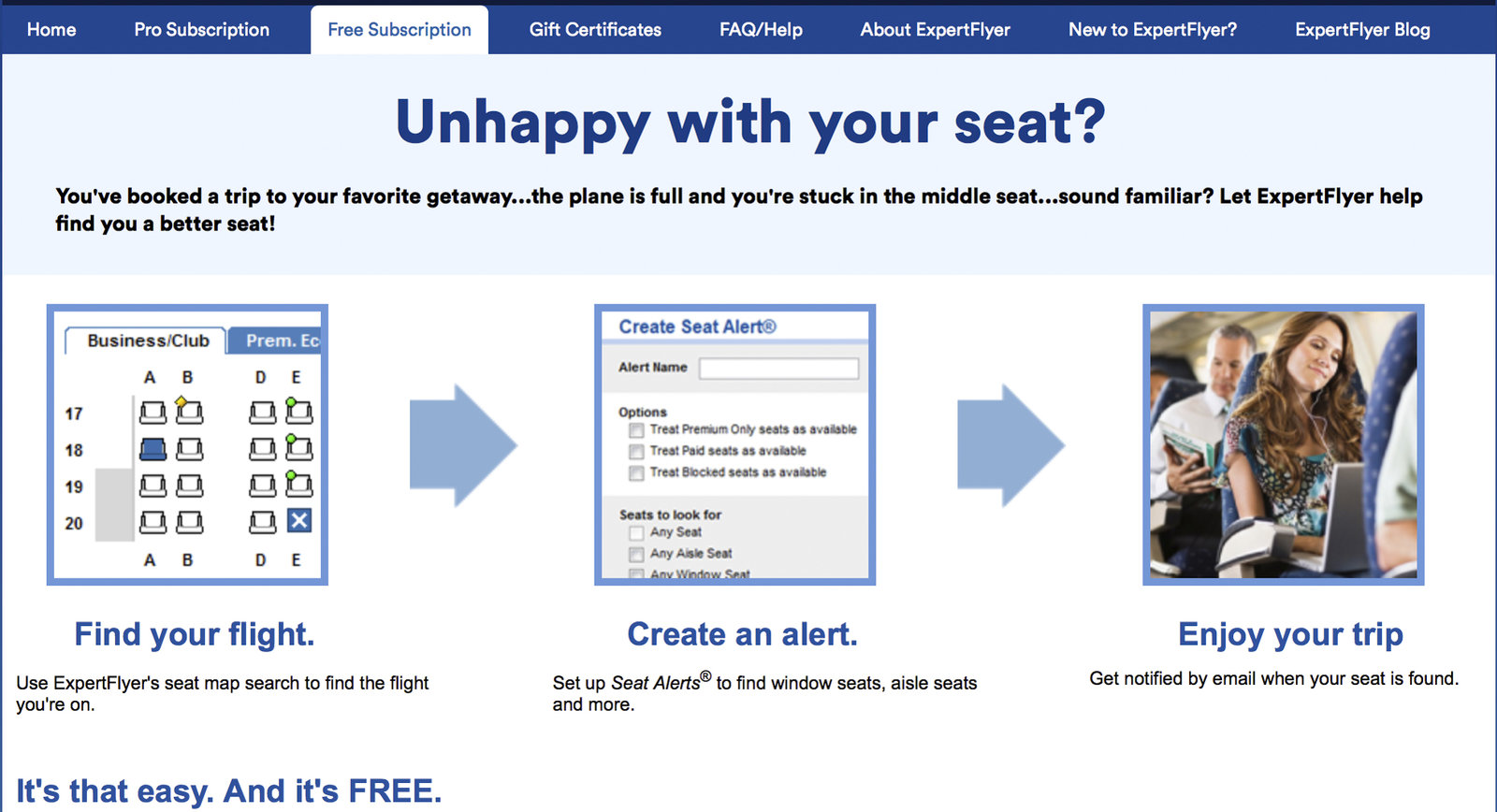
With the ExpertFlyer Basic plan ($5.99 USD/month), you can perform up to 250 queries per month, access detailed cabin plans, and create seat alerts (up to 50 at a time).
The Premium subscription to ExpertFlyer gives you access to many exciting features, including the possibility to create flight availability alerts. This will ensure that you receive an email when seats become available in your desired fare class and on your selected flight or aircraft. The Premium plan also provides access to the new Quick Alerts. These Quick Alerts simplify creating alerts for aircraft changes, schedule modifications, and availability across all fare classes, allowing you to monitor your flights even more effectively.
There’s no limit to the number of searches, which can span almost a week (so you avoid searching for flights date by date), and you also unlock the freedom to create other types of alerts. This can be an asset for the AvGeek who would like to choose their plane or simply for the person who hopes for a schedule change to modify their itinerary for free.
The ExpertFlyer Premium plan costs $10.99 USD per month with an annual subscription. Don’t forget to use a no-conversion-fee credit card like the Scotiabank Passport Visa Infinite + to save 2.5% on your purchase!
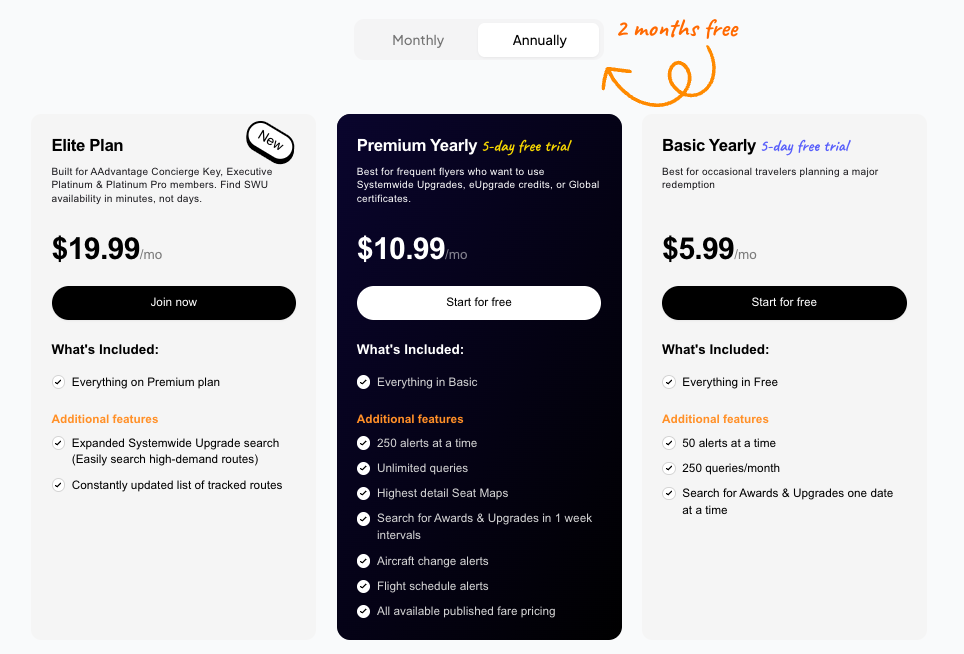
The new ExpertFlyer Elite plan at $19.99 USD per month (available only with annual billing) is designed for travelers with high-tier American Airlines status. Its flagship feature allows searching for systemwide upgrade (SWU) availability up to 330 days in advance on the most sought-after routes, a functionality exclusive to this tier.
American Airlines Concierge Key, Executive Platinum, and Platinum Pro members will find an indispensable tool for maximizing the use of their upgrade certificates before expiration. The Elite plan also includes all Premium features, with 250 simultaneous alerts and access to the new Quick Alerts to monitor aircraft changes, schedule modifications, and availability across all fare classes.
| Credit card | Annual fee | Welcome offer | |
|---|---|---|---|
| $150 |

Airlines on ExpertFlyer
Not all airlines are displayed on ExpertFlyer; make sure you have access to the airlines you are targeting before subscribing to a plan.
Qatar Airways is not available to search for award availability on ExpertFlyer. You can, however, consult the cabin maps to see the seating arrangements and create alerts if specific seats become available. Then, the tool is still helpful for nearly a hundred airlines.
The airlines that are available on ExpertFlyer’s search engine include the following:
| Aegean Airlines | Gulf Air | Kuwait Airways |
| Aer Lingus | Hainan Airlines | Martinair |
| Aeroflot | Hawaiian Airlines | Philippine Airlines |
| Aeromexico | JetBlue Airways | Qantas Airways |
| Air Europa | Kenya Airways | Saudia (Saudi Arabian Airlines) |
| Air France | KLM Royal Dutch Airlines | Shanghai Airlines |
| Air Malta | Korean Air | Finnair |
| Air Mauritius | Alaska Airlines | Garuda Indonesia |
| Air Serbia | American Airlines | GOL Linhas Aéreas |
| Air Seychelles | Azul Brazilian Airlines | El Al Israel Airlines |
| Air Tahiti Nui | British Airways | Emirates |
| Canadian North | China Airlines | China Southern Airlines |
| Turkish Airlines | Xiamen Airlines |
Some airlines only allow access to seat maps or paid seat selection, without the ability to search for award availability.
Detailed Features of ExpertFlyer
How to Check Seat Availability with ExpertFlyer?
To search for award ticket availability with ExpertFlyer, click on « Awards & Upgrades » on the left side of the screen.
In fact, all ExpertFlyer’s functions can be easily found on the left-hand side of the main screen.
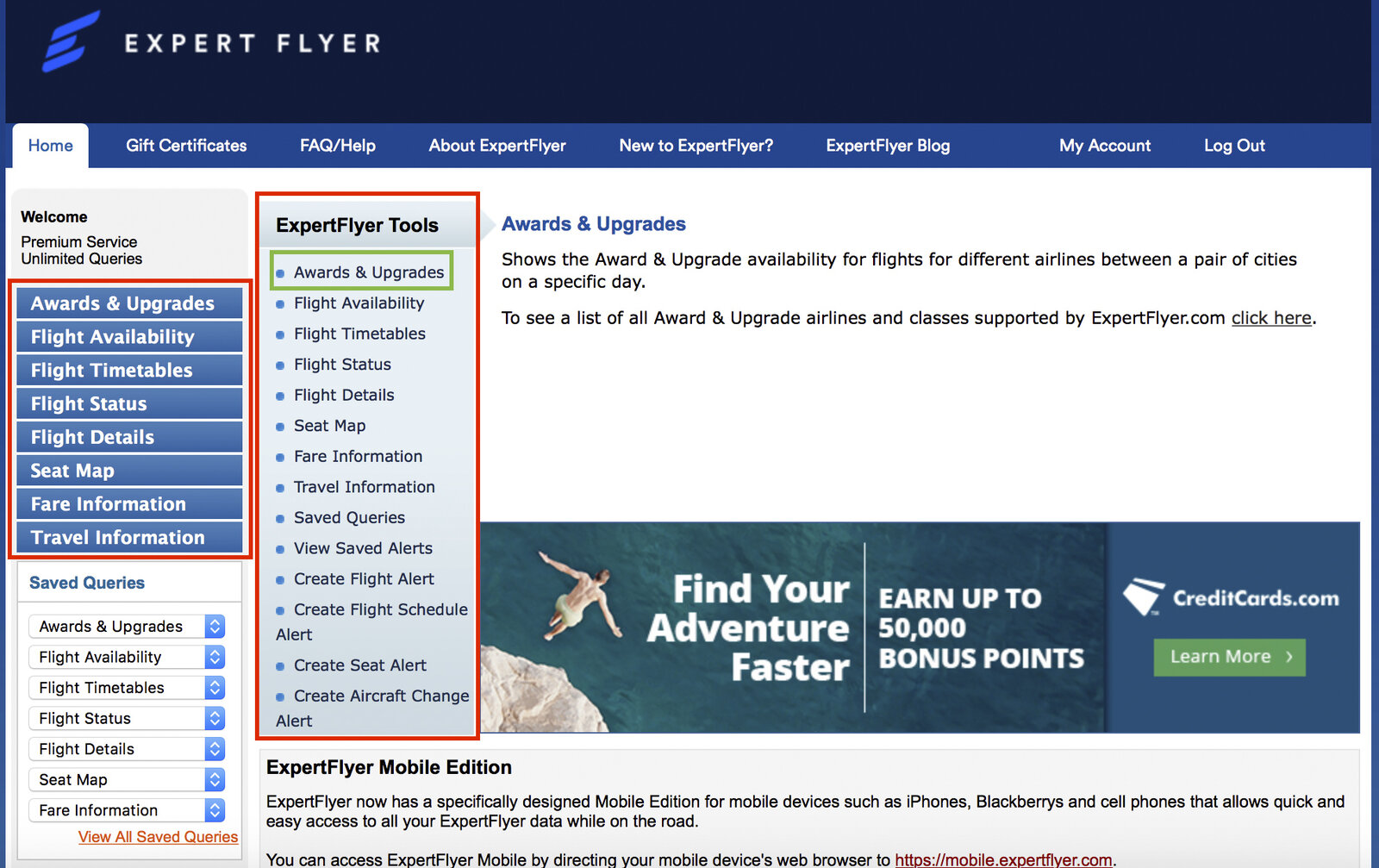
You will then be taken to another page where you can enter your search data:
- Route
- Dates (flexible or not)
- Airline
- Number of passengers
- Fare classes
- Type of flight (direct or with connection)
ExpertFlyer can save you a lot of time, as searches can be conducted across multiple dates and fare classes, and you can filter results to view only direct flights using the tool.
Enhanced Visual Seat Maps
ExpertFlyer now offers enhanced visual seat maps that provide a significantly improved user experience. These new maps clearly display:
- Available and occupied seats in real time
- Seat pitch in inches
- Seat width
- Different aircraft variants and their configurations
- Cabin product details
You can easily toggle between the new detailed view and the classic ExpertFlyer interface according to your preferences. This integration helps you better understand the onboard product you will experience, particularly on aircraft types that may have multiple cabin configurations.
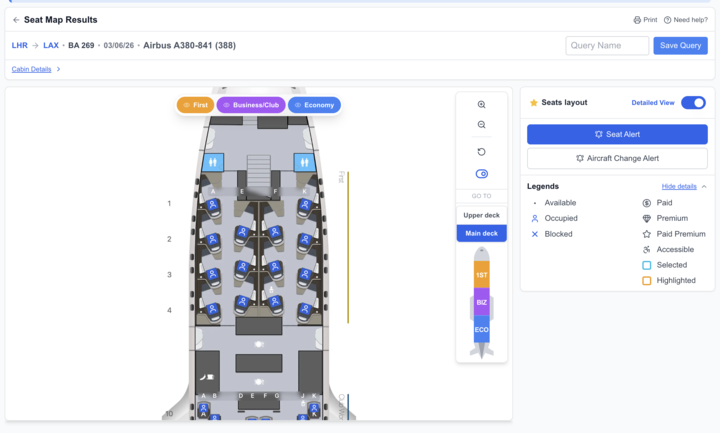
Then, under a date constraint, you create an email alert; ExpertFlyer will notify you if a seat becomes available. What are the chances that seats will become available? Cabin rescheduling is always happening, right up to the last minute, with some passengers cancelling and others changing their flights. So you have to be quick to get your hands on those seats!
Setting Up Alerts for Your Preferred Flights
Alerts can be used in two ways
- You want to find award availability on a particular flight
- You want to be notified if award availability on a flight decreases
To create an alert with ExpertFlyer, click on the exclamation mark icon. A new window will open. Next, you need to choose the class of service for the alert. For premium subscribers, you can create as many alerts as you like, covering multiple dates and classes.
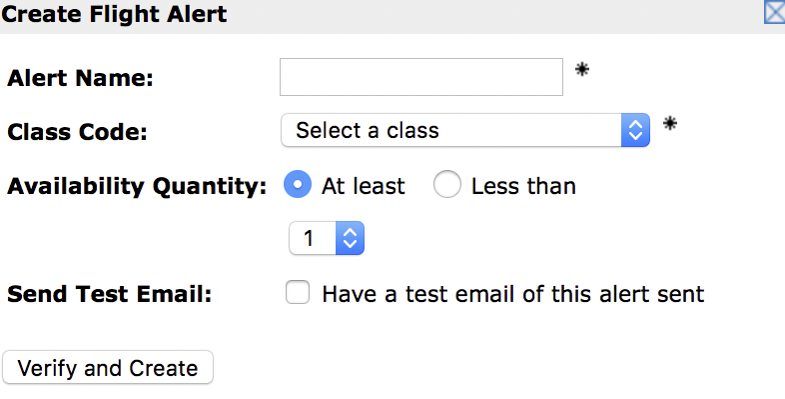

ExpertFlyer has also introduced Quick Alerts for Premium and Elite subscribers, allowing faster creation of alerts to monitor:
- Aircraft changes
- Schedule modifications
- Availability across all fare classes
These Quick Alerts greatly simplify the alert creation process and save you valuable time in monitoring your flights.
The second way is practical when you are waiting to make a reservation because there are free seats, but you want to receive an alert if the situation changes to decide whether or not to make the reservation.
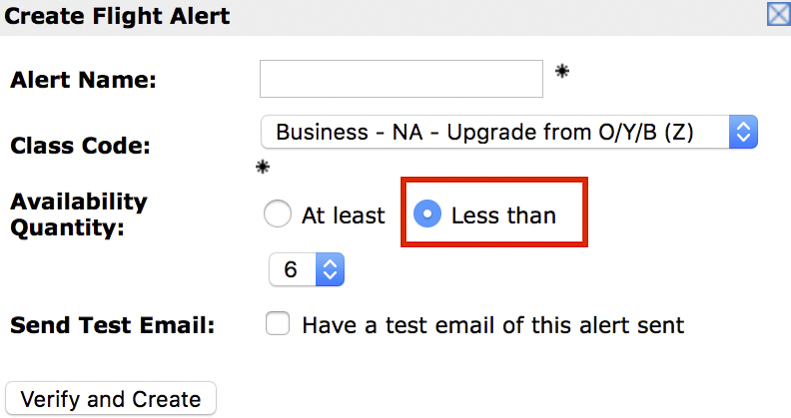
For eUpgrade credit users, ExpertFlyer makes it easy for you to get immediate confirmation of your business class upgrade when « R » seats are available. More details on this subject in the next section.
The Different Fare Classes
When travelling, you often hear the terms « Economy, » « Premium Economy, » « Business Class, » and « First Class. » Indeed, these are the different cabins available on the aircraft. However, the four classes are not available on all aircraft and all airlines; for example, Air Canada does not offer « First Class, » and there is no « Premium Economy » on an Airbus A320.
Then, the seats in each cabin are further subdivided into multiple fare types; Economy Class can have a dozen different fare categories!
These fares are represented by letters; each has its price and particularities.
Here is a table of Air Canada fare subdivisions
| Cabin class | Booking fare class |
| Business class | J, C, D, Z, P, R, I |
| Economy Privilege | O, E, N, A |
| Economy | Y, B, M, U, H, Q, V, W, S, T, L, K, X |
These letters indicate all the details relating to the ticket you have purchased and determine the benefits you have. For example, Y Economy fare is the full Latitude fare where you can cancel at no charge or take advantage of a same-day Air Canada hold with no route constraints.
The famous « R code » is what you look for when you hope to get immediate confirmation in business class using eUpgrade credits. Business class can be empty, but you can be added to the upgrade waiting list due to a lack of availability for R seats.
So ExpertFlyer can help you determine the number of « low cost » tickets in economy. This way, those who simply want to travel as cheaply as possible can find out if they need to book right away, or if there are still many tickets available at this fare.
In general, we can assume that there are plenty of seats when there are at least 9 free seats; on this flight between Montreal and Vienna on Austrian Airlines, there are still plenty of seats. However, don’t forget that not all seats on partner airlines can be reserved. This can be seen in the following screenshot.
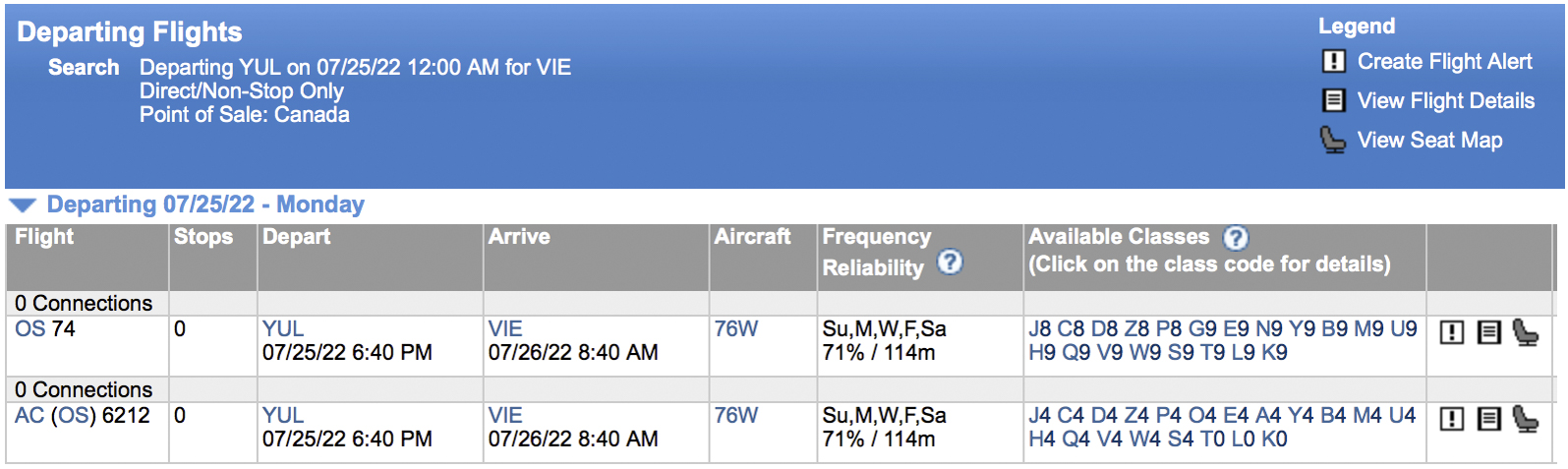
Finally, I had a situation where I found a reasonable rate by researching with one passenger. However, when I repeated the search for 4 people, the price per ticket was not equivalent to the first fare found. This was due to the fare classes; there was only one ticket left at the low fare.
Finding Availability in General
We just detailed the availability search function for award tickets. However, ExpertFlyer can help you find availability on all flights and routes between your departure and arrival points.
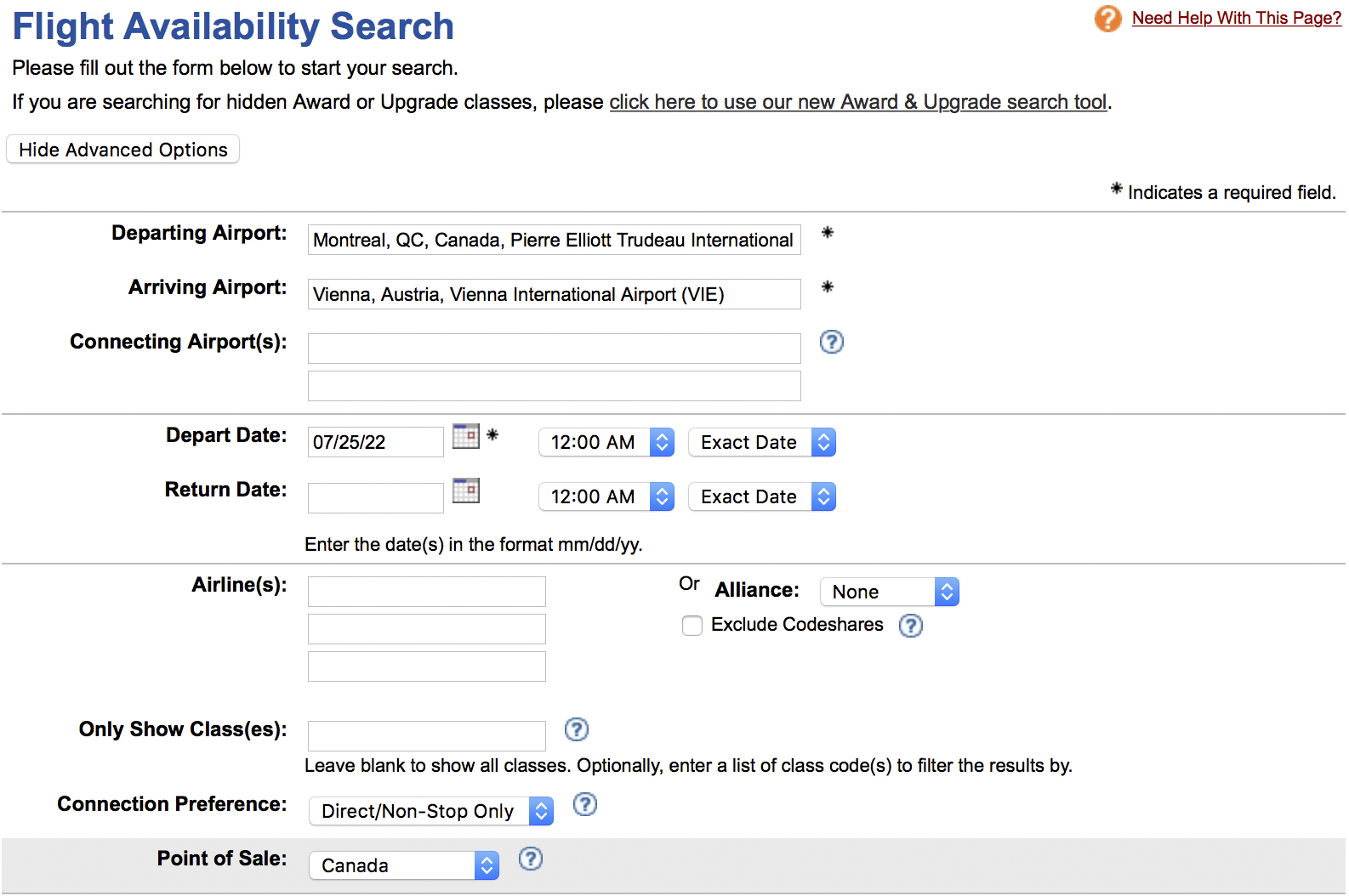
So, if your flight ends up being canceled, you can find possible alternatives on other flights yourself to ease the process. In fact, according to the APPR, the carrier must rebook you on another flight if a delay of more than 9 hours occurs; this alternative flight can also be on a different airline.
For example, if your return flight from Italy with Air Transat is canceled, Air Transat is obligated to place you on another flight (including competitors) if the delay exceeds 9 hours, according to the APPR.
Search on ExpertFlyer you can see for yourself that there is space on the Air Canada flight from Rome to Montreal in all fare classes. This means you’ll be able to reach your final destination, Quebec, without being subject to a delay of more than 9 hours.
Indeed, missing the first flight segment would have caused a significant delay (only one flight between FCO and YUL per day, thus +24 hours), which entitles you to APPR protections. Additionally, a delay that causes you to miss your connection and results in a delay of more than 9 hours is a situation eligible under APPR.

Then, if you want to use the Air Canada Same Day Standby feature, ExpertFlyer can tell you whether or not flights leaving earlier have space. This way, you can find out in advance, rather than waiting for the registration to open.
Finally, when we take a look at the availability of our flight, we can also get an idea of details such as:
- The flight is empty: you may be able to lie down on several seats
- The flight is full: you may run out of space for your carry-on luggage
For example, if the flight is full, it might be wiser to apply for a credit card that offers priority boarding.
Indeed, a card like the TD® Aeroplan® Visa Infinite Privilege* Credit Card or the American Express® Aeroplan®* Reserve Card offers boarding in zone 2 no matter where you’re sitting on the plane. In times of overcrowded flights, baggage compartments fill up quickly, and you may not always have room for your carry-on.
These are high-end cards, so they offer generous welcome bonuses and numerous benefits to justify the annual fee. In addition, they are often sent by courier, so you can receive them quickly and take advantage of the benefits if you notice your flight is full on ExpertFlyer!
| Credit card | Annual fee | Welcome offer | |
|---|---|---|---|
| $599 | |||
| $599 |

How to Create Alerts for Specific Seats with ExpertFlyer
Another use of ExpertFlyer is to find availability for specific seats. This feature can be beneficial for travelling in a group, if you prefer a seat with a bassinet for a baby, if you want to sit in the emergency exit row, etc.
You can access the plans:
- from the main menu
- on the search results page
Just like the availability alerts, ExpertFlyer will send you an email as soon as it becomes available. So you can quickly get your hands on it. Don’t forget to use your National Bank World Elite Mastercard travel credits for a seat selection fee refund!
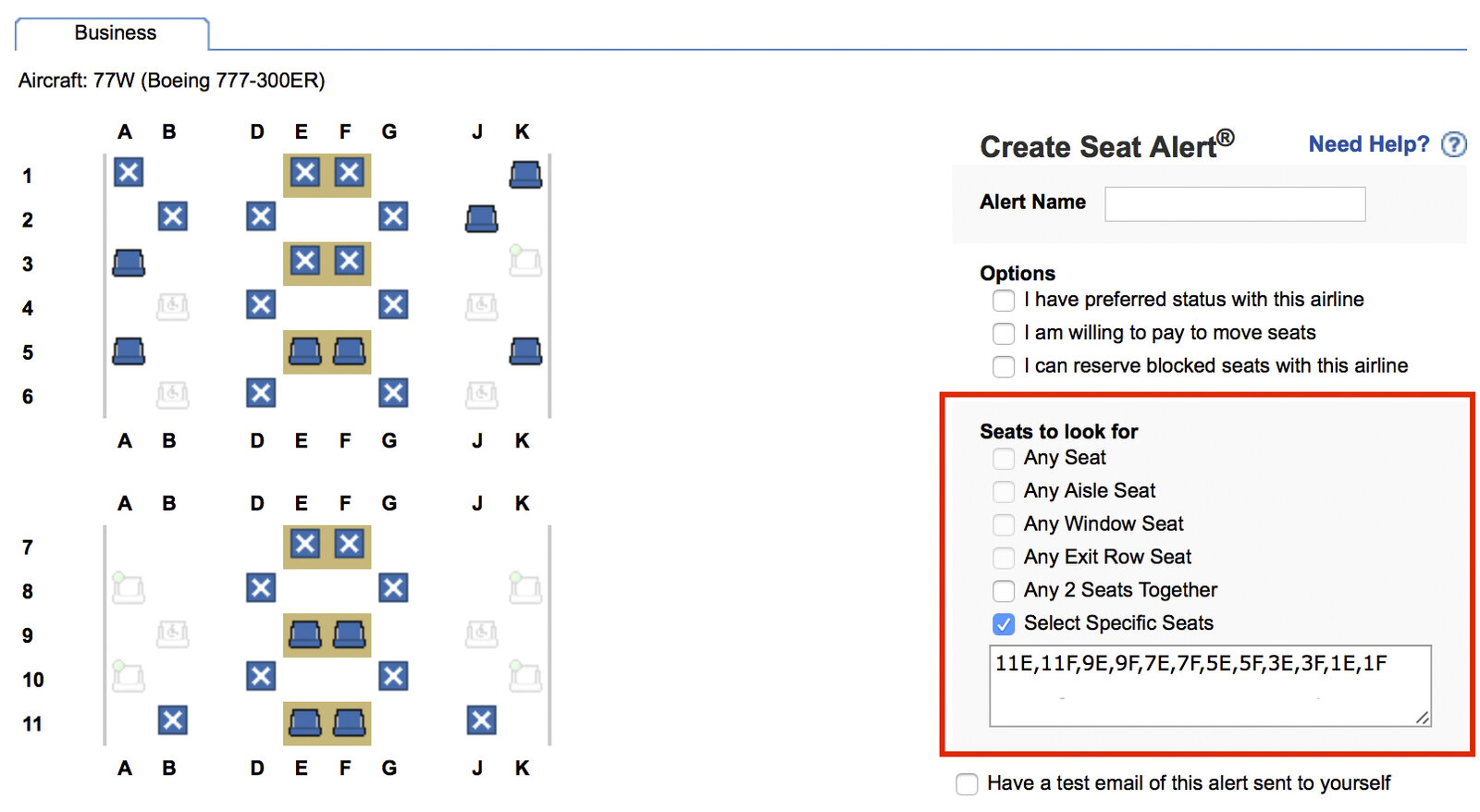
For example, you’ve managed to book tickets on the superb Qsuite for your trip to the Maldives for your honeymoon, with no flexibility in the dates. Ideally, you would like to have two seats side by side where you can lower the center divider.

You can select the desired seats one by one and you can do it with all the seats that can be accepted with seat alerts with ExpertFlyer. Qatar Airways may unblock these seats or some passengers may change their flight, so you want to be notified as soon as possible.
| Credit card | Annual fee | Welcome offer | |
|---|---|---|---|
| $150 | |||
| $0 |

How to Stay Informed on Airplane Equipment Changes
For many travellers, the type of aircraft on your flight can matter greatly, and choosing the right plane requires careful selection. It can be quite disappointing if the aircraft is swapped without notification! With timely information, you can decide to adjust (or not) with a different itinerary or date, especially if it’s a last-minute change.
Indeed, one example where a change of equipment can be very frustrating is with the Qsuite and Qatar Airways’ outdated business class. Same class of service, but a totally different experience.
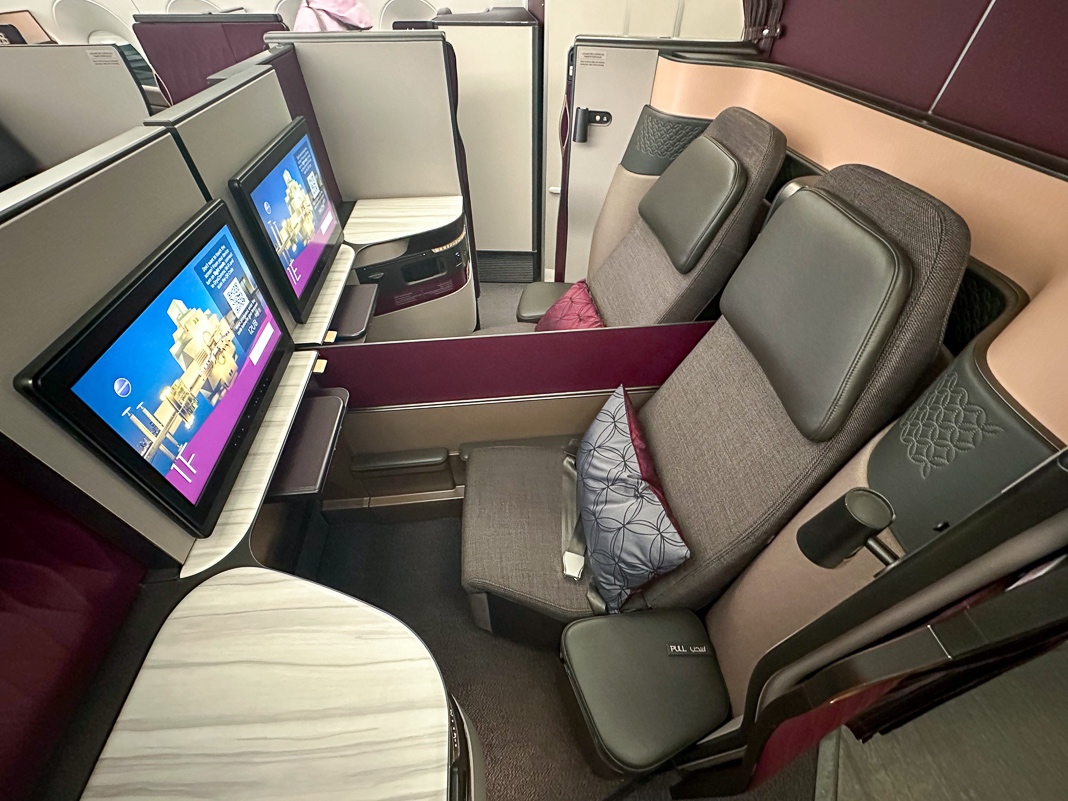
You can set up an aircraft change alert from the seat alert page or the ExpertFlyer homepage.
ExpertFlyer's Secondary Features
The primary use of ExpertFlyer is to search for flight availability and book tickets with points. ExpertFlyer, on the other hand, is packed with a wealth of other information; these are advanced and technical, but it’s worth knowing about them, whether for your own curiosity, to plan your lounge visits or to help you make a claim for compensation under the APPR.
Flight Status Search
With this function, you can consult a tide of information about your flight before and after your departure; you can use your flight number or you can manually enter your route.
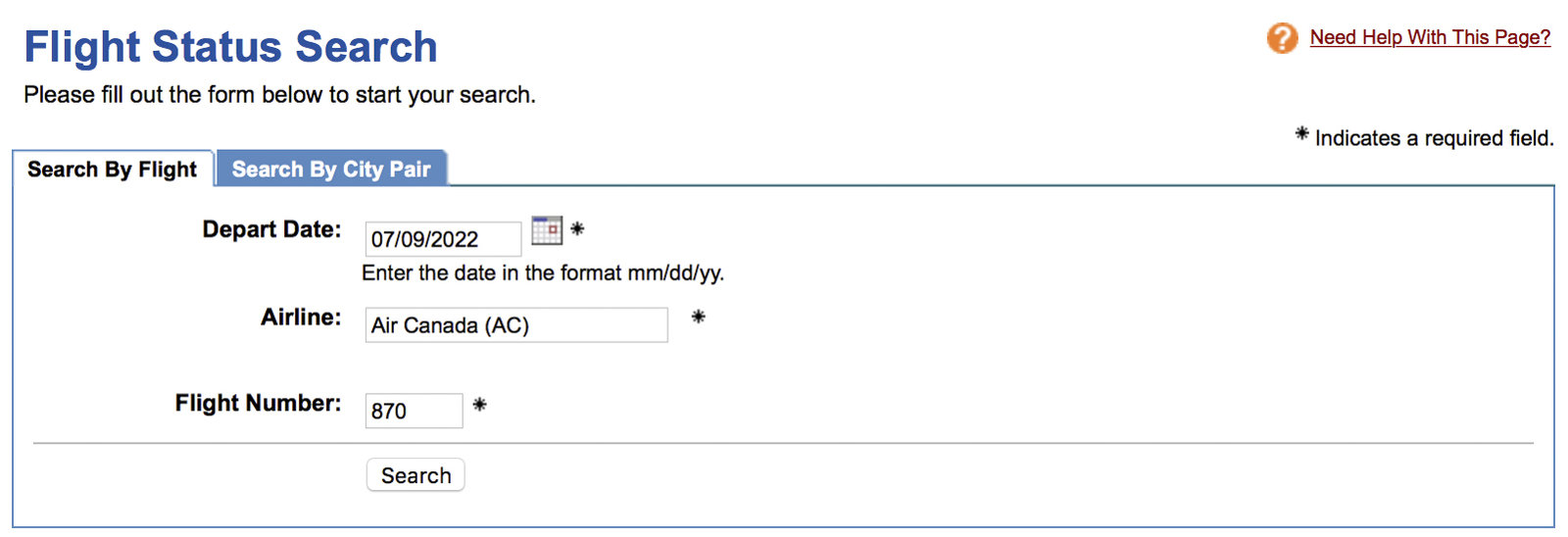
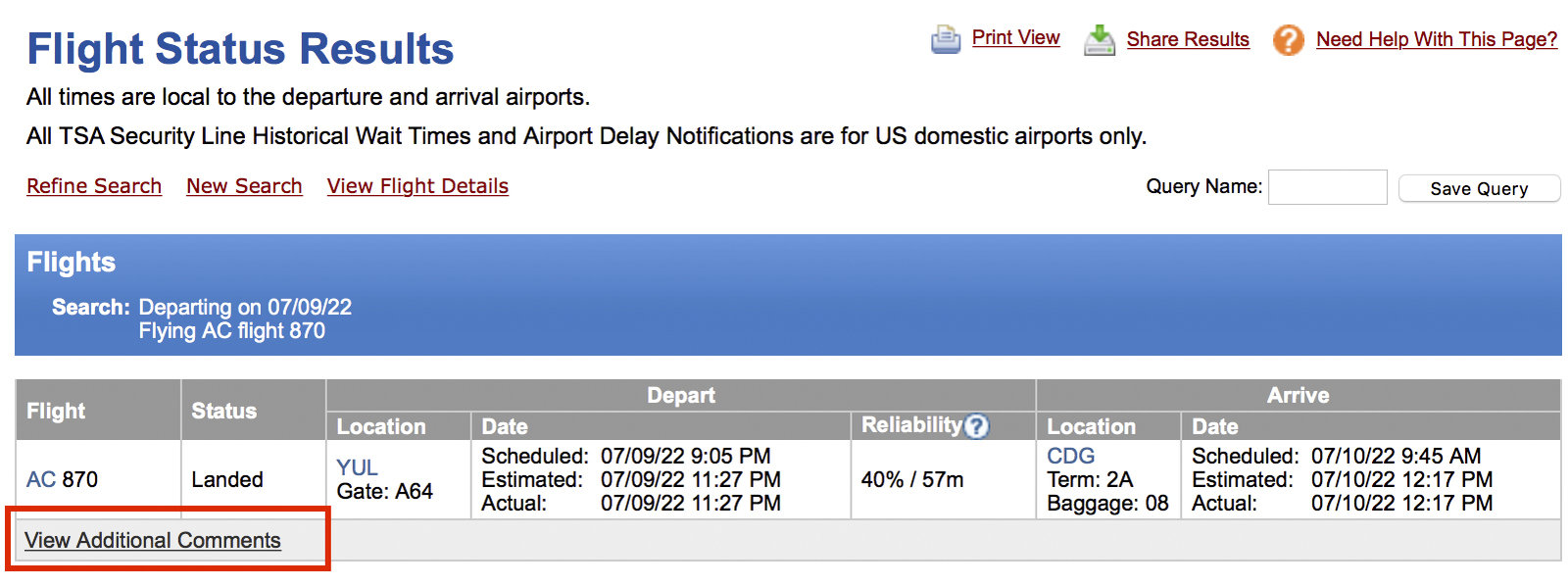
Before departure, you can use this function for logistical planning like lounge access, terminal changes, or your arrival terminal, for instance, to let your family know where to pick you up.
Post-departure information can be very useful in the event of a claim under the APPR or EU261. Indeed, airlines are required to record all flight details, from departure/arrival times to the cause of delays or cancellations. The information passed on to passengers can sometimes differ from reality; ExpertFlyer allows you to verify if everything aligns.
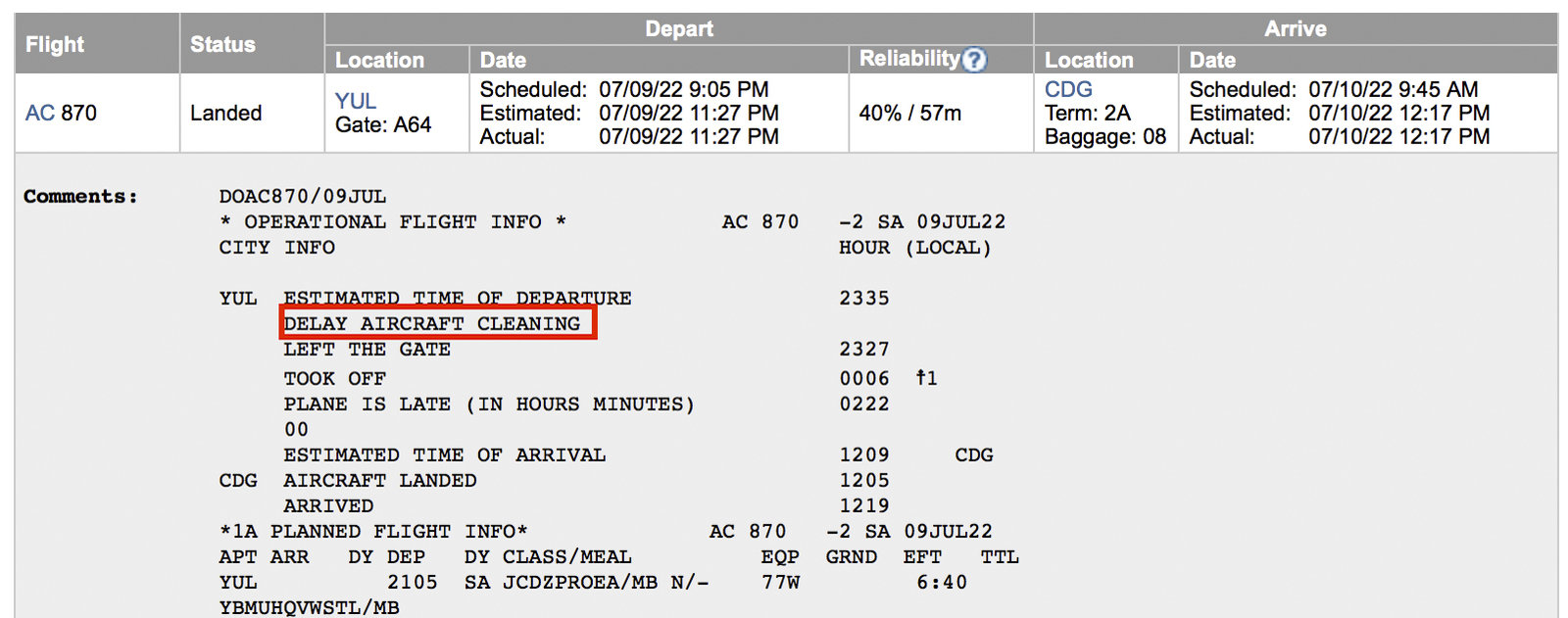
This data is also helpful for flight delay insurance claims since most coverage is only triggered after 4 hours of delay. With ExpertFlyer you have the numbers to the minute.
Flight Schedule Change Alerts
Flight schedule changes have become a norm lately. It is almost certain that your flight schedule will be adjusted, especially if you have booked your ticket months and months in advance.
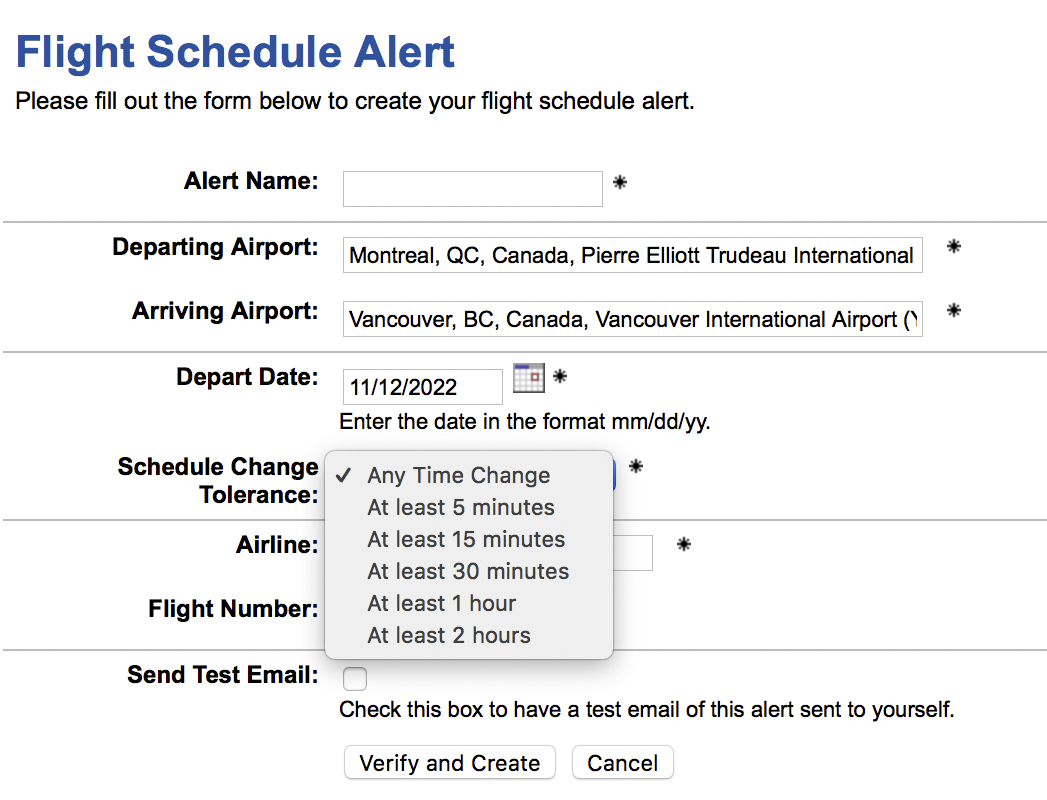
Usually the airline notifies us of these changes… sometimes we only find out when we log into our account. So make sure you get the information you need as soon as possible, ExpertFlyer can send you an alert for these changes.
This allows you to make decisions, if any, about the change. ExpertFlyer can choose between « any change » or your preference.
General Travel Information
This section of ExpertFlyer section contains general travel information such as minimum connection times from airports to details of entry and exit requirements.
Since this information is easily found elsewhere beyond ExpertFlyer we won’t dwell on it too much.
The information categories are:
- Ratings & Delays: the percentage of delays or reliability of this flight
- Minimum Connection Times: the minimum legal time for a connection
- Maximum Permitted Mileage: the maximum distance covered to get from one place to another on a ticket (very useful for round-the-world or sweetspots).
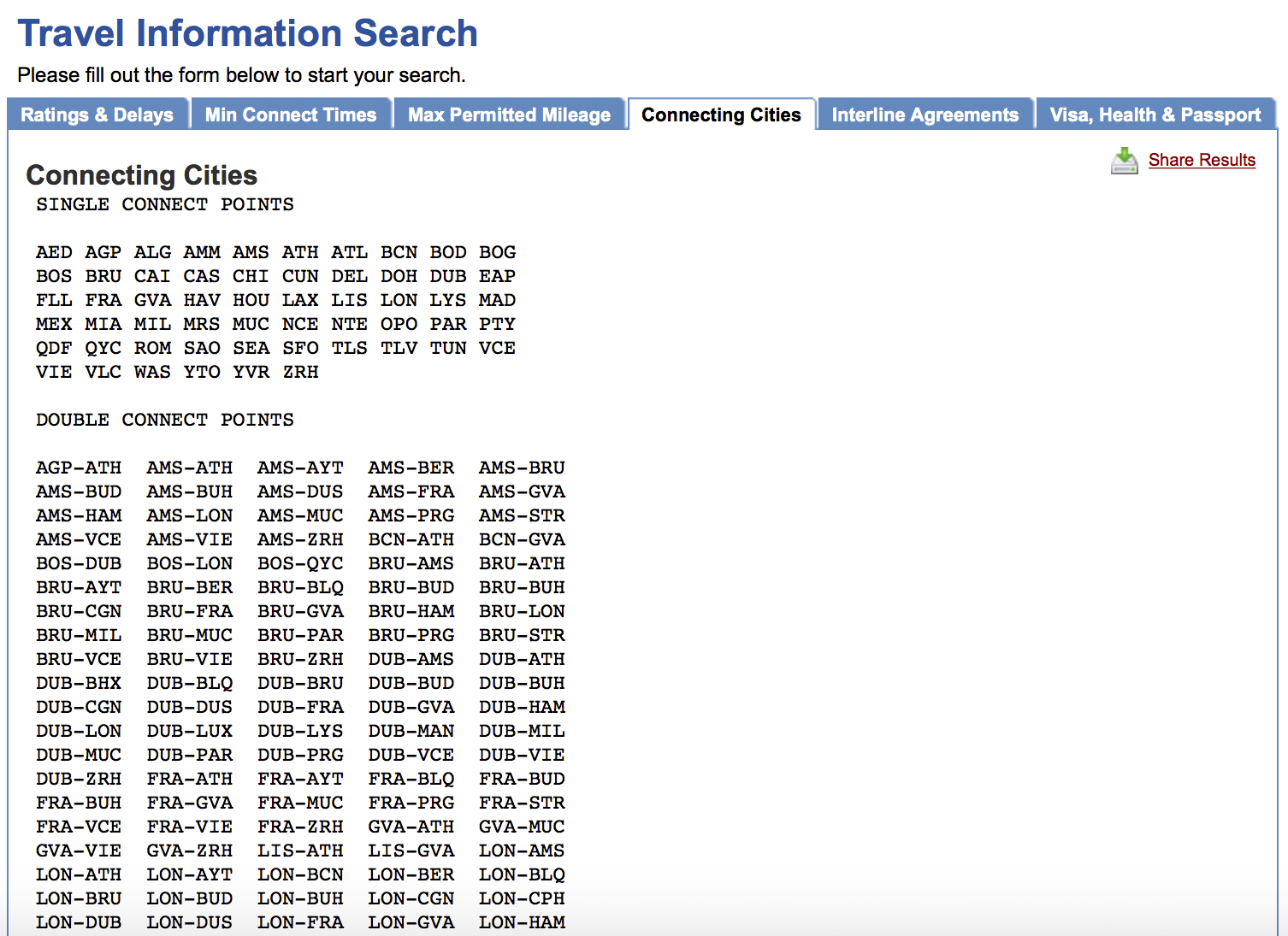
- Connecting Cities: all possible stopovers (1 or 2) between two airports
- Interline Agreements: the list of partners of an airline including those who are not part of the same alliance (e.g. Air Canada and Emirates)
- Visa, Health & Passport: information on entry requirements, vaccination, etc.
Personally, I love using the “Connecting Cities” tool from ExpertFlyer to quickly visualize my options when planning Aeroplan Stopovers.
Bottom Line
ExpertFlyer is extremely relevant for any traveller wishing to optimize their points. Indeed, it is sometimes impossible to find award availability without ExpertFlyer in your arsenal.
Without this tool, you’d need to manually search for award availability; I’ll leave the value of your time to you, but at USD 9.99 per month, I much prefer letting the machine do the work while I go about my hobbies. Additionally, there are complementary search tools to ExpertFlyer like Roame, Point.me, and Seats.aero for finding award availability.
What’s more, I can even earn points with this subscription by paying with my Scotiabank Passport Visa Infinite + card and save on conversion fees!
What is ExpertFlyer?
ExpertFlyer is a flight search platform offering detailed information on various aspects of air travel. The service helps users find the best flights while strategically optimizing the use of their points. It is designed for travellers looking not only to book flights, but also to obtain detailed information on seat availability, upgrade possibilities, and flight schedules.
How does ExpertFlyer work?
ExpertFlyer is a detailed flight search platform for frequent flyers. It offers essential information such as flight times, seat availability, cabin layouts, booking classes and upgrade options. Its infrastructure collects data from airline websites, enabling optimal travel planning.
How do I use ExpertFlyer?
To use ExpertFlyer, you first need to create an account on their website. Once you’ve done that, you can start exploring their search tools to find flights that match your preferences. ExpertFlyer also lets you check seat availability and get upgrade alerts, maximizing the use of your loyalty points.
How does the ExpertFlyer seat alert work?
ExpertFlyer lets you set up seat alerts to be informed as soon as a seat becomes available on a specific flight. After searching for seat availability, you can activate an alert by selecting your flight and specifying the type of seat you require. Once the alert is activated, you’ll receive an e-mail notification as soon as a seat becomes available, giving you the opportunity to book quickly before other passengers.
What are the differences between ExpertFlyer subscriptions?
ExpertFlyer offers different levels of subscription, each offering different features. The free subscription gives you access to basic features such as flight and seat searches. The Premium subscription, on the other hand, offers advanced options such as real-time availability alerts, unlimited searches and access to detailed seat maps. This version is ideal for frequent travellers or those looking to maximize the use of their loyalty points. The Elite plan is specifically designed for travelers with high-tier American Airlines status (Concierge Key, Executive Platinum, or Platinum Pro). If you hold systemwide upgrade (SWU) certificates and are looking to maximize their use, the extended 330-day search feature amply justifies the investment. Other travelers will generally find that the Premium plan perfectly meets their needs with its 250 alerts and access to Quick Alerts.
Is ExpertFlyer worth it?
ExpertFlyer is especially valuable for frequent travellers and aviation enthusiasts who seek detailed information about their flight options. For those looking for award seats or upgrade opportunities, ExpertFlyer provides specific data that is often difficult to find elsewhere. Its wealth of information can make the cost worthwhile for anyone who regularly maximizes their loyalty points.
How do I use the ExpertFlyer seat map?
ExpertFlyer’s seat map allows you to visualize the layout of seats on an aircraft for a specific flight. This feature is useful for identifying the best seats available, whether due to legroom or location within the aircraft. To use the map, select your flight in the interface, then access the seat map section. You’ll be able to see which seats are available and choose the one that suits you best.
Does ExpertFlyer offer any free features?
Yes, ExpertFlyer offers a free level which includes access to some basic features such as flight and price search. However, some advanced features, such as real-time seat alerts and full access to seat maps, require a Premium subscription. This is a great way to start exploring the tool before deciding whether a paid subscription is necessary for your needs.

- Annual fee
- $150
- Our valuation
- $350Milesopedia first-year estimate First-year valueWelcome bonus$350Total$350Rewards on your spending are not included. The calculator that adds them from your own profile is on the card's page.
- Welcome offer
- Up to 35,000 points
Milesopedia first-year estimateFirst-year valueWelcome bonus$350Total$350Rewards on your spending are not included. The calculator that adds them from your own profile is on the card's page.
Ends Nov 1, 2026
on Scotiabank's website
Our featured card

- Annual fee
- $120
- Our valuation
- $990Milesopedia first-year estimate First-year valueWelcome bonus$990Total$990Rewards on your spending are not included. The calculator that adds them from your own profile is on the card's page.
- Welcome offer
- Up to 110,000 points
Milesopedia first-year estimateFirst-year valueWelcome bonus$990Total$990Rewards on your spending are not included. The calculator that adds them from your own profile is on the card's page.
Ends Sep 22, 2026
on American Express's website
Apply with confidence — no impact on your credit scoreApply with confidenceCheck whether your application will be approved before you submit it, with no impact on your credit score*When you apply for a personal American Express Credit Card, we will tell you whether you are eligible without affecting your credit score. So you can apply with confidence.*Instant decisions are only available for consumer Card applications (also called “personal Cards”).
Our editorial integrity
Our reviews and rankings are based on an objective assessment. Advertisers do not influence our content. We may receive compensation through some links; our analysis and opinions remain independent.