

Roame: A Complete Guide to the Search Engine for Finding Flights with Points

In a world where travel is increasingly accessible thanks to earning credit card points and airline miles, Roame stands out as a must-have solution for quickly finding availability and great prices.
In this guide, discover everything Roame has to offer: its features, benefits, subscriptions, and tips to optimise its use for your travel plans.

What is Roame?
Roame is a platform designed to help travelers find available flights using points. Its interface is inspired by Google Flights and Kayak: smooth navigation, ideal even for beginners.
- Real-time searches across multiple loyalty programs, with accurate, up-to-date results.
- Extensive compatibility with Aeroplan, Flying Blue, and Avios.
- Integration of transfers between partner airlines to simplify complex itineraries.
- Full access for Canadians to the most useful programs on the market.
Roame supports 23 airline loyalty programs, with searchable availability across more than 200 airlines.
Good to know for KrisFlyer: Singapore Airlines now requires a minimum mileage balance to search for award space directly on singaporeair.com, which makes a tool like Roame even more useful for nearly empty accounts.
Roame also recently started searching for EVA Air Infinity MileageLands award availability, currently limited to EVA Air-operated flights and one passenger at a time. This feature is open to all users for now, but will eventually be reserved for Pro subscribers.
- AeroMexico Club Premier
- Air Canada Aeroplan
- Air France / KLM Flying Blue
- Alaska Mileage Plan
- American Airlines AAdvantage
- Avianca LifeMiles
- British Airways Club
- Delta SkyMiles
- EVA Air Infinity MileageLands, Emirates Skywards, Etihad Guest, Finnair Plus
- Iberia Plus Avios, JetBlue TrueBlue, Qantas Frequent Flyer
- Qatar Airways Privilege Club
- SAS EuroBonus, Singapore Airlines KrisFlyer, Free Spirit
- Turkish Airlines Miles
- United Airlines MileagePlus
- Virgin Australia Velocity, Virgin Atlantic Flying Club
Roame’s Main Features
Under the « Flights » tab, three options are available:
- Live Search: results identical to those on airline websites, in real time.
- SkyView: regular searches on 6,500 popular routes, with access over several months or regions.
- Discover: a page featuring the best deals identified by Roame.
Real-Time Flight Search
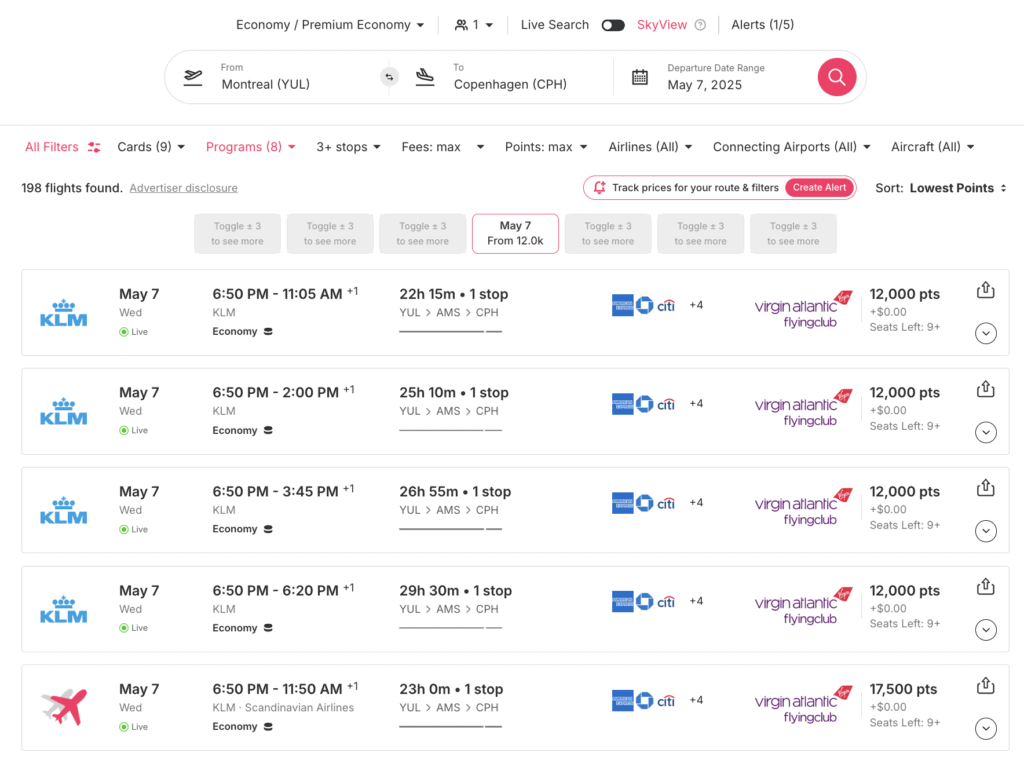
Roame lets you search for award flights up to 365 days in advance, in economy, business, and first class. Results load very quickly, with an interface similar to Google Flights.
Aeroplan results may include transfer promotions reserved for US cards (Chase Ultimate Rewards). Even if you disable this card in the filters, these offers may still appear. Not a major issue, but something to keep in mind.
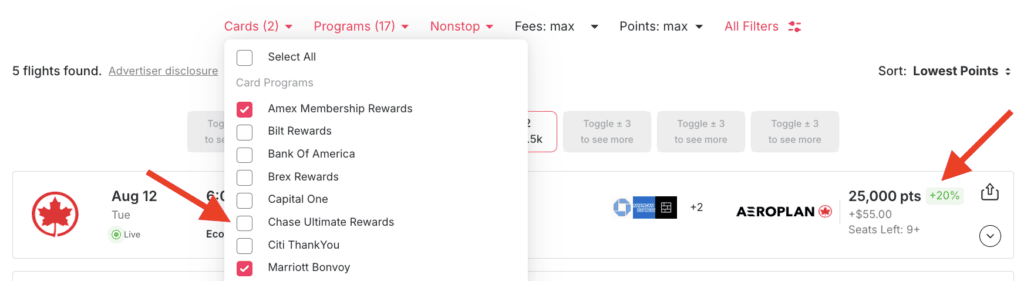
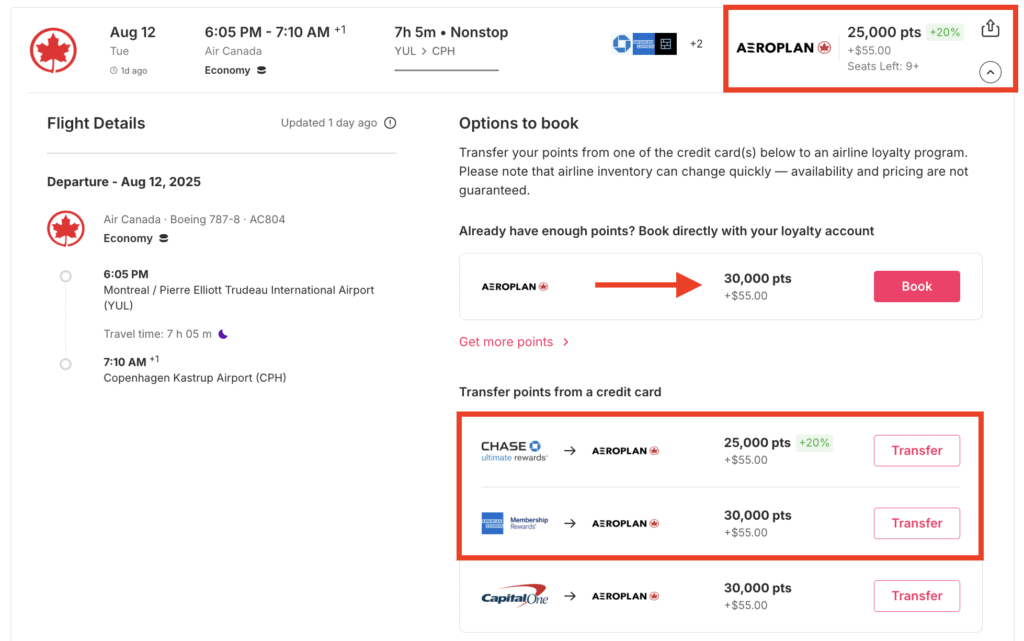
Roame Results with Aeroplan
Taxes and fees shown on Roame are in U.S. dollars. Keep this in mind to avoid confusion when evaluating actual costs.
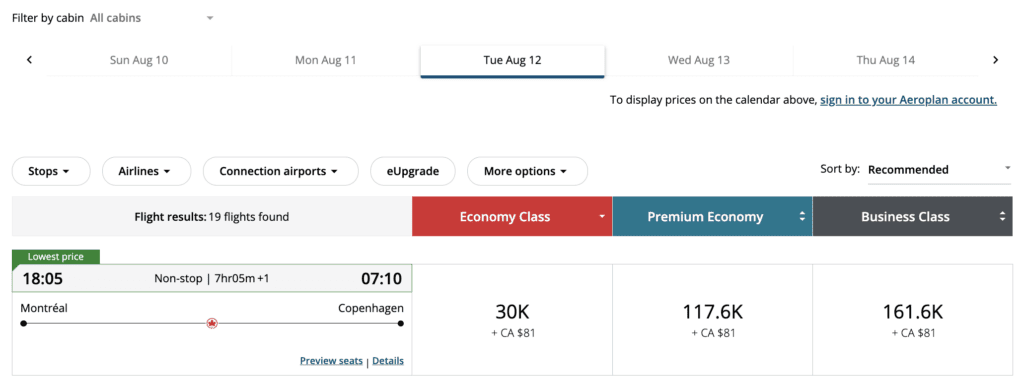
Roame does not display preferred pricing available to holders of an Aeroplan co-branded card. These fares may differ slightly from what the tool shows.
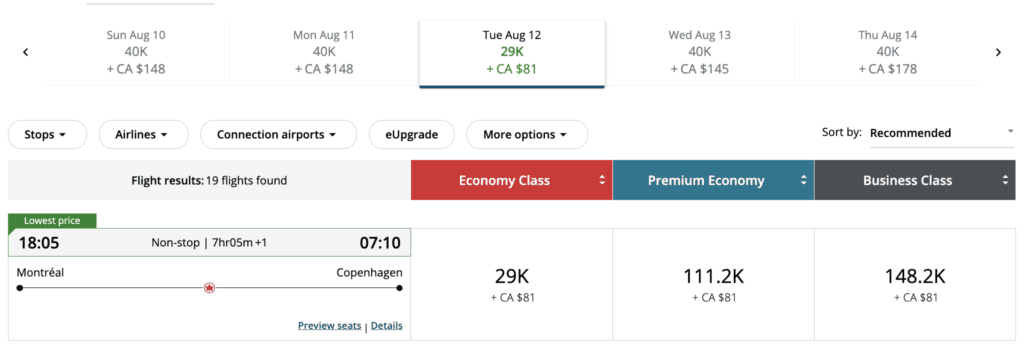
One detail I appreciate: seeing at a glance which segments are in economy and which are in business class, without clicking anywhere.
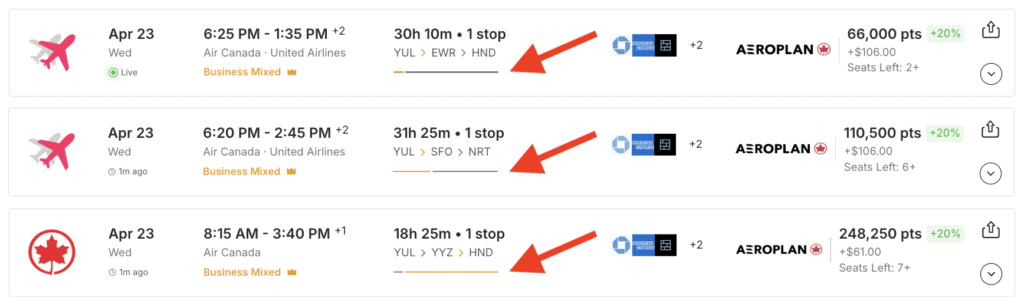
The filter for the percentage of the trip in a mixed cabin is especially useful. If you’re paying the business-class price, you might as well make sure most of the journey matches it.
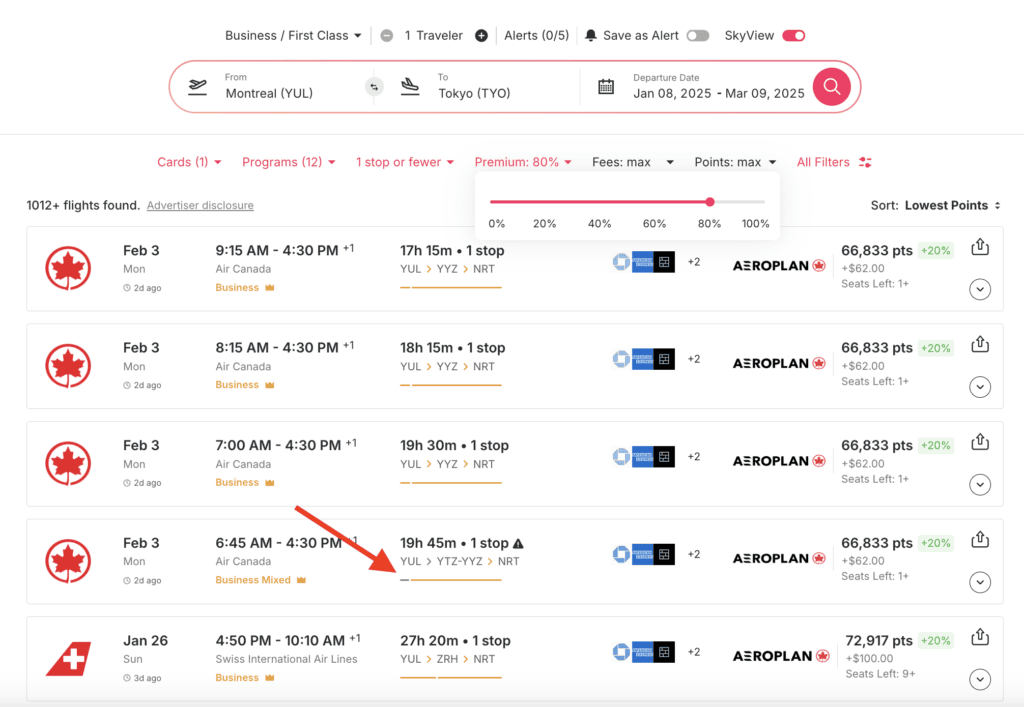
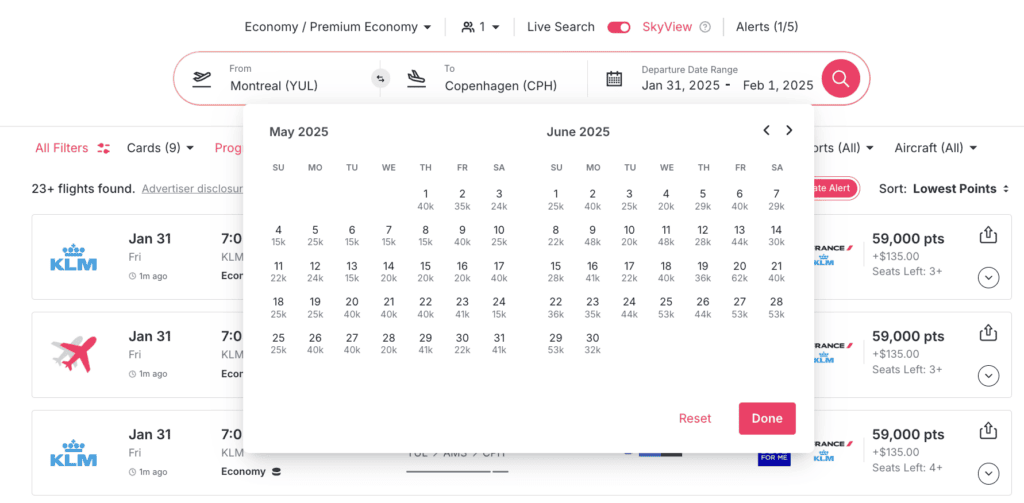
SkyView: 60-day view
SkyView provides a 60-day panoramic view of flight availability. It’s the ideal tool for families or travelers who are flexible with dates and destinations.
- Daily search on millions of routes to detect all points availability.
- Total flexibility: search by defined periods and by region.
- Sort by number of points required according to your connected programs.
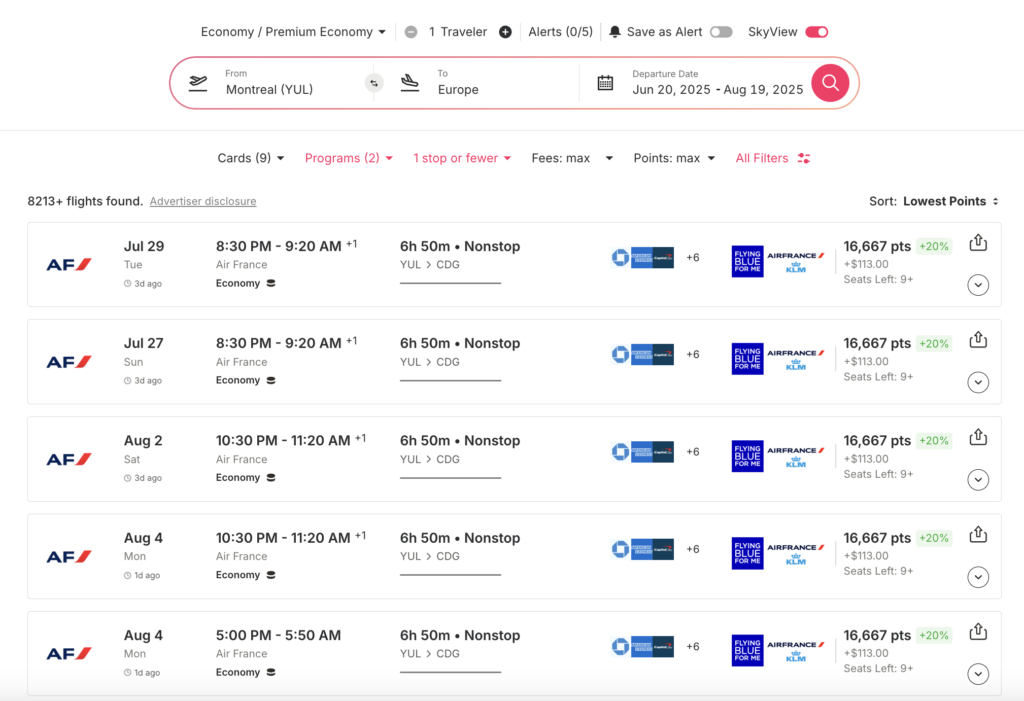
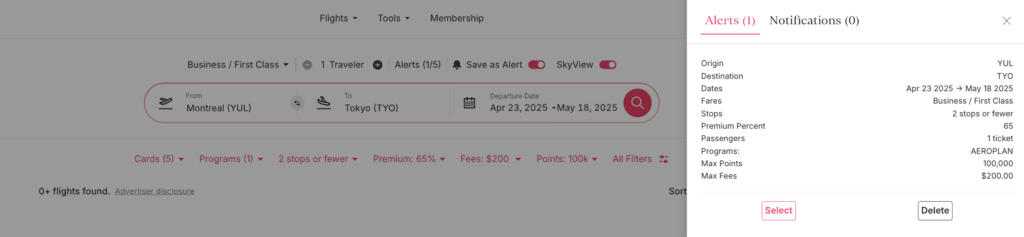
Roame Alert: Personalized alerts
Roame alerts notify you as soon as availability matches your criteria. Log in, open SkyView, set your criteria, then enable « Save as Alert ». You’ll receive an email as soon as a matching flight is available.
An entire date range counts as a single alert. Roame performs searches every 1 to 6 hours depending on the route, which sets it apart from most competing tools.
Discover: for flexible travelers
The Discover tab brings together award flights from a departure airport, with filters by travel class and loyalty program (Aeroplan, Flying Blue, Avios, etc.). Ideal if you’re looking for inspiration before choosing a destination.

Roame Tools
Under the « Tools » tab:
- Wallet: an overview of all your points balances, centralized in one place.
- Credit Cards: offers available for US cards only for now.
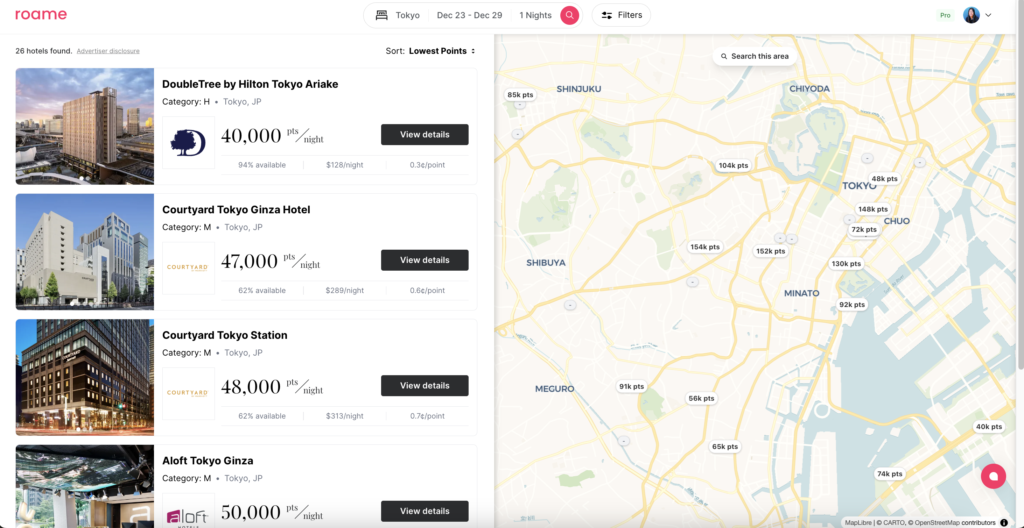
- Points Hotel Search: beta feature recently launched, covering World of Hyatt, Hilton Honors, and Marriott Bonvoy.
Advantages and Limitations
- Time-saver: fast, centralized searches across multiple loyalty programs.
- Key programs covered: Aeroplan, Flying Blue, and Avios, the three essentials for Canadians.
- Detailed filters: travel classes, number of points, taxes, mixed-cabin segments.
- Effective alerts: easy to set up, real-time notifications.
- Flexibility: explore without limiting yourself to direct flights.
- Limited multi-airport search: by region only, not by specific airports.
- Geographically limited promotions: some offers apply only to US cards.
- No filters for Canadian transfers: comparison between programs remains manual.
Roame vs. its competitors
Roame stands out for its simple, fast interface, similar to Google Flights or Kayak. For beginners, that’s a real advantage over more technical tools like ExpertFlyer or Seats.Aero.
With SkyView, the 60-day search is rarely offered by competitors. In terms of pricing, the « Friends of Roame » subscription offers excellent value for money, especially with our exclusive code.
Subscription plans and promo code
| Plan | Key Features | Price (USD) |
|---|---|---|
| Community | Unlimited award flight searches over 365 days. Ideal for beginners. | Free |
| Friends of Roame | Access to SkyView (60 days), personalized alerts, and advanced tools. | $12.99/month or $109.99/year |
| Business | Tailored features for agencies and businesses. | $3,499.99/year |
How to use Roame effectively
- Create an account: sign up on Roame and choose your subscription. The process takes less than two minutes.
- Connect your programs: sync your accounts to track your balances and expiry dates at a glance.
- Explore SkyView: identify the best opportunities over 60 days, ideal for planning ahead with the family.
- Set up alerts: one alert per date range, and you’ll be notified in real time as soon as a flight matches your criteria.
- Analyze and book: use the « Roame’s Pick » recommendations to choose flights with the best points-to-fees value.
Our verdict on Roame
Roame is an excellent tool for optimizing your points and miles. Fast interface, effective alerts, compatibility with key programs for Canadians: it’s well designed overall.
Having personally tested several tools (Point.me, AwardFares, Seats.Aero, and ExpertFlyer), Roame stands out for its intuitive interface and speed. It’s not perfect yet—especially due to the lack of Canadian transfer programs—but it’s the closest thing to ideal on the market.
The free subscription is suitable for beginners. Experienced users will appreciate « Friends of Roame » for the time saved.
Roame – Frequently Asked Questions
Is Roame free?
Yes, the Community plan is free and includes unlimited 365-day searches. For SkyView, alerts, and advanced tools, the Friends of Roame subscription is US$12.99/month or US$109.99/year.
Which programs does Roame support?
Roame supports 23 airline programs including Aeroplan, Flying Blue, Avios, Delta SkyMiles, American Airlines AAdvantage, and United MileagePlus. New programs are added regularly.
Does Roame work for Canadians?
Yes. Roame integrates Aeroplan, Flying Blue, and Avios, the three most widely used programs in Canada. The wallet section supports U.S. cards only for now, but flight search and alerts work very well for Canadian travelers.
How to use the Milesopedia promo code?
Enter code MILESOPEDIA when you sign up to get 10% off a Friends of Roame subscription. Click here to take advantage of this offer.
What is the difference between SkyView and Live Search?
Live Search queries airlines in real time on demand. SkyView is a database updated regularly (every 1 to 6 hours) on 6,500 popular routes over 60 days, allowing for near-instant results for common destinations.
Our featured card


- Annual fee
- $120
- Our valuation
- $990Milesopedia first-year estimate First-year valueWelcome bonus$990Total$990Rewards on your spending are not included. The calculator that adds them from your own profile is on the card's page.
- Milesopedia first-year estimateFirst-year valueWelcome bonus$990Total$990Rewards on your spending are not included. The calculator that adds them from your own profile is on the card's page.
- Welcome offer
- Up to 110,000 points
- Ends Sep 22, 2026
on American Express's website
Apply with confidence — no impact on your credit scoreApply with confidenceCheck whether your application will be approved before you submit it, with no impact on your credit score*When you apply for a personal American Express Credit Card, we will tell you whether you are eligible without affecting your credit score. So you can apply with confidence.*Instant decisions are only available for consumer Card applications (also called “personal Cards”).
Our editorial integrity
Our reviews and rankings are based on an objective assessment. Advertisers do not influence our content. We may receive compensation through some links; our analysis and opinions remain independent.