

Tutoriel AMEX : Comment transférer des Points-Privilèges d’American Express

Transférer ses Points-Privilèges American Express, c’est le geste qui sépare un titulaire de carte de quelqu’un qui voyage vraiment avec ses points. Personnellement, je transfère mes Points-Privilèges 3 ou 4 fois par année, et chaque transfert me rapporte entre 1,5 ¢ et 5 ¢ par point. Comparé à l’option crédit-relevé qui plafonne autour de 0,7 ¢ par point, l’écart est énorme.
Depuis le 3 janvier 2026, le programme s’est encore amélioré : Flying Blue rejoint Aéroplan et British Airways Avios dans le club des partenaires 1:1. Concrètement, un vol Montréal-Paris en classe économique tombe maintenant à 25 000 Points-Privilèges, contre 33 333 avant la mise à jour.
Dans ce tutoriel, je vous montre exactement comment transférer vos Points-Privilèges American Express, vers quel partenaire selon votre destination, et les pièges que je vois revenir le plus souvent dans la communauté Milesopedia.
Les cartes Amex Points-Privilèges
Pour transférer vos Points-Privilèges, vous devez d’abord les accumuler. Voici les cartes American Express qui permettent de bâtir un solde rapidement.
Cartes pour particuliers
Quatre cartes Amex particuliers donnent accès au transfert vers les partenaires :
| Carte de crédit | Frais annuels | Prime de bienvenue | |
|---|---|---|---|
| 191,88 $ | |||
| 0 $ | |||
| 799 $ | |||
| 250 $ |



Cartes pour entreprise
Les propriétaires d’entreprise peuvent transférer leurs Points-Privilèges depuis ces 2 cartes Amex Affaires :
| Carte de crédit | Frais annuels | Prime de bienvenue | |
|---|---|---|---|
| 799 $ | |||
| 199 $ |


Les 8 partenaires de transfert
Vos Points-Privilèges s’échangent contre 8 programmes partenaires : 5 aériens et 3 hôteliers. Les ratios et délais varient considérablement. Voici le tableau de référence à garder sous la main.
| Partenaire | Type | Ratio | Délai officiel |
|---|---|---|---|
| Aéroplan | Aérien | 1 000 → 1 000 (1:1) | Instantané à 30 min |
| Flying Blue (Air France, KLM) | Aérien | 1 000 → 1 000 (1:1) | Jusqu’à 3 jours |
| British Airways Club (Avios) | Aérien | 1 000 → 1 000 (1:1) | 5 jours ouvrables |
| Delta SkyMiles | Aérien | 1 000 → 750 | Instantané à 30 min |
| Asia Miles (Cathay Pacific) | Aérien | 1 000 → 750 | 5 jours ouvrables |
| Marriott Bonvoy | Hôtelier | 1 000 → 1 200 (1:1,2) | Instantané à 48 h |
| Hilton Honors | Hôtelier | 1 000 → 1 000 (1:1) | 5 jours ouvrables |
| ALL Accor Live Limitless | Hôtelier | 1 000 → 500 (2:1) | Immédiat à 48 h |
Trois choses à noter dans ce tableau. Premièrement, seuls Aéroplan, Flying Blue, British Airways et Hilton Honors offrent un ratio 1:1 strict. Deuxièmement, Marriott Bonvoy est techniquement le meilleur ratio (1:1,2), mais sa valeur par point hôtelier est plus basse qu’un mille aérien. Troisièmement, les transferts vers Asia Miles perdent 25 % en chemin et ALL Accor convertit à 2 pour 1 : je réserve ces options aux cas où aucune autre ne convient.
Tutoriel pas à pas pour transférer
L’interface American Express Canada se navigue en 6 étapes. Comptez 3 à 5 minutes pour un premier transfert depuis votre compte en ligne, gratuitement.
Étape 1, Se connecter à son compte
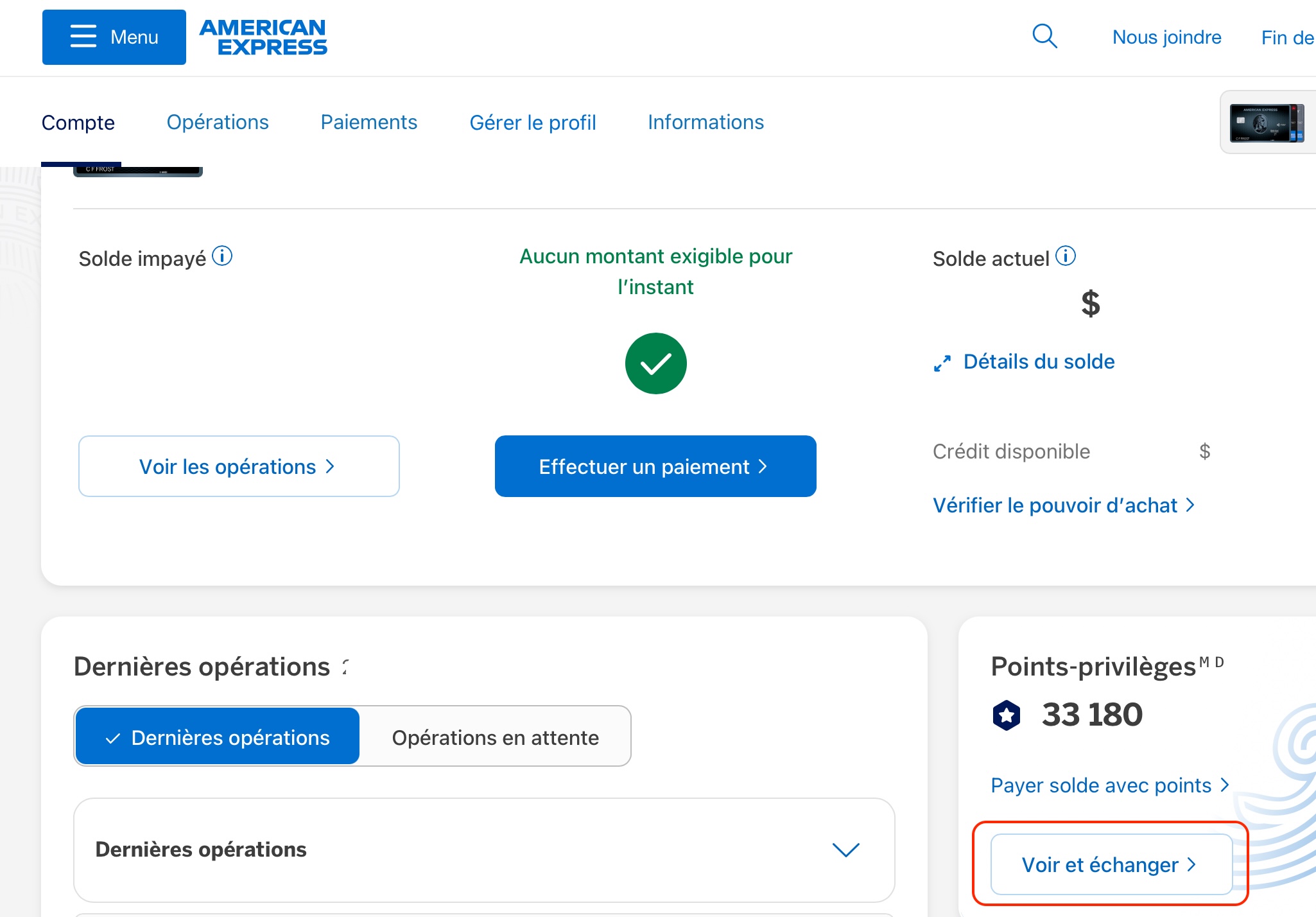
Rendez-vous sur americanexpress.com/ca-fr et connectez-vous. Cliquez sur « Voir et Échanger » dans la section Points-Privilèges du tableau de bord. Sur mobile, c’est dans le menu « Récompenses ».
Étape 2, Sélectionner le bon compte
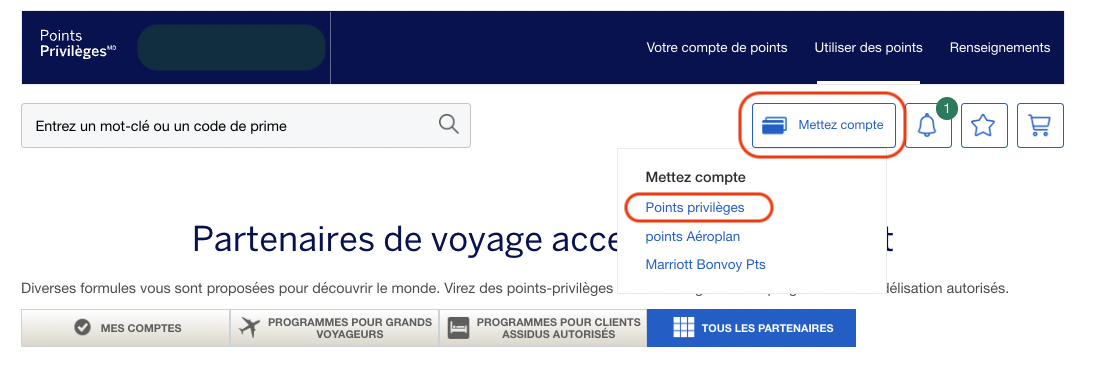
Si vous avez plusieurs cartes Amex sur le même profil, assurez-vous que le bon compte de Points-Privilèges est sélectionné. Cliquez sur « Mettez Compte » et choisissez le compte source du transfert. Mon astuce : je consolide toujours mes points sur le compte de ma carte principale avant de transférer.
Étape 3, Choisir « Transférer des points »
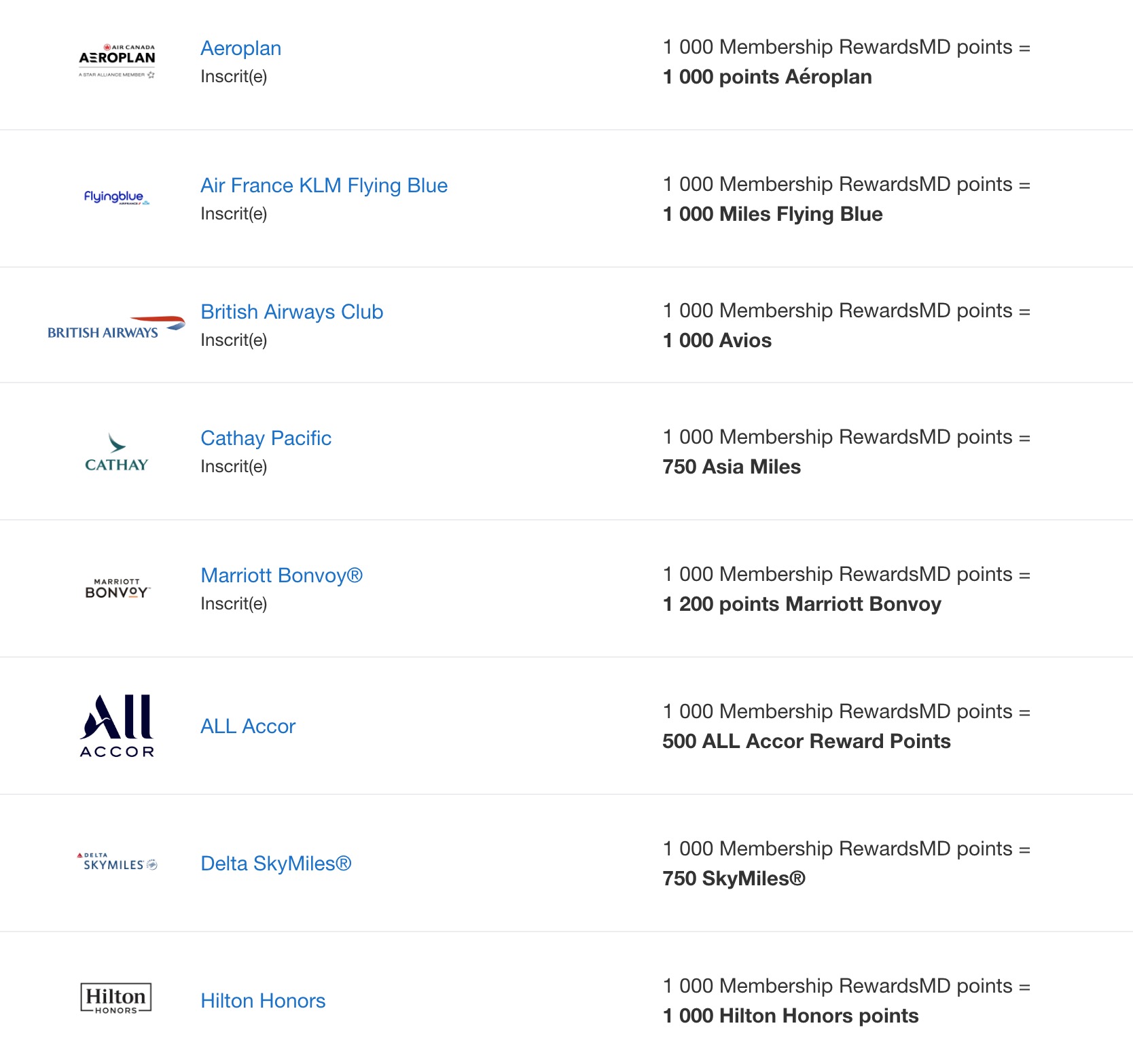
Dans la section Utiliser des points, sélectionnez Transférer des points. Vous voyez ensuite la liste des partenaires aériens, puis hôteliers.
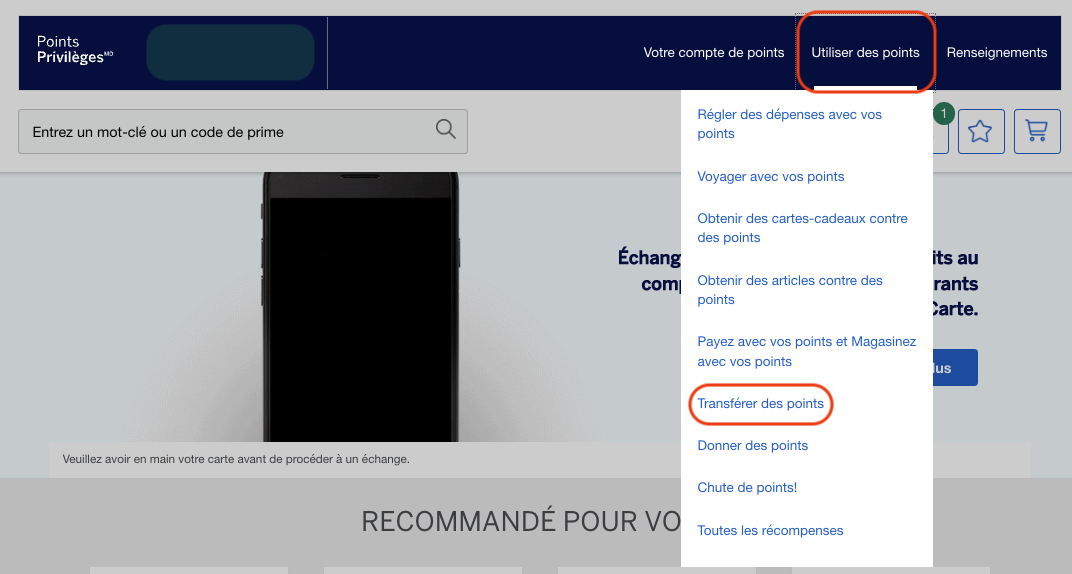
La liste complète des partenaires s’affiche, aériens et hôteliers réunis : Aéroplan, Air France KLM Flying Blue, British Airways Club, Cathay Pacific, Marriott Bonvoy, ALL Accor, Delta SkyMiles et Hilton Honors.
Étape 4, Lier votre compte partenaire
Deux options se présentent :
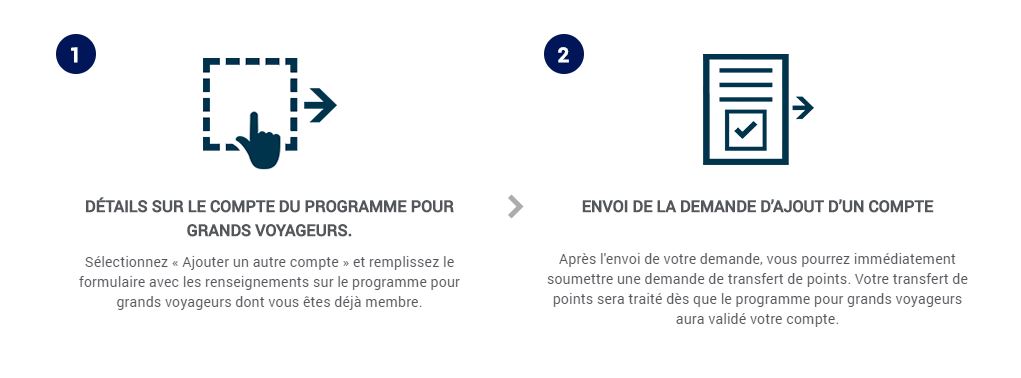
- Option A (recommandée) : ajouter votre numéro de membre existant chez le partenaire
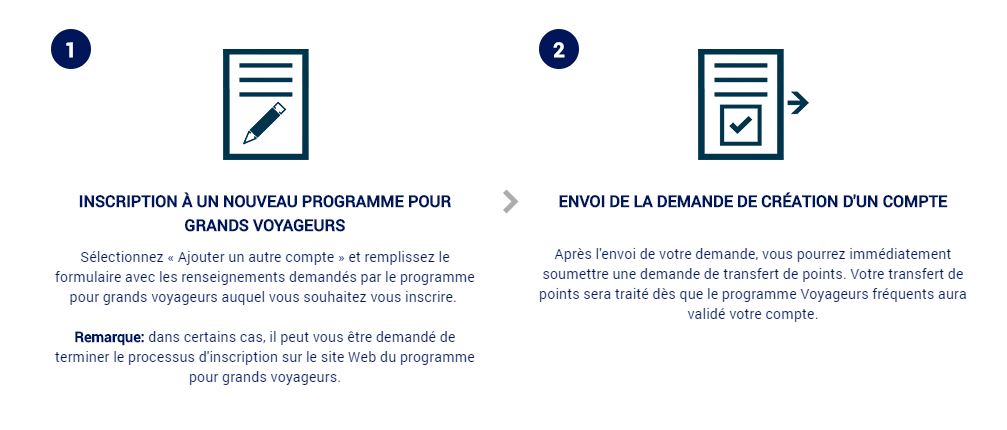
- Option B : demander à American Express d’ouvrir un compte chez le partenaire à votre place
Option A, Numéro de membre existant
C’est l’option que je recommande systématiquement. Vous gardez la maîtrise de l’ouverture du compte, vous connaissez immédiatement votre numéro de fidélité et votre mot de passe, et vous évitez les délais d’ouverture côté partenaire.
Option B, Amex ouvre le compte
Cette option vous fait souvent attendre plusieurs jours avant d’obtenir votre numéro chez le partenaire. À éviter sauf si vous n’avez aucun moyen d’ouvrir le compte vous-même.
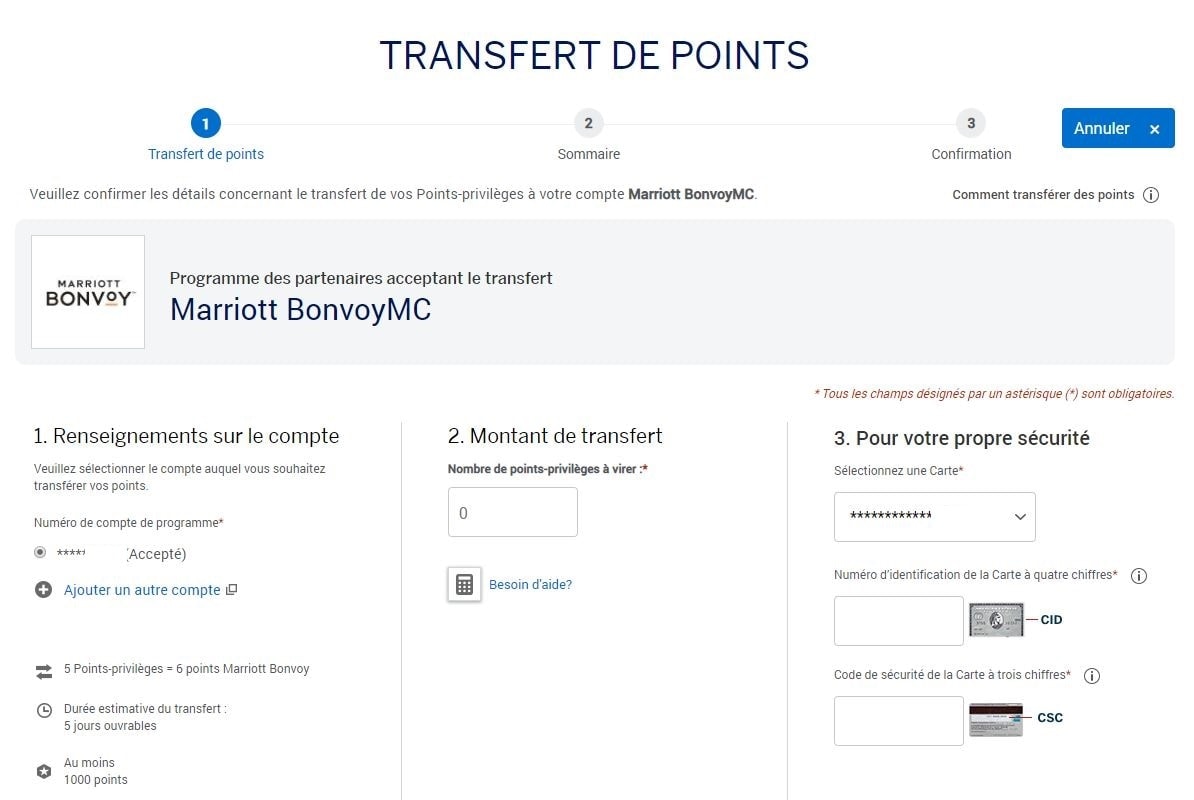
Étape 5, Effectuer le transfert
Une fois le compte partenaire ajouté, vous transférez vos Points-Privilèges en 3 sous-étapes.
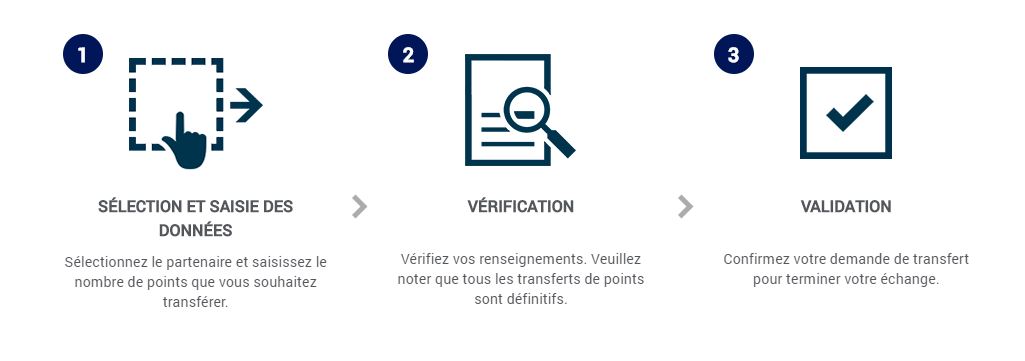
Vous indiquez :
- Le montant de Points-Privilèges à transférer (minimum 1 000 pts, puis par tranches de 100 pts)
- Les informations de sécurité liées à votre carte Amex : CID à 4 chiffres (recto, au-dessus du numéro) et CSC à 3 chiffres (verso)
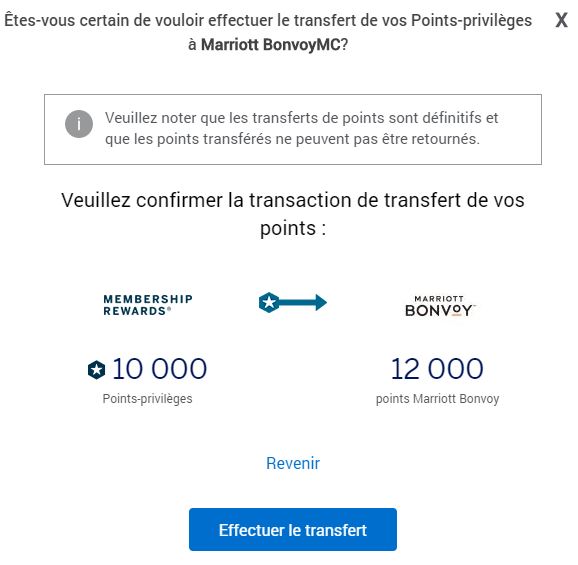
Un écran de vérification confirme le nombre de Points-Privilèges débités et le nombre de points reçus chez le partenaire.
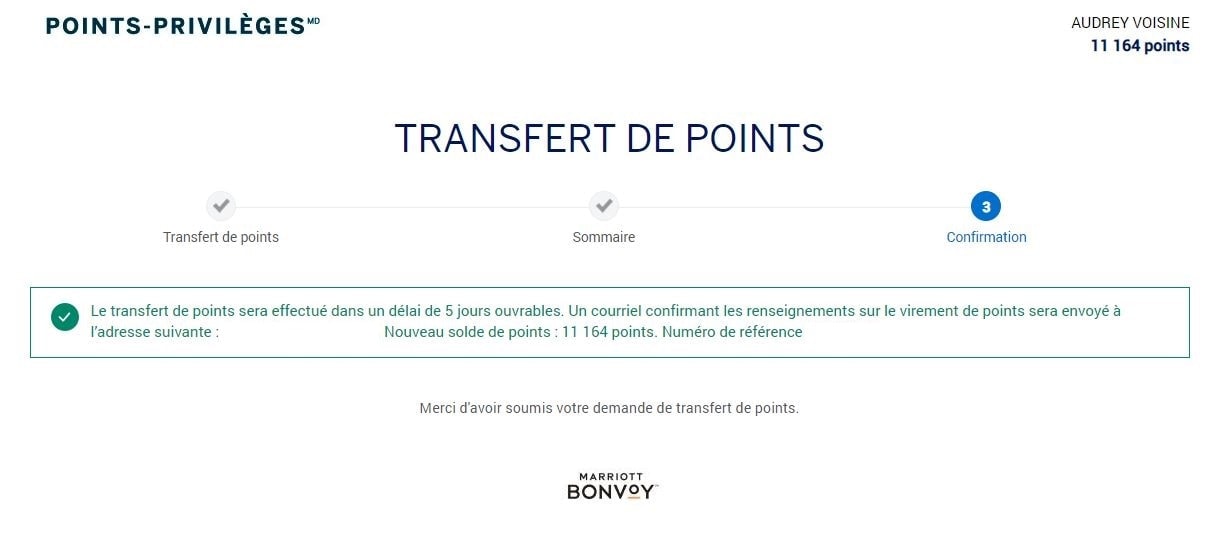
Une fois validé, vous voyez un écran de confirmation avec votre nouveau solde de points.
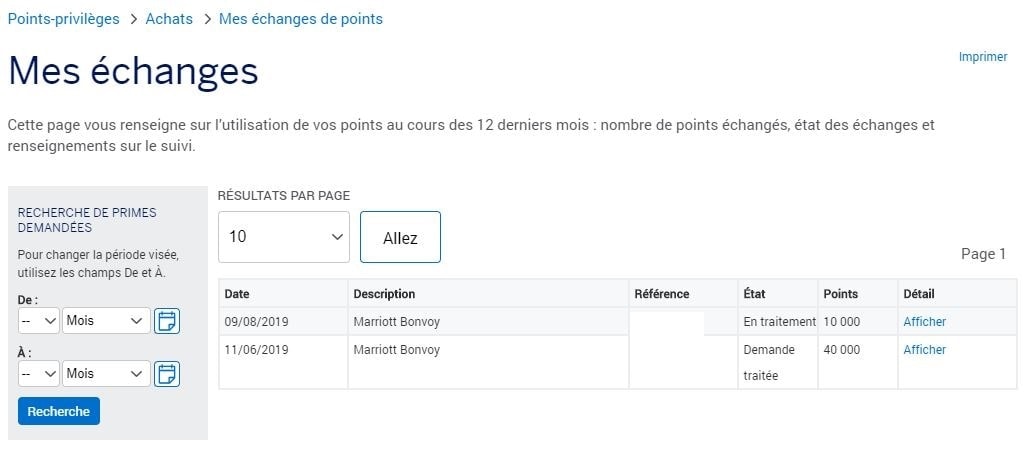
Étape 6, Consulter l’état du transfert
Pour consulter la liste de vos transferts, rendez-vous dans le menu « Votre compte Points » puis cliquez sur « Mes Primes ». Vous obtenez un récapitulatif complet des transferts effectués, leur statut et leur date.
Quel partenaire selon votre destination
Ma règle générale : je choisis le partenaire qui possède la meilleure disponibilité sur la route que je veux, pas celui qui offre le meilleur ratio sur papier. Voici comment je décide.
Europe, Flying Blue ou Aéroplan
Depuis janvier 2026, Flying Blue est devenu mon premier réflexe pour Paris et Amsterdam : 25 000 points pour un aller simple en éco, 60 000 points pour la classe affaires. Aéroplan reste fort sur le réseau Star Alliance (Lufthansa, Swiss, ANA), surtout pour les cabines premium. Je vérifie les deux avant de transférer.
Asie, Aéroplan en priorité
Pour l’Asie, Aéroplan est mon choix par défaut, grâce à ses partenaires Star Alliance (ANA, Singapore Airlines, EVA). Asia Miles est une option intéressante en théorie, mais le ratio 1 000 → 750 me fait perdre 25 % de mes points dès le départ.
États-Unis, Aéroplan ou Delta
Delta SkyMiles offre un transfert instantané, pratique pour les réservations de dernière minute. Mais avec le ratio 1 000 → 750, je préfère encore Aéroplan pour les vols domestiques canadiens et les routes vers les États-Unis sur le réseau Air Canada et United.
Vols courts au Canada, Avios
Mon transfert le plus sous-coté reste British Airways Avios. Pour les vols courts d’Air Canada (Montréal-Toronto, Calgary-Vancouver), Avios facture à partir de 7 500 points pour un aller simple, contre 12 500 points minimum chez Aéroplan. Sur un billet à 250 $, ça représente plus de 3 ¢ par point.
Hôtels, Marriott avant Hilton
Marriott Bonvoy bonifie automatiquement les transferts à 1 000 → 1 200, ce qui en fait le seul partenaire à donner plus que le ratio strict. Je le réserve pour les nuits catégorie 4 à 6 (entre 25 000 et 50 000 points la nuit) et je surveille les bonus de transfert Marriott qui reviennent environ 2 fois par année.
Si vous préférez accumuler des points Marriott Bonvoy directement plutôt que de les transférer, sachez que les cartes Marriott Bonvoy American Express proposent régulièrement des primes de bienvenue bonifiées.
ALL Accor Live Limitless complète le trio depuis juillet 2026. Le ratio de 1 000 → 500 paraît sévère, mais un point Reward vaut une valeur fixe d’environ 2 centimes d’euro : le rabais est prévisible, sans catégorie ni saisonnalité. Je le garde pour les séjours Fairmont au Canada et les hôtels Accor en Europe, quand je veux simplement effacer une partie de la facture.
Un détail que peu de gens connaissent : ALL Accor reconvertit ses points Rewards vers une trentaine de compagnies aériennes. Le détour est perdant presque partout, sauf vers Qantas Frequent Flyer, où 2 000 points Rewards donnent 2 500 points Qantas. Résultat : 625 points Qantas pour 1 000 Points-Privilèges, contre 400 en passant par Marriott Bonvoy. Je détaille le calcul dans notre guide des programmes de transfert au Canada.
Mes calculs concrets par profil
Pour vous donner des points de repère réels, voici 3 transferts concrets que j’ai faits ou recommandés cette année, avec la valeur exacte par point obtenue.
Profil 1, Paris éco (Flying Blue)
| Élément | Valeur |
|---|---|
| Points Amex transférés | 50 000 |
| Miles Flying Blue obtenus (1:1) | 50 000 |
| Aller-retour Montréal-Paris éco | 50 000 miles + ~250 $ de taxes |
| Prix marché du même billet | ~1 500 $ |
| Valeur par point Amex | 2,5 ¢ par point |
| Comparaison crédit-relevé (0,7 ¢/pt) | 350 $ seulement |
Concrètement, transférer 50 000 points Amex vers Flying Blue plutôt que de les encaisser en crédit-relevé fait passer leur valeur de 350 $ à environ 1 250 $ net. Le transfert vaut littéralement 3,5 fois plus.
Profil 2, Tokyo affaires (Aéroplan)
| Élément | Valeur |
|---|---|
| Points Amex transférés | 75 000 |
| Miles Aéroplan obtenus (1:1) | 75 000 |
| Aller simple Montréal-Tokyo affaires (ANA via Aéroplan) | 75 000 miles + ~150 $ de taxes |
| Prix marché du même billet | ~4 500 $ |
| Valeur par point Amex | 5,8 ¢ par point |
| Comparaison crédit-relevé (0,7 ¢/pt) | 525 $ seulement |
C’est le scénario le plus rentable que j’ai personnellement utilisé : 75 000 Points-Privilèges transférés à Aéroplan, échangés contre un billet en classe affaires sur ANA. Je dépasse les 5 ¢ par point, soit 8 fois plus que le crédit-relevé.
Profil 3, Nuits Marriott Bonvoy
| Élément | Valeur |
|---|---|
| Points Amex transférés | 40 000 |
| Points Marriott Bonvoy obtenus (1:1,2) | 48 000 |
| Nuit Marriott catégorie 5 (saison standard) | 40 000 points Bonvoy |
| Prix marché de la même nuit | ~400 $ |
| Valeur par point Amex (sans promo) | ~1,2 ¢ par point |
| Avec promo bonus de transfert 25 % (2 fois/an) | ~1,5 ¢ par point |
Les transferts vers Marriott sont moins spectaculaires en pure valeur par point, mais ils me servent surtout quand je veux figer le tarif d’une nuit hôtel à l’avance. Mon astuce : j’attends toujours une promotion bonus de transfert 25 % avant de pousser des points massivement vers Bonvoy.
Mes astuces d’expert pour maximiser
Six habitudes que j’applique systématiquement avant chaque transfert. Elles font la différence entre un transfert moyen et un transfert vraiment optimisé.
- Trouver le vol avant de transférer : je vérifie toujours la disponibilité du siège ou de la nuit visée sur le site du partenaire avant de transférer le moindre point. Une fois transférés, les points sont gelés.
- Attendre les bonus de transfert Marriott Bonvoy : Marriott offre un bonus de 25 % à 40 % sur les transferts environ 2 fois par année. J’attends cette fenêtre pour pousser de gros volumes vers Bonvoy.
- Transférer le strict minimum nécessaire : les points en surplus restent bloqués chez le partenaire. Je calcule au point près, pas en arrondi vers le haut.
- Créer mon compte partenaire en amont : ouvrez votre compte Flying Blue, Aéroplan, Bonvoy directement chez le partenaire, jamais via l’interface Amex. Vous gardez la main sur votre profil.
- Surveiller le délai annoncé : certains partenaires (BA Avios, Asia Miles, Hilton Honors) prennent jusqu’à 5 jours ouvrables. Pour une réservation urgente, je privilégie Aéroplan ou Delta SkyMiles, transferts instantanés.
- Vérifier l’identité du compte une semaine avant : au tout premier transfert vers un partenaire, Amex demande une vérification qui peut prendre 5 jours ouvrables. Je lance toujours cette étape avant ma fenêtre de réservation.
Quelle carte Amex pour accumuler
Tous les transferts du monde ne servent à rien si vous n’accumulez pas assez de points. Au Canada, la Carte Or avec primes American Express est ma préférée pour combiner accumulation rapide de Points-Privilèges et frais annuels raisonnables.


- Frais annuels
- 250 $
- Notre évaluation
- 1 020 $Estimation Milesopedia la première année Valeur de la première annéePrime de bienvenue1 020 $Total1 020 $Les récompenses sur vos dépenses ne sont pas comptées ici. Le calculateur qui les ajoute selon votre profil est sur la page de la carte.
- Estimation Milesopedia la première annéeValeur de la première annéePrime de bienvenue1 020 $Total1 020 $Les récompenses sur vos dépenses ne sont pas comptées ici. Le calculateur qui les ajoute selon votre profil est sur la page de la carte.
- Prime de bienvenue
- Jusqu'à 60 000 points
sur le site d'American Express
Demande sans effet sur votre dossier de créditSoumettez une demande en toute confianceVérifiez si votre demande sera approuvée avant de la soumettre, sans incidence sur votre cote de crédit*Lorsque vous demandez une Carte de crédit personnelle d’American Express, nous vous dirons si vous êtes admissible sans nuire à votre cote de crédit. Vous pouvez donc soumettre votre demande en toute confiance.*Les décisions instantanées sont uniquement offertes pour les demandes de Carte grand public (qu’on appelle aussi « Carte personnelle »).
Pour aller plus loin
Transfert Points-Privilèges Amex – Questions fréquentes
Combien de temps prend un transfert de Points-Privilèges ?
Le délai dépend du partenaire. Aéroplan et Delta SkyMiles sont instantanés à 30 minutes. Marriott Bonvoy prend généralement de quelques minutes à 48 heures. ALL Accor est habituellement immédiat, avec un maximum de 48 heures. Flying Blue, British Airways Avios, Asia Miles et Hilton Honors peuvent prendre jusqu’à 5 jours ouvrables. Pour une réservation urgente, privilégiez Aéroplan ou Delta.
Le transfert est-il vraiment irréversible ?
Oui, totalement. Une fois transférés, vos Points-Privilèges sont déposés dans le programme partenaire et ne peuvent plus revenir chez American Express, ni être déplacés vers un autre partenaire. Vérifiez toujours la disponibilité du vol ou de la nuit que vous visez avant de cliquer sur Confirmer.
Quel est le minimum de points pour faire un transfert ?
Le minimum est de 1 000 Points-Privilèges pour le premier bloc transféré, puis par tranches de 100 points ensuite. Cette règle est appliquée par American Express Canada dans son interface en ligne, peu importe le partenaire choisi.
Comment fonctionne le transfert vers ALL Accor ?
ALL Accor Live Limitless est le troisième partenaire hôtelier des Points-Privilèges depuis juillet 2026. Le ratio est de 1 000 Points-Privilèges pour 500 points Reward, par tranches de 100 points, avec un minimum de 1 000 Points-Privilèges et un maximum de 999 900 par transfert. Vous devez déjà posséder un compte ALL actif à votre nom. Le transfert est habituellement immédiat, mais prévoyez jusqu’à 48 heures. Etihad Guest, lui, a quitté la liste des partenaires le 20 juin 2026.
Le transfert coûte-t-il des frais ?
Non. Le transfert depuis votre compte American Express vers n’importe quel des 8 partenaires est entièrement gratuit. Vous payez seulement les taxes et frais aéroportuaires lors de la réservation effective du vol ou de la nuit chez le partenaire.
Quelles cartes American Express permettent de transférer ?
Toutes les cartes American Express qui accumulent des Points-Privilèges (ou Points-Privilèges Sélect) sont éligibles : Cobalt, Or, Or pour PME, Platine, Platine Entreprise. Vérifiez sur votre relevé que vos points sont bien des Points-Privilèges et non un autre type de récompense.
Combien vaut concrètement un Point-Privilège transféré ?
Selon le partenaire et le type de réservation, un Point-Privilège transféré vaut entre 1 ¢ et 5 ¢ par point. Pour les cabines premium long-courrier (classe affaires Aéroplan vers l’Asie ou l’Europe), je dépasse régulièrement les 4 ¢ par point. Pour les nuits Marriott Bonvoy, je tourne autour de 1,2 à 1,5 ¢. À titre de comparaison, l’option crédit-relevé plafonne autour de 0,7 ¢ par point, soit la pire utilisation possible.
Que se passe-t-il si je ferme ma carte Amex avec des points en banque ?
Vos Points-Privilèges sont liés au compte, pas à une carte précise. Si vous fermez une carte mais que vous gardez au moins une autre carte Amex avec Points-Privilèges sur le même profil, les points restent disponibles. Si vous fermez la dernière carte, prévoyez de transférer vos points avant la fermeture, sinon ils seront perdus.
Le nouveau ratio Flying Blue 1:1 est-il garanti à long terme ?
American Express Canada n’a annoncé aucune date d’expiration pour le ratio 1:1 vers Flying Blue. C’est désormais la grille standard, comme pour Aéroplan et British Airways Avios. Cela dit, les programmes de fidélité peuvent ajuster leurs ratios sans préavis : ma règle est de transférer quand j’ai une réservation concrète en vue, pas de spéculer.
Notre carte en vedette
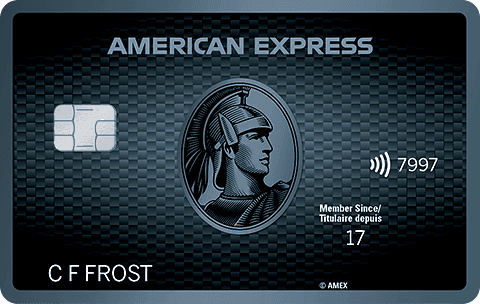
- Frais annuels
- 191,88 $
- Notre évaluation
- 255 $Estimation Milesopedia la première année Valeur de la première annéePrime de bienvenue255 $Total255 $Les récompenses sur vos dépenses ne sont pas comptées ici. Le calculateur qui les ajoute selon votre profil est sur la page de la carte.
- Estimation Milesopedia la première annéeValeur de la première annéePrime de bienvenue255 $Total255 $Les récompenses sur vos dépenses ne sont pas comptées ici. Le calculateur qui les ajoute selon votre profil est sur la page de la carte.
- Prime de bienvenue
- Jusqu'à 15 000 points
sur le site d'American Express
Demande sans effet sur votre dossier de créditSoumettez une demande en toute confianceVérifiez si votre demande sera approuvée avant de la soumettre, sans incidence sur votre cote de crédit*Lorsque vous demandez une Carte de crédit personnelle d’American Express, nous vous dirons si vous êtes admissible sans nuire à votre cote de crédit. Vous pouvez donc soumettre votre demande en toute confiance.*Les décisions instantanées sont uniquement offertes pour les demandes de Carte grand public (qu’on appelle aussi « Carte personnelle »).
Notre intégrité éditoriale
Nos avis et classements reposent sur une évaluation objective. Les annonceurs n’influencent pas notre contenu. Certains liens peuvent nous permettre de recevoir une rémunération ; nos analyses et nos opinions restent indépendantes.