

Two-Factor Authentication (2FA) When Travelling

Two-factor authentication (2FA) adds an extra layer of protection by requiring not only a password, but also a second form of verification. In today’s digital world, the security of your accounts when using online services is very important, especially when travelling.
However, when travelling, access to these multi-factor authentication methods can be compromised, especially when we don’t have access to our phone number or the Internet.
Here are some tips and tricks on how to effectively manage 2FA on the move.
What Is Two-Factor Authentication?
First of all, let’s start by defining what it is: two-factor authentication or 2FA is a security method that requires two separate forms of identification to access an account, whether it’s your bank account or your loyalty program account. This greatly reduces the risk of unauthorized access, even if your password has been compromised.
How Do I Use Two-Factor Authentication?
Here’s an example of a screenshot illustrating two-factor authentication for a National Bank account, whether to access the online banking platform or to access à la carte Rewards to redeem your points.
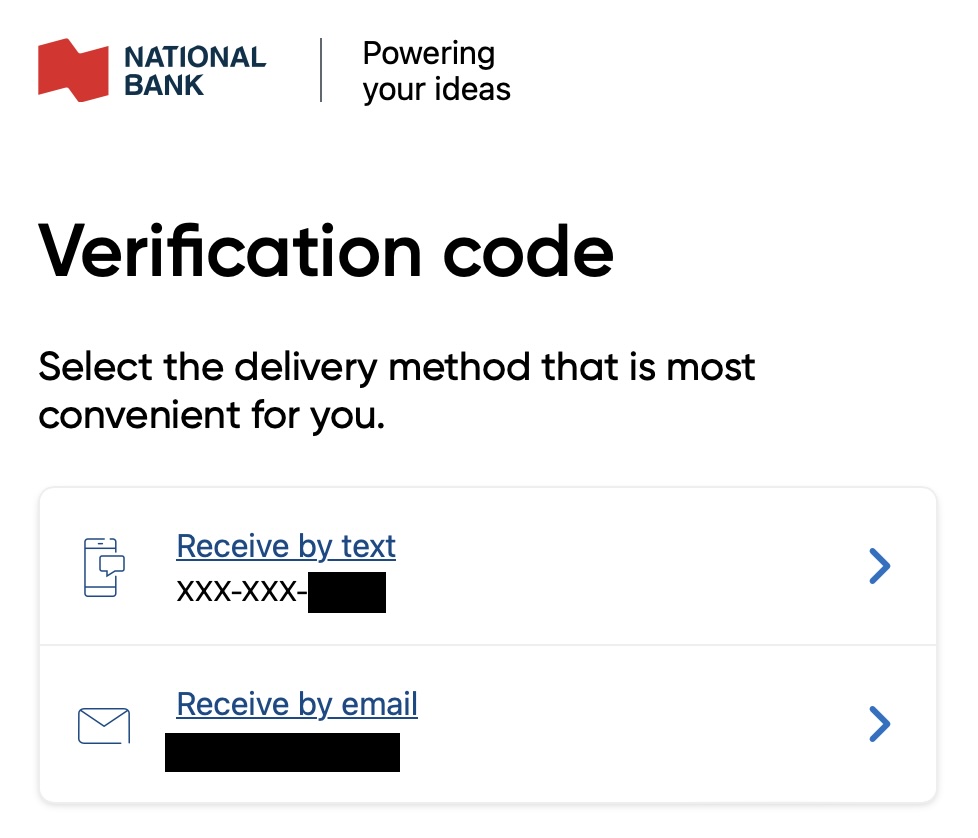
In most cases, two-factor authentication is automatically activated by banks to ensure the security of your account. It is generally not possible to deactivate it. When you log on, the system detects whether you are using a new device or are in an unusual location. If this is the case, a verification request is automatically displayed.
Usually, you will then receive a code by SMS (text message), e-mail or via a notification from the banking application. Simply enter this code in the box provided to finalize your connection and access your account in complete security.
How Do I Retrieve My Two-Factor Authentication Code?
Generally speaking, you receive this code by e-mail or SMS, but you can also get it by phone call, push notification or authentication application, depending on the financial institution. If you’ve lost access to your two-factor authentication code, or if you don’t receive it, you have several options, depending on the method you use:
- Code Received via SMS or Email: Check your inbox or text messages. If you don’t receive the code, ensure your phone has network reception or try requesting a new one.
- Authentication application (Google Authenticator, Authy, etc.): Open the application on your phone to retrieve the generated code. If you’ve changed device without transferring the application, some applications like Authy allow recovery via an account.
- Emergency codes: When activating 2FA, some banks and services provide recovery codes. Consult your documents or your account management area to find them.
If you are unable to retrieve your code using the above methods, please contact the customer service department of your bank or the service concerned. They will be able to help you reset your authentication after verifying your identity.
Why Two-Factor Authentication Doesn't Always Work While Travelling
When you’re on the move, several obstacles can complicate this process, potentially jeopardizing access to your banking information and loyalty programs.
Here are the main challenges encountered with two-factor authentication when travelling:
- Access to mobile networks may be limited, making receiving SMS codes problematic if you don’t have mobile service abroad or if roaming charges are high.
- If your device is lost or stolen, you may not be able to access the necessary codes.
- Some authentication applications may be incompatible and may not function correctly in certain countries.
- Many banks and loyalty programs use SMS for authentication, which means you need to keep an active Canadian SIM card, which can lead to additional charges.
In general, incoming SMS messages are free with most telephone providers in Canada, whether you’re abroad or at home. However, data may be used if you haven’t deactivated mobile data on your cell phone. Personally, I’ve never had a problem disabling data to receive only SMS and calls. I’m only charged if I answer an SMS or make a call.
However, bugs can occur, and when you return from your trip, you may be surprised to be billed for data, or a day’s use abroad. Many packages offer this, giving you access to your usual services for 24 hours at a fixed cost. However, if you only receive an SMS, it can be expensive for a simple text message.
How Do I Remove Two-Factor Authentication?
Although two-factor authentication is an essential security measure, it can be tempting to temporarily disable it during a trip to simplify access to your accounts. However, it’s important to point out that this option isn’t always available, as some platforms don’t allow you to disable 2FA to guarantee account security.
If you nevertheless decide to disable multi-factor authentication, and if this is possible, here are the steps to follow:
- Go to the security section of your account (bank, e-mail, etc.) in the settings.
- Look for the « Two-factor authentication » option and select the option to disable or delete it.
- Confirm your choice by entering the security code sent by e-mail or SMS, depending on the service used.
It’s important to note that, while this option can be useful in some cases, it’s always best to take alternative measures, such as setting a device as a « favourite device » or using an authentication app to avoid compromising the security of your accounts.
Tips for Managing Two-Factor Authentication When Travelling
Preparing Access to Online Services Before Departure
Before you leave on your trip, it’s essential to prepare all aspects of your digital access, especially those requiring two-factor authentication. These preparations will ensure a smooth trip, free from the stress of accessing your important accounts. Here are a few steps to follow:
- Install all the necessary banking and loyalty applications before you travel.
- Register your device as a « favourite device » whenever possible, to receive notifications directly on your phone without the need for an SMS.
Understanding eSIM Limitations for Multi-Factor Authentication
eSIM cards have become very popular with travellers, as they offer a simple solution for staying connected internationally. However, it’s important to understand the limitations of this technology when it comes to receiving SMS messages for two-factor authentication when travelling.
- Although eSIMs, like Airalo, are useful for a mobile connection abroad, they don’t allow you to receive SMS messages linked to multi-factor authentication if the service is based solely on your Canadian phone number.
- You may be required to keep your Canadian SIM card active in your phone, and may have to pay roaming charges to receive verification codes.
Learn About the 2FA Methods Used by Canadian Banks
Each institution has its own 2FA methods for accessing online services, and it is crucial to know them. For example, with National Bank, simple internet access is sufficient to access your bank account. However, Desjardins requires an SMS code, unless you use their mobile application. It is therefore important to be prepared according to your bank’s specific requirements.
The following table summarizes the two-factor authentication methods used by Canadian banks:
| Bank | None | SMS | Call | Notification | |
| American Express | ✅ | ||||
| BMO | ✅ | ✅ | |||
| NBC | ✅ | ✅ | |||
| Brim Financial | ✅ | ||||
| Canadian Tire Financial | ✅ | ||||
| CIBC | ✅ | ✅ | ✅ | ✅ (favourite device) | |
| Desjardins | ✅ | ✅ | |||
| EQ Bank | ✅ | ✅ | |||
| Manulife | ✅ | ✅ | |||
| MBNA | ✅ | ✅ | |||
| PC Financial | ✅ | ✅ | |||
| RBC | ✅ (favourite device) | ||||
| Rogers | ✅ | ||||
| Scotiabank | ✅ (favourite device) | ||||
| Simplii Financial | ✅ | ✅ | ✅ | ✅ (favourite device) | |
| Tangerine | ✅ | ✅ | |||
| TD | ✅ | ✅ | ✅ (TD Authenticate) | ||
| Wise | ✅ |
These 2FA methods also apply when you want to use your points abroad. If you’re in the habit of booking as you travel, banks will ask you for a 2FA to connect to portals such as Expedia for TD or NBC À la carte Rewards, for example. Make sure you’re ready to handle these verifications when you travel.
Understanding 2FA Requirements for Loyalty Programs
Like the banking rewards portals mentioned in the previous section, many loyalty programs have also adopted 2FA measures. Here’s an overview of the methods used:
| Loyalty program | No | SMS | |
| Air Canada Aeroplan | ✅ (can be disabled) | ✅ | ✅ |
| Air France-KLM Flying Blue | – | ✅ | ✅ |
| Alaska Mileage Plan | – | ✅ | – |
| American Airlines AAdvantage | ✅ | – | – |
| Best Western Rewards | – | ✅ | – |
| British Airways Executive Club | – | ✅ | – |
| Marriott Bonvoy | – | ✅ | ✅ |
| Hilton Honors | – | ✅ | – |
| IHG One | ✅ | – | – |
| Qatar Airways Privilege Club | – | – | ✅ |
| World of Hyatt | – | ✅ | – |
| Westjet Rewards | – | ✅ | – |
| Wyndham Rewards | – | – | ✅ |
Taking Extra Precautions
When you’re travelling abroad, it’s essential to take certain extra precautions to ensure secure and smooth connections to your online services, especially those requiring two-factor authentication while travelling. Here are a few tips to help you avoid the unexpected:
- Have a solution for making low-cost international calls, as some banks require a call to validate a simple connection or transfer.
- Consider a third-party authentication application (Google Authenticator, Microsoft Authenticator, or TD Authenticate App) to bypass the need for SMS.
- Use a VPN, like NordVPN, to secure your Internet connection when accessing your online accounts from public networks.
What is the Google Authenticator?
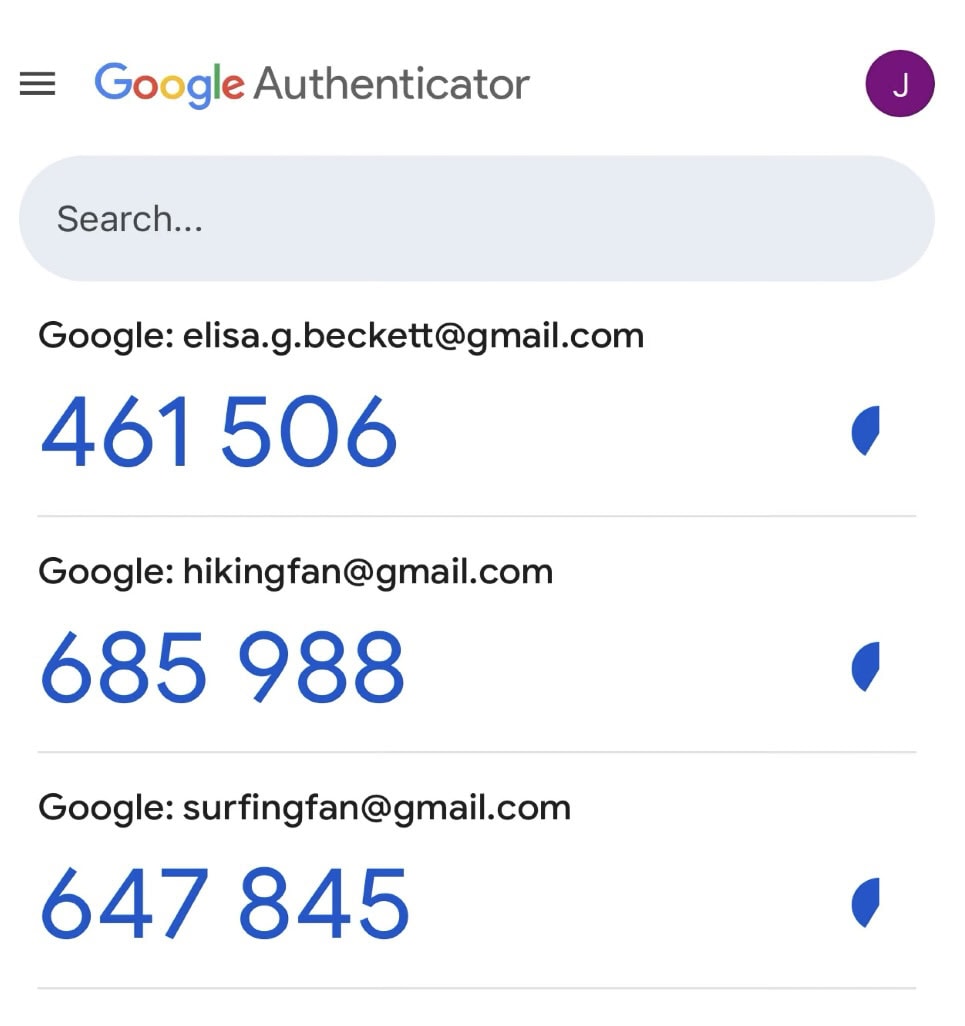
Google Authenticator is a mobile application developed by Google to enhance the security of online accounts through two-factor authentication. It is available from the Apple Store and Google Play. It generates temporary single-use codes, which serve as a second level of verification after password entry. Unlike codes sent by SMS, Google Authenticator works offline and requires no Internet or mobile network connection, making it more secure against certain forms of hacking, such as SMS interception.
To use Google Authenticator, you first need to associate it with an account by scanning a QR code or entering a secret key provided by the service concerned (banks, messaging services, social networks, etc.). Once configured, the application generates a six-digit verification code, which is renewed every 30 seconds. When connecting to a 2FA-protected account, simply enter this code to confirm your identity.
The advantage of Google Authenticator is that it reduces the risk of phishing attacks and password theft. However, it is important to back up your recovery codes or use a backup solution, because if the application is deleted or you change phones without transferring your accounts, it may be difficult to recover access to protected services.
What is the TD Authenticate App?
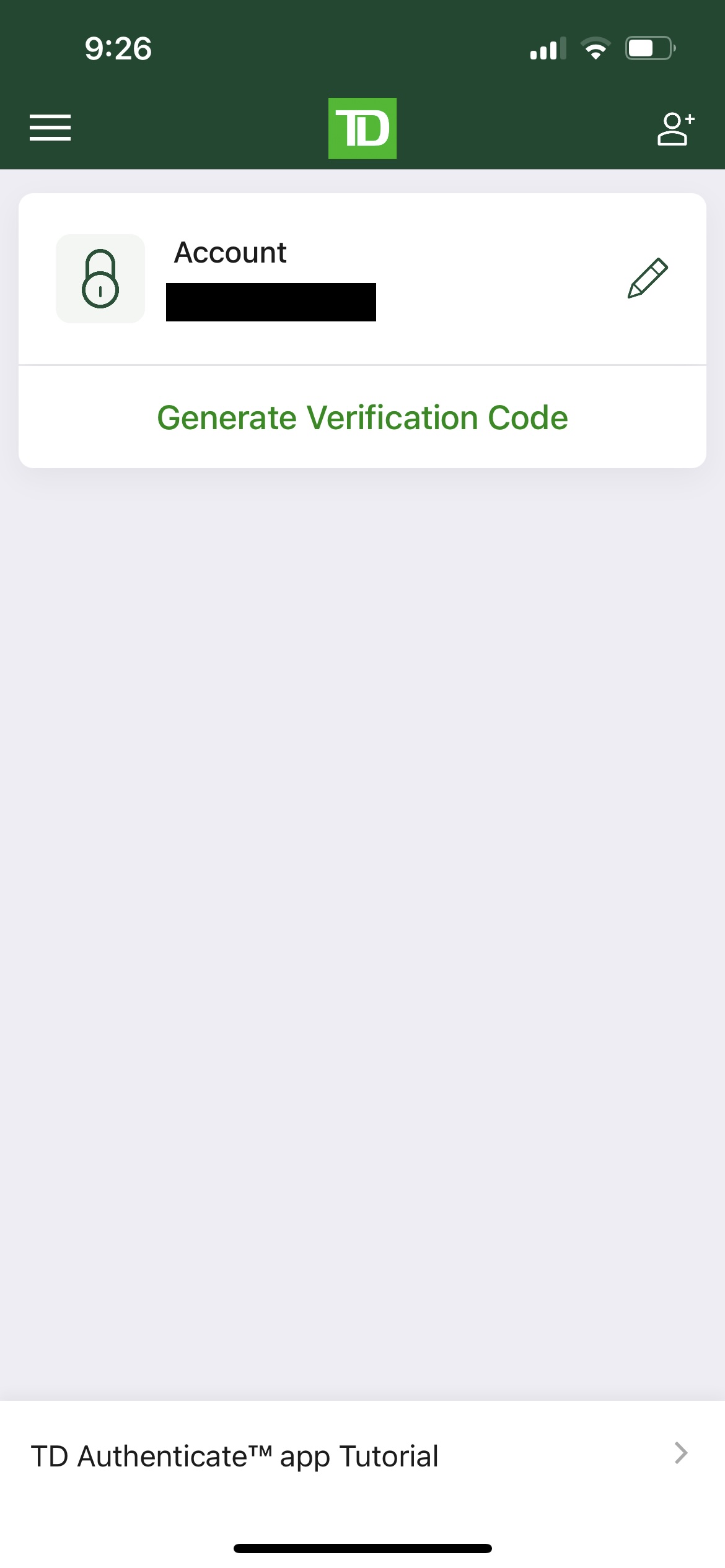
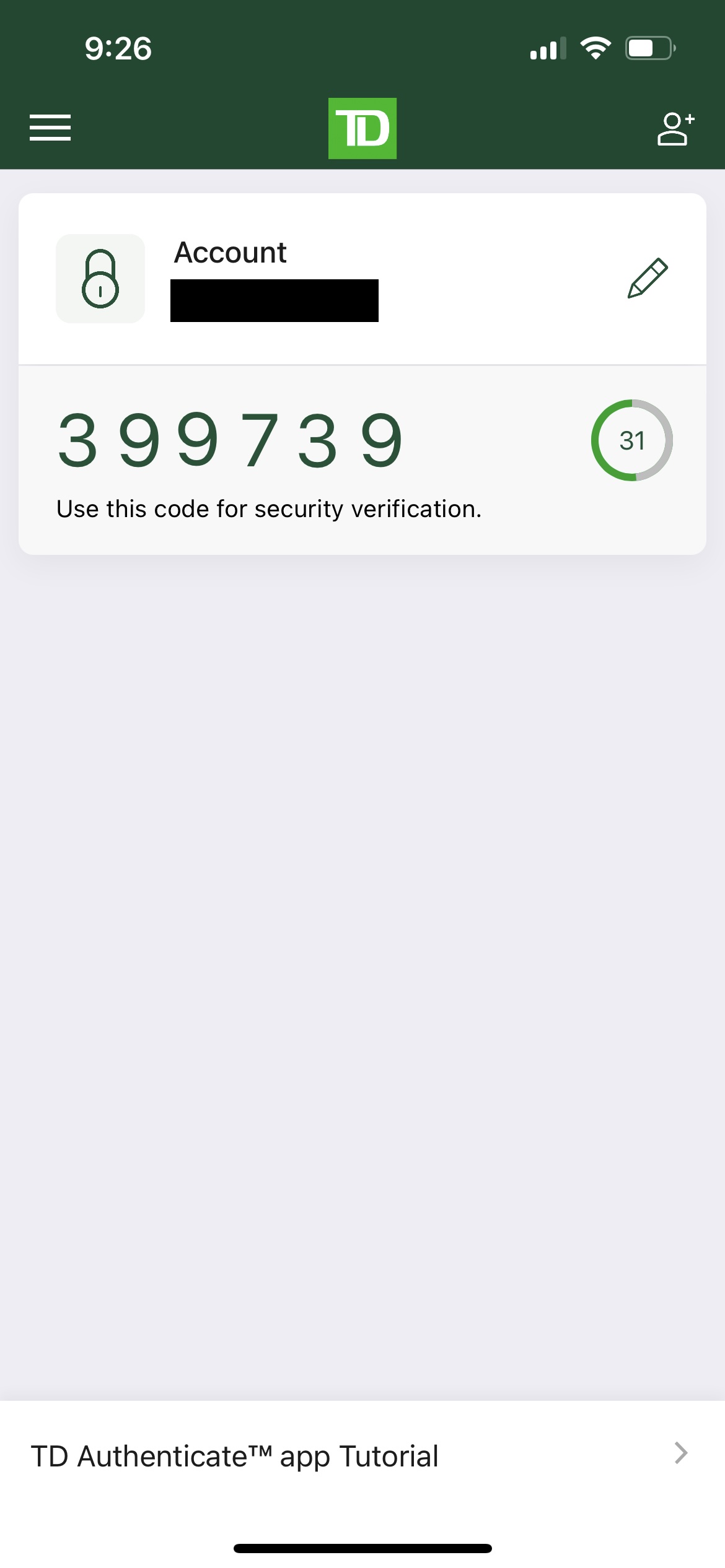
TD stands out from other Canadian institutions and has adapted to today’s reality with its TD Authenticate application. TD Authenticate is a two-factor authentication solution for secure access to online accounts. Unlike the traditional method, which uses SMS or e-mail to send security codes, TD Authenticate generates verification codes directly on your mobile device, offering enhanced security. Once the application is installed, it can be used to confirm your identity every time you log in to your TD account, replacing or supplementing other verification methods. This method is particularly useful when travelling, as it does not require access to the mobile network to receive SMS messages, thus avoiding roaming charges or connection problems.
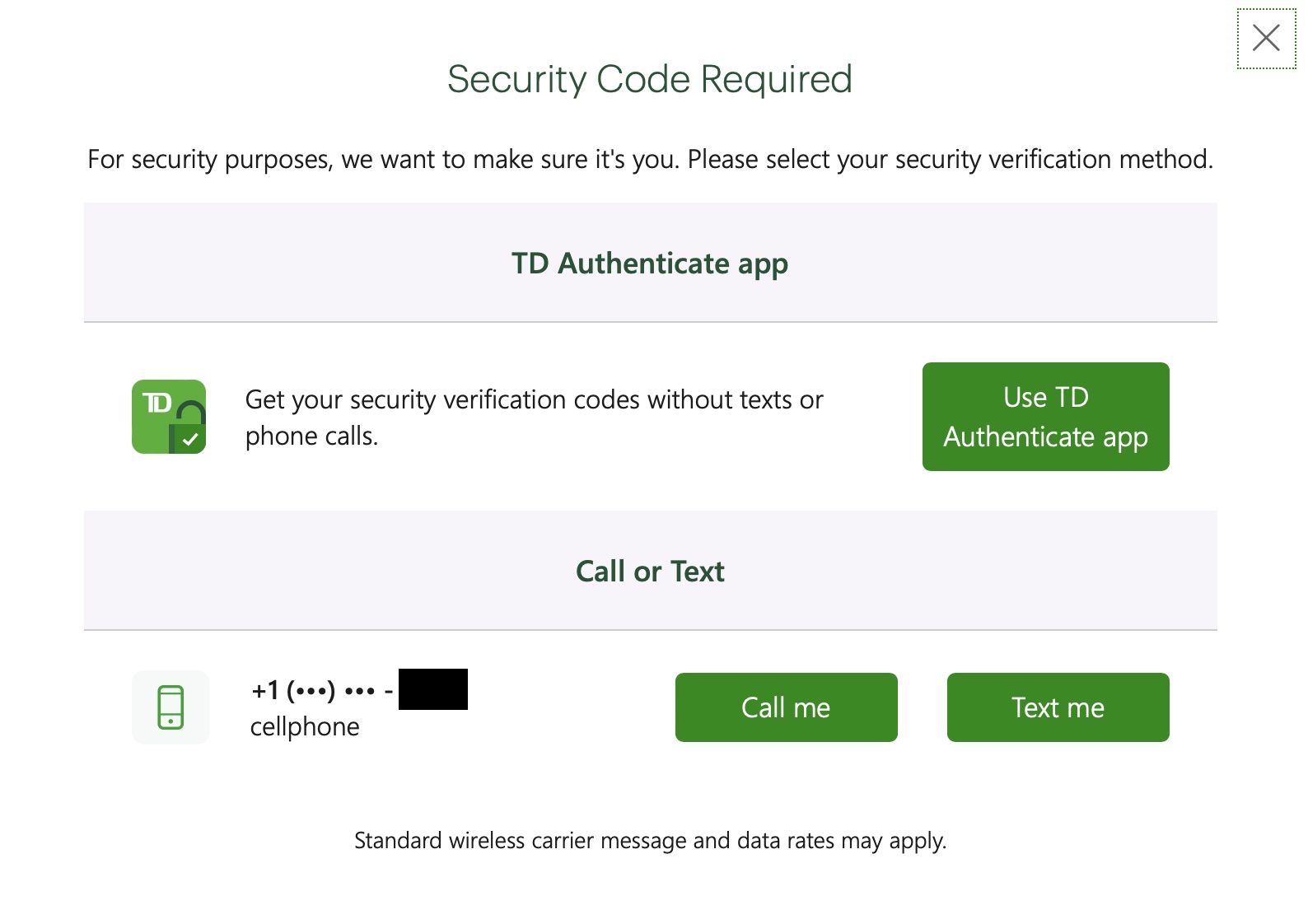
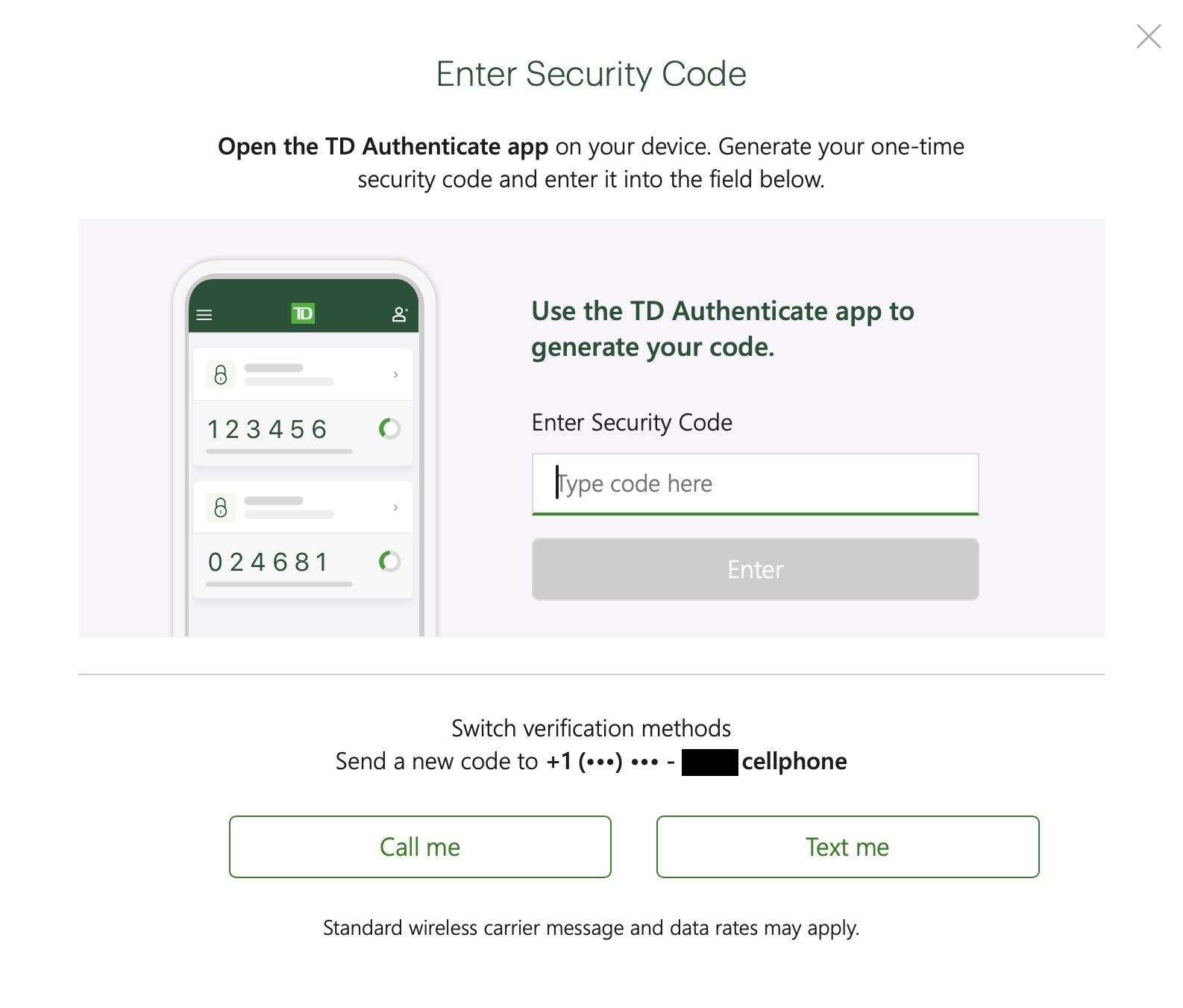
The application works in sync with your TD bank account, and each time you log in, you must approve a code sent directly to the application. This allows you to access your account more securely, while reducing the risk of security codes being intercepted. TD Authenticate is simple to use, and takes just a few minutes to set up.
Conclusion
The security of your online accounts should not be overlooked when travelling. By taking the necessary precautions and informing yourself about the authentication methods used by your banks and loyalty programs, you’ll avoid many unpleasant surprises abroad.
However, the 2FA system in Canada still relies heavily on SMS, a method that can be cumbersome and costly for travellers. In other countries, banking institutions already favour authentication applications, offering enhanced security without relying on a mobile network. Fortunately, some Canadian banks are starting to move in this direction. For example, TD already offers a more modern solution than others with its TD Authenticate application, which enables secure access to accounts without requiring a mobile network for two-factor authentication when travelling.
It would be desirable for other banks to follow this example and adopt more flexible and secure solutions, facilitating access to accounts without exposing users to unnecessary risks or costs. In the meantime, it is essential to adapt one’s practices and use the tools available to guarantee the protection of one’s accounts, wherever one may be in the world.

- Annual fee
- $0 $139No annual fee the first year
- No annual fee the first year
- Our valuation
- $939Milesopedia first-year estimate First-year valueWelcome bonus$800Annual fee rebated$139Total$939Rewards on your spending are not included. The calculator that adds them from your own profile is on the card's page.
- Milesopedia first-year estimateFirst-year valueWelcome bonus$800Annual fee rebated$139Total$939Rewards on your spending are not included. The calculator that adds them from your own profile is on the card's page.
- Welcome offer
- Up to 160,000 points
- + First Year Annual Fee Rebate
on TD's website
Our featured card

- Annual fee
- $120
- Our valuation
- $990Milesopedia first-year estimate First-year valueWelcome bonus$990Total$990Rewards on your spending are not included. The calculator that adds them from your own profile is on the card's page.
- Milesopedia first-year estimateFirst-year valueWelcome bonus$990Total$990Rewards on your spending are not included. The calculator that adds them from your own profile is on the card's page.
- Welcome offer
- Up to 110,000 points
- Ends Sep 22, 2026
on American Express's website
Apply with confidence — no impact on your credit scoreApply with confidenceCheck whether your application will be approved before you submit it, with no impact on your credit score*When you apply for a personal American Express Credit Card, we will tell you whether you are eligible without affecting your credit score. So you can apply with confidence.*Instant decisions are only available for consumer Card applications (also called “personal Cards”).
Our editorial integrity
Our reviews and rankings are based on an objective assessment. Advertisers do not influence our content. We may receive compensation through some links; our analysis and opinions remain independent.